


FSX Rutan 61 Long EZ 'Red 61'
Rutan 61 Long EZ “Red 61” brings a bold, fictional racing livery to the sleek canard homebuilt in Microsoft Flight Simulator X, adding vivid red styling and crisp details across the exterior while preserving the aircraft’s familiar feel. It requires the payware AlphaSim Long EZ package and slots in as a standout repaint for fast, sporty flights.
 Rate
Rate
Images & Screenshots
2 total
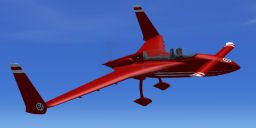
Enhance your virtual hangar by adding a striking, fictional racing-inspired livery to the Rutan 61 Long EZ in Microsoft Flight Simulator X. This custom repaint, titled “Red 61,” introduces a bold aesthetic for pilots who value eye-catching detail paired with the distinctive canard design of Burt Rutan’s famous home-built aircraft. Created by Andy Nott of AGN Textures, this add-on delivers a vivid visual presentation while retaining the Long EZ’s essential flight dynamics.
An Energetic Take on the Iconic Canard Configuration
This repaint highlights the forward canard layout and sleek airframe that make the Rutan Model 61 Long EZ so recognizable among private aviation enthusiasts. By integrating a vivid red scheme with racing motifs, those who crave a spirited edge in their simulator flights can enjoy an attention-grabbing appearance without changing the aircraft’s reliable handling characteristics.

Rutan 61 Long EZ "Red 61" in flight.
Collaboration and Development
The “Red 61” repaint is a freeware release, yet it requires the payware version of the Alphasim Long EZ to function properly. The foundation of this livery stems from deep attention to detail and a desire to bring new life to a cherished model. Development and paintwork come from the skillful efforts of Andy Nott (AGN Textures), ensuring a quality finish that complements the Rutan 61’s streamlined form.
Payware Model by AlphaSim.
Created by: Andy Nott of AGN Textures.
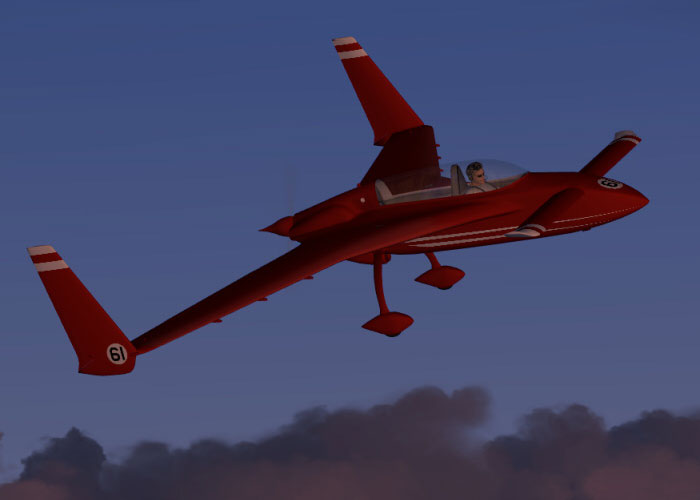
Rutan 61 Long EZ "Red 61" taking flight.
Implementation Steps
1. Copy and paste the newly provided texture folder named redracer into your primary ALPHA Rutan 61 Long-EZ O-320 directory.
2. Within the aircraft.cfg file, add the code snippet below, changing “X” to the correct sequential number in your list of [fltsim.X] entries.
[fltsim.X]

title=ALPHA Rutan 61 Long-EZ O-320 Red 61

sim=ALPHA_LongEZ_o320

model=320

panel=

sound=

texture=redracer

kb_checklists=LongEZ_o320_check

kb_reference=LongEZ_o320_ref

atc_id=

ui_manufacturer="Rutan"

ui_type=Rutan Model 61 Long-EZ

ui_variation="Red 61 Racing Scheme - Fictional - (O-320)"

ui_typerole="Home-built Aircraft"

ui_createdby="AlphaSim Ltd"

description=Rutan 61 Long-EZ\n\nThe Rutan Long-EZ for Flight Sim is the first in a next-generation line of AlphaSim products. The Long-EZ is an incredibly popular home-built aircraft flown by pilots all over the world. The prototype of the Long-EZ first flew in 1979. Approximately 700 Long-EZ exist in the USA alone, with many more being built. This version features the fuel-injected Lycoming O-320, with a whopping 160 HP for stunning performance.
Disclaimer
Neither the developer nor the publisher assumes any responsibility for potential harm to your computer or simulator setup. This repaint is offered “as-is,” and any usage is at your own discretion.
This free repaint complements the payware aircraft and does not include the primary model. To enjoy this vivid “Red 61” scheme, you will need the Alphasim Rutan 61 Long EZ add-on available for purchase from various stores, including SimShack. Once installed, embark on a swift and nimble flight experience in your updated Long EZ, complete with a vibrant racing identity.
Ready to download Rutan 61 Long EZ 'Red 61'?
Free for all simmers · 663.67 KB · Scanned clean Sep 2026
File information
Download speed: Free tier is capped at 0.5 Mbps. PRO members download at full line speed.
How to install this mod
FSX / P3D
Repaint for Payware Model
How to install this mod
-
Extract the downloaded archive
Use 7-Zip (free) or WinRAR to extract the ZIP to a temporary folder. Don't install while still zipped — the simulator can't read inside ZIP files. -
Add livery to base aircraft folder
Place the texture folder (typicallytexture.{airline}) insideFSX\SimObjects\Airplanes\{base-aircraft}\. -
Update aircraft.cfg
Open the baseaircraft.cfgin Notepad. Add a new[fltsim.X]section per the readme. -
Always read the included readme
Every mod ships with areadme.txtorREADMEfile. It tells you exactly where files go, what dependencies are needed, and any quirks specific to this add-on.
What’s inside this archive
The archive ezred61x.zip has 18 files and directories contained within it.
File Contents
This list displays the first 500 files in the package. If the package has more, you will need to download it to view them.
| Filename/Directory | File Date | File Size |
|---|---|---|
| ez_red61_1.jpg | 03.11.08 | 72.24 kB |
| pilot3.dds | 03.03.08 | 1.00 MB |
| prop.dds | 02.14.08 | 64.12 kB |
| Rutan61_t1_t.dds | 03.11.08 | 1.00 MB |
| Rutan61_t2_t.dds | 03.11.08 | 1.00 MB |
| Rutan61_t3_t.dds | 03.11.08 | 1.00 MB |
| Rutan61_t4_t.dds | 03.11.08 | 1.00 MB |
| Rutan61_t5_t.dds | 03.11.08 | 1.00 MB |
| Rutan61_t6_t.dds | 03.11.08 | 1.00 MB |
| Rutan61_t7_t.dds | 03.11.08 | 1.00 MB |
| Rutan61_t8_t.dds | 03.11.08 | 1.00 MB |
| texture.cfg | 02.06.08 | 134 B |
| thumbnail.jpg | 03.11.08 | 6.49 kB |
| Thumbs.db | 03.11.08 | 7.00 kB |
| readme.txt | 03.11.08 | 1.30 kB |
| file_id.diz | 03.11.08 | 146 B |
| flyawaysimulation.txt | 10.29.13 | 959 B |
| Go to Fly Away Simulation.url | 01.22.16 | 52 B |
Rate this add-on
PRO perkOnly PRO members can place votes.
0 comments
Be the first to leave a comment on this download.
No comments yet
Be the first to share your thoughts on this download.