

 FSX General Aviation Aircraft
Rutan 61 Long EZ 'Red 61'
Enhance your virtual hangar by adding a striking, fictional racing-inspired l…
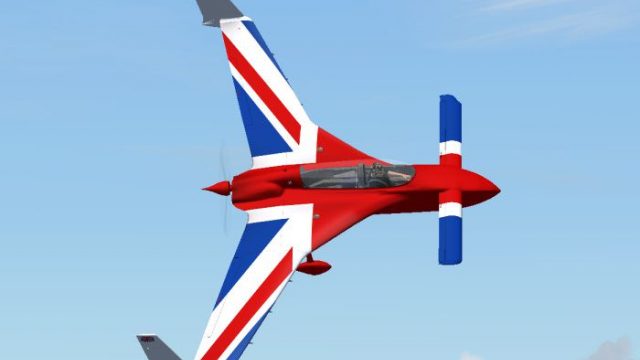
Rutan Model 61 Long-EZ G-JACK delivers a bold Union Jack-inspired repaint for the AlphaSim Long-EZ in Microsoft Flight Simulator X, highlighting the aircraft’s distinctive canard layout and sleek homebuilt character. Crisp red, white, and blue detailing spans fuselage, wings, and canard for high-visibility ramp presence, and requires the payware AlphaSim package.
 Rate
Rate
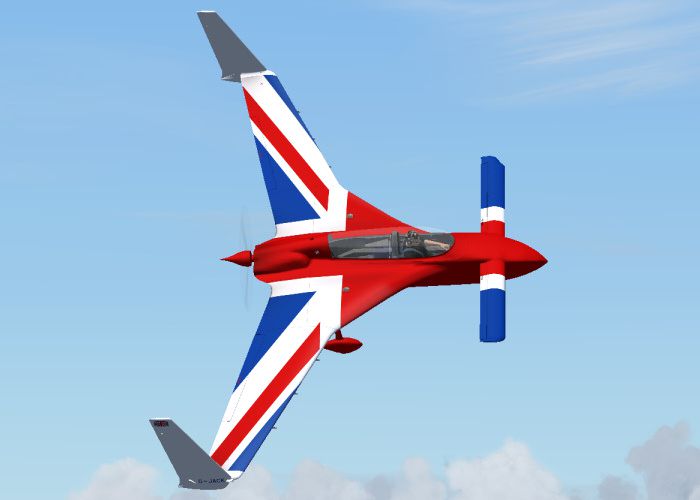
This fictional G-JACK repaint brings a vibrant Union Jack-inspired aesthetic to the Rutan Model 61 Long-EZ for Microsoft Flight Simulator X. Created by Andy Nott of AGN Textures, this modification offers a unique visual style while retaining the distinctive canard layout of Burt Rutan’s innovative homebuilt design. Please note that it requires the payware AlphaSim Long-EZ package, which is not included here but can be acquired separately.
The Rutan Model 61 Long-EZ is well known across the aviation world for its front-mounted canard surfaces and rear-mounted propeller arrangement. This specific aircraft layout, pioneered by Burt Rutan, emphasizes stability and efficiency. The fictional G-JACK variant integrates a bold Union Jack exterior, enhancing visibility and offering a patriotic livery for virtual pilots seeking something different.
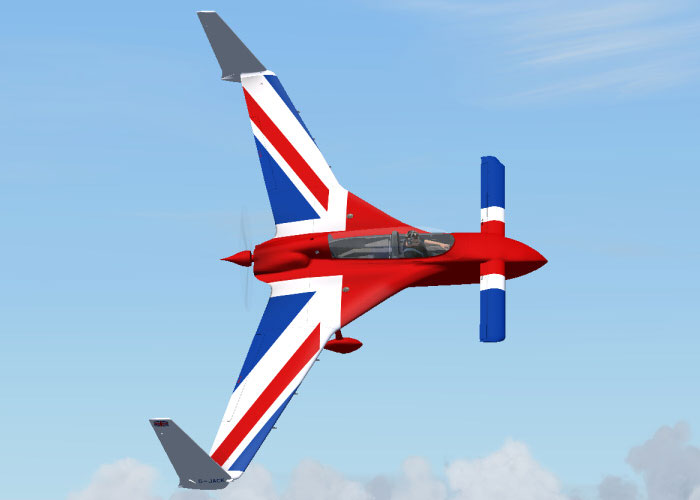
Rutan 61 Long EZ G-JACK in flight.
This homebuilt aircraft variation, modeled by AlphaSim, showcases the enhanced Lycoming O-320 engine for agile flight handling. The remodeling reflects the lightweight foam-and-fiberglass construction typical of these canard aircraft. With the fictional G-JACK repaint, enthusiasts can experience the Long-EZ’s quick climb capabilities and expansive view through a cockpit that sits well forward in the fuselage.
The G-JACK repaint incorporates vibrant red, white, and blue elements merged with sleek lines to represent a stylized Union Jack. The repaint design from Andy Nott showcases careful detail work along the fuselage, main surfaces, and canard, giving a distinctive look that stands out during virtual flights.
This livery is built for the commercial release of the AlphaSim Rutan Model 61 Long-EZ. The required payware package is not bundled here, so you will need to own the official AlphaSim product to utilize this repaint fully.
Below is an excerpt showing how to integrate the G-JACK repaint into your existing Long-EZ aircraft folder. After copying the texture folder into your “ALPHA ALPHA Rutan 61 Long-EZ O-320” directory, include the following lines in your aircraft.cfg, adjusting the X in [fltsim.X]:
[fltsim.X]
title=ALPHA Rutan 61 Long-EZ O-320 G-JACK
sim=ALPHA_LongEZ_o320
model=320
panel=
sound=
texture=G-JACK
kb_checklists=LongEZ_o320_check
kb_reference=LongEZ_o320_ref
atc_id=
ui_manufacturer="Rutan"
ui_type=Rutan Model 61 Long-EZ
ui_variation="G-JACK - fictional (O-320)"
ui_typerole="Home-built Aircraft"
ui_createdby="AlphaSim Ltd"
description=Rutan 61 Long-EZ

The Rutan Long-EZ for Flight Sim is the first in a next-generation line of AlphaSim products. The Long-EZ is an incredibly popular home-built aircraft flown by pilots all over the world. The prototype of the Long-EZ first flew in 1979. Approximately 700 Long-EZ exist in the USA alone, with many more being built. This version features the fuel-injected Lycoming O-320, with a whopping 160 HP for stunning performance.
This repaint is distributed as-is and has been tested to be safe. The creator, Andy Nott, and other involved parties accept no responsibility for any unexpected issues. By installing these files, users acknowledge all associated risks.
Free for all simmers · 821.86 KB · Scanned clean Oct 2026
Download speed: Free tier is capped at 0.5 Mbps. PRO members download at full line speed.
texture.{airline}) inside FSX\SimObjects\Airplanes\{base-aircraft}\.aircraft.cfg in Notepad. Add a new [fltsim.X] section per the readme.readme.txt or README file. It tells you exactly where files go, what dependencies are needed, and any quirks specific to this add-on.The archive ezjackx.zip has 17 files and directories contained within it.
This list displays the first 500 files in the package. If the package has more, you will need to download it to view them.
| Filename/Directory | File Date | File Size |
|---|---|---|
| ez_jack_2.jpg | 03.12.08 | 92.81 kB |
| file_id.diz | 03.12.08 | 157 B |
| readme.txt | 03.12.08 | 1.30 kB |
| pilot3.dds | 03.03.08 | 1.00 MB |
| prop.dds | 02.14.08 | 64.12 kB |
| Rutan61_t1_t.dds | 03.12.08 | 1.00 MB |
| Rutan61_t2_t.dds | 03.12.08 | 1.00 MB |
| Rutan61_t3_t.dds | 03.12.08 | 1.00 MB |
| Rutan61_t4_t.dds | 03.12.08 | 1.00 MB |
| Rutan61_t5_t.dds | 03.12.08 | 1.00 MB |
| Rutan61_t6_t.dds | 03.12.08 | 1.00 MB |
| Rutan61_t7_t.dds | 03.12.08 | 1.00 MB |
| Rutan61_t8_t.dds | 03.12.08 | 1.00 MB |
| texture.cfg | 02.06.08 | 134 B |
| thumbnail.jpg | 03.12.08 | 5.83 kB |
| flyawaysimulation.txt | 10.29.13 | 959 B |
| Go to Fly Away Simulation.url | 01.22.16 | 52 B |
Only PRO members can place votes.
More FSX & P3D add-ons hand-picked based on this download.
FSX General Aviation Aircraft
Enhance your virtual hangar by adding a striking, fictional racing-inspired l…
 FSX General Aviation Aircraft
Rutan 61 Long EZ, USMC two tone grey (fictional). This repaint requires the A…
 FSX General Aviation Aircraft
Experience a distinctive livery for the Rutan 61 Long EZ, featuring a vivid b…
 FSX General Aviation Aircraft
This repaint package offers a Rutan Model 61 Long-EZ in a striking “Blue Flam…
 FSX General Aviation Aircraft
This detailed repaint delivers a striking Blue, Yellow, and White finish for …
 FSX General Aviation Aircraft
This carefully crafted repaint introduces an orange and white USAF-style fini…
 FSX General Aviation Aircraft
Experience a special repaint of the Rutan Model 61 Long EZ, originally flown …
 FSX General Aviation Aircraft
Bring a bold fictional USAF “SEA” theme to your virtual hangar with this high…
Read what other simmers think, or add your own.
