


FSX Lockhart River Air Crash Mission
Lockhart River Air Crash Mission recreates the 7 May 2005 Queensland disaster with authentic IFR weather, radio traffic, and tightly scripted phases that demand precise hand-flying. Built for Microsoft Flight Simulator X, it offers Standard guidance gates for learning and an Enhanced realism mode with strict profiles, timers, crash-site overflight, and a challenging landing at Lockhart River.
Lockhart River Air Crash Simulation v2 with Standard and Enhanced Realism modes. This is a highly technical mission that accurately simulates the flight details, weather conditions and radio traffic of the Lockhart River air disaster that occured in Queensland, Australia on the 7th of May 2005. To succeed you have to fly each phase of the mission to a tight timeframe and flight profile, overfly the crash site and safely land at Lockhart River, all in IFR conditions with no autopilot. By Steve Ireland.
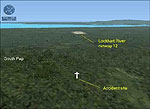
Lockhart River Air Crash Mission.
Synopsis
This mission accurately simulates the flight details, weather conditions and radio traffic of the Lockhart River Air Disaster that occured in Queensland, Australia on the 7th of May 2005. This mission can now be played in two ways.
In the standard mode (the default) there are guidance gates, relaxed flight profiles and no phase timers to beat.
When you complete the mission you will have a very good idea on how the incicent happened and you will be rewarded with the standard medal.
The enhanced realsim mode is tough and challenging. To succeed you have to fly each phase of the mission to a tight timeframe and flight profile, overfly the crash site and safely land at Lockhart River, all in IFR conditions with no autopilot. If you succeed and complete the mission you are rewarded with the enhanced medal. Are you good enough?
To install the mission unzip and run LRACSInstall.exe.
Full instructions on how to swap mission types is in the preflight briefing along with useful tips to get through the mission.
Ready to download Lockhart River Air Crash Mission?
Free for all simmers · 7.25 MB · Scanned clean
File information
Download speed: Free tier is capped at 0.5 Mbps (this file takes approximately 2 mins at the cap). PRO members download at full line speed.
How to install this mod
FSX / P3D
mission
How to install this mod
-
Extract the downloaded archive
Use 7-Zip (free) or WinRAR to extract the ZIP to a temporary folder. Don't install while still zipped — the simulator can't read inside ZIP files. -
Place mission files
Missions go intoFSX\Missions\as a sub-folder. The folder must contain an XML file describing the mission. -
Always read the included readme
Every mod ships with areadme.txtorREADMEfile. It tells you exactly where files go, what dependencies are needed, and any quirks specific to this add-on.
What’s inside this archive
The archive lracinst.zip has 4 files and directories contained within it.
File Contents
This list displays the first 500 files in the package. If the package has more, you will need to download it to view them.
| Filename/Directory | File Date | File Size |
|---|---|---|
| lracsInstall.exe | 03.14.08 | 7.32 MB |
| ReadMe.txt | 03.14.08 | 1.13 kB |
| flyawaysimulation.txt | 10.29.13 | 959 B |
| Go to Fly Away Simulation.url | 01.22.16 | 52 B |


0 comments
Leave a Response