


 FSX Scenery
RAF Coningsby
RAF Coningsby UK. This scenery depicts RAF Coningsby, Lincolnshire, England a…
RAF Andreas (X9AN) brings the historic Isle of Man airfield to life in FSX, recreating its 1941–45 RAF footprint and today’s gliding-focused layout with custom airport, flatten, and scenery BGLs tuned for photo-real terrain. It requires Horizon GenX Volume 3 and GenX Mesh, with optional Runway12 and UK VFR object libraries for full detail.
 Rate
Rate
 Isle of Man
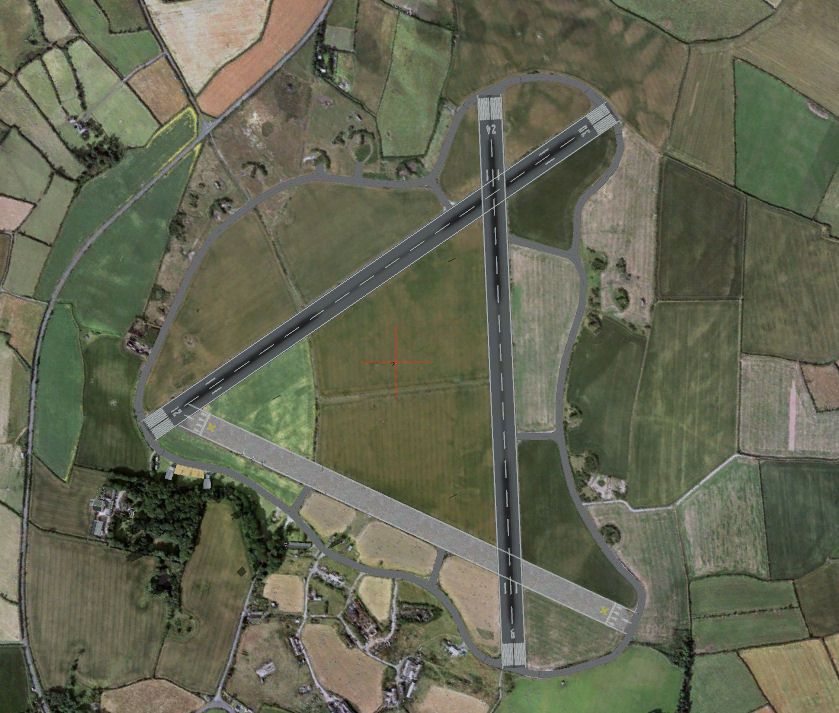
X9AN RAF Andreas (Isle of Man). Designed to blend with Horizon GenX Photo Scenery and Mesh. Aditional files from Rwy12 and UK VFR Addons required to display as included pictures. By Tony Meredith.
X9AN RAF Andreas Scenery.
Dedicated to all those men and women, of all the armed services, past and present who serve to protect us.
Operational with the RAF between 1941 and 1945. The airfield is now primarily used for gliding.
Not included in the original FSX list of UK Airfields.
These files are specifically for FSX using Horizon GenX Photo scenery and included mesh. They have not been tested using default mesh or any other mesh. They may look OK and work OK with other scenery packages and mesh, if they do fine, if not, sorry, I am not going to customise further.
Required Scenery.
Horizon GenX Photo scenery volumes 3 together with GenX Mesh.
These files may also work with VFR Real Scenery; however, this has not been tested and may give odd results. It will not function with FS9.
Recommended complementary scenery, (download separately): -
In order to use the included "scenery" .bgl(s) you should have installed: -
Scenery/Object Files from the Runway12 library available on Avsim and Flightsim.com and the UK add-on scenery library.
Detailed file listing at end of this document.
This scenery is released as Freeware. Copyright Anthony R Meredith, except where otherwise stated. As freeware you are permitted to distribute this archive subject to the following conditions,
a) The archive must be distributed without modification to the contents of the archive. Redistributing this archive with any files added, removed or modified is prohibited.
b) The inclusion of any individual file from this archive in another archive without the prior permission of the author is prohibited.
c) No charge may be made for this archive. The archive is freeware. No commercial distribution may contain this freeware without express written permission of the copyrights holder(s).
d) The authors' rights and wishes concerning this archive must be respected.
My thanks to all those who worked to produce the software and for making it freely available. Without you people I wouldn't have been able to do 'my bit'.
DISCLAIMER
Use of this software is entirely at your own risk. If you do not accept responsibility for any and all damage that may result from installing this software then you must not install it. Installation is an acceptance of these conditions and you become responsible for any and all risks involved.
HOW TO INSTALL
(a) Use the auto install programme which came with this document or
(b) Expand into a temporary directory them move them into your ?:\Program Files\Microsoft Games\Microsoft Games\Microsoft Filight Simulator X\Addon Scenery\Scenery
The file traffic_filton_fsx.bgl is an optional AI aircraft file built to loosely represent the traffic movements on a daily basis. This has been based on published data at 06/09/2007.
To remove this scenery just delete the files as listed. DO NOT delete the Scenery directory as this is integral to the working of Flight simulator X.
What’s in this file
The following files are included: -
1. Andreas X9AN.bgl (airport file)
2. cvxAndreas.bgl (airport flatten file)
3. Andreasscenery.bgl (Primary Scenery file)
4. Readme file – this file.
5. PDF ReadMe File (Further information)
6. File_ID.diz
*** SCENERY FILE ***
*** ADD-ON LIBRARIES USED ***
Addon Scenery\Static Objects Library\scenery\add_dwag_hangers.BGL
Addon Scenery\Static Objects Library\scenery\add_SeevKahn.BGL
Addon Scenery\Static Objects Library\scenery\Statics1LibFSX.BGL
Addon Scenery\Static Objects Library\scenery\Objects01_lib.bgl
*** LIBRARY MODELS USED ***
Addon Scenery\Static Objects Library\scenery\add_dwag_hangers.BGL:
{ccea2b11-9b8e-498f-9014-28c85bed2ec4}
Scenery\Global\scenery\vehicles_land.bgl:
VEH_Land_car_compact1_red {954e43b5-000d-45e8-8dd8-7fffabd313f3} (FSX only!)
VEH_Land_car_midsize1_white {faca490a-e9ad-4fdc-b3cd-4a8101c35e14} (FSX only!)
VEH_Land_car_minivan1_white {8141627b-55f3-4019-8190-93c3bf2d56a6} (FSX only!)
Addon Scenery\Static Objects Library\scenery\Objects01_lib.bgl:
{621602d5-0567-cb69-23e4-ebae97c63355}
{621602d5-0567-cb69-23e4-ebae9ec63355}
{621602d5-0567-cb69-23e4-ebae93c63355}
Scenery\Global\scenery\vegetation.bgl:
veg_tb_Chestnut1_10m_sp {294e92ae-50e3-4269-aba9-4add1383768f} (FSX only!)
veg_tb_Chestnut1_14m {7ba21ac2-417f-43bc-a9d7-3362132823f3} (FSX only!)
veg_tb_Oak1_22m {55188d41-b20e-4693-ad77-4821400ac7b8} (FSX only!)
veg_tb_Chestnut1_10m {ae221d1c-8660-418b-b45e-93f291d71d3c} (FSX only!)
veg_tb_Chestnut1_20m_sp {f4f7cedd-d4e1-471c-a02d-49cf3293a9e9} (FSX only!)
veg_tb_Elm1_19m {458eb040-3985-4505-85bd-8291f94adab2} (FSX only!)
Scenery\Global\scenery\autogen.bgl:
ag_barn_3 {f214ae09-5de8-4ab1-bc22-5a3a210c7b75}
ag_cob_house {2703bda7-a685-4152-9f70-1cefe40bdcca}
ag_uswarehouse08 {61e33e19-8732-46e6-a025-1062a4280dc0} (FSX only!)
agn_farmbunkhouse_3 {6cb3b7bb-fb2c-4a93-8c5f-af6d0fcca8dd} (FSX only!)
ag_barn_4 {682406ce-2e8b-48e8-833e-affad1df3ca2}
Addon Scenery\Static Objects Library\scenery\Statics1LibFSX.BGL:
blueblade {5edd7c79-33a5-4ac6-abe4-b4ce59df797f} (FSX only!)
yellowbladeblade {5baf2fcb-891f-47dc-981c-45097acb2854} (FSX only!)
Scenery\Global\scenery\buildings.bgl:
gen_cntrltowerbldg05 {3e1611b3-ab5a-4eac-ac41-f4f30c25806d} (FSX only!)
Scenery\Global\scenery\vehicles_aircraft.bgl:
GEN_Plane_Schweizer2_bluestripe {981a973c-c8e1-4ddd-8243-fab2c25af17a} (FSX only!)
GEN_Plane_Schweizer2_maroonstripe {85a91fab-9172-4d73-a779-c7a7a7b9721a} (FSX only!)
GEN_Plane_Schweizer2_orange {1bc5722f-4b5d-4013-8a01-e88955490e96} (FSX only!)
GEN_Plane_Schweizer2_orngstripe {81135244-a307-4b0c-809c-3d64068df3de} (FSX only!)
GEN_Plane_Schweizer2_redstripe {6e7d0e2f-a54d-4455-8537-c47cf9bc2244} (FSX only!)
GEN_Plane_Schweizer2_yellstripe {6bbbae83-689a-4db8-99bf-ffd554ea66f9} (FSX only!)
Addon Scenery\Static Objects Library\scenery\add_SeevKahn.BGL:
{d9d491d5-436f-4157-80c5-dc1adf50a5fd}
Scenery\Global\scenery\vegetation_fsxrtm.bgl:
veg_b_oak_mat1 {087b0615-0c24-4c87-a0c5-30c2a2fd1fdd} (FSX only!)
veg_b_oak_mat5 {ffcb945f-26f6-413b-8d78-7c2ef578d3df} (FSX only!)
veg_b_sycamore_yng4 {d0740f77-997c-460a-94b6-f24492b96e9c} (FSX only!)
veg_b_sycamore_mat4 {593f257d-7a0e-4d0c-8411-a43fb0d79108} (FSX only!)
Free for all simmers · 913.93 KB · Scanned clean Oct 2026
Download speed: Free tier is capped at 0.5 Mbps. PRO members download at full line speed.
FSX\Addon Scenery\ containing scenery and texture sub-folders.readme.txt or README file. It tells you exactly where files go, what dependencies are needed, and any quirks specific to this add-on.Use these coordinates to fly directly to this location once the mod is installed.
54.36900000,-4.44900000
Launch FSX or Prepar3D and use Flights → Load to open the downloaded .pln file. Your aircraft will be positioned at this location.
The archive x9an_raf.zip has 10 files and directories contained within it.
This list displays the first 500 files in the package. If the package has more, you will need to download it to view them.
| Filename/Directory | File Date | File Size |
|---|---|---|
| Andreas X9AN.bgl | 09.24.07 | 5.21 kB |
| Andreasscenery.BGL | 09.25.07 | 5.45 kB |
| cvxANDEAS.BGL | 09.02.07 | 285 B |
| File_ID.DIZ | 09.25.07 | 204 B |
| ReadmeFirst.txt | 09.25.07 | 6.61 kB |
| X9AN RAF Andreas.pdf | 09.25.07 | 771.95 kB |
| X9AN.jpg | 09.25.07 | 139.08 kB |
| FILE_ID.DIZ | 10.01.07 | 216 B |
| flyawaysimulation.txt | 10.29.13 | 959 B |
| Go to Fly Away Simulation.url | 01.22.16 | 52 B |
Only PRO members can place votes.
More FSX & P3D add-ons hand-picked based on this download.
FSX Scenery
RAF Coningsby UK. This scenery depicts RAF Coningsby, Lincolnshire, England a…
 FSX Scenery
RAF Mildenhall (EGUN), UK. Home to the 100th ARW, RAF Mildenhall is one of th…
 FSX Scenery
RAF Mount Pleasant (EGYP) in the Falkland Islands. It includes aircraft hanga…
 FSX Scenery
Situated on the dramatic Moray Firth coastline of northern Scotland, RAF Loss…
 FSX Scenery
RAF Marham in the UK for the period circa 1993. Designed for use with the Vic…
 FSX Scenery
RAF Fairford 2009 (EGVA), UK. Built with SBuilderX, ADE and Whisplacer with r…
 FSX Scenery
Scenery RAF Marham in the UK. A very detailed, but frame rate efficient scene…
 FSX Scenery
RAF Woodvale UK Scenery for FSX and GenX. EGOW RAF Woodvale for FSX and GenX …
Be the first to leave a comment on this download.
Be the first to share your thoughts on this download.