

 FSX Scenery
Oceana Miramar Carrier
Carrier Oceana Miramar Pensacola 4.5. Carrier scenery of all three locations …
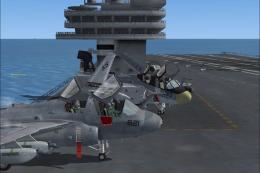
Carrier Group Miramar places a detailed naval fleet about 60 NM west of MCAS Miramar, with carriers, cruisers, and destroyers tuned for smoother performance at dense settings. In FSX, working arrestor cables, deck helicopters, plus NDB and LOC/DME signals for both carriers support realistic carrier-style approaches.
 Rate
Rate
 United States of America
Carrier Group Miramar v4.0. A naval fleet located 60 nm west of Miramar MCAS including carriers, cruisers, destroyers. Each carrier has an NDB and localizer.
Extract To desktop, Move FCBG_ADE_TM FSXF-CarrierGroupMiramarPUB V4.0 folder out of the unziped/extracted Folder to your FSX-MAIN Directory- Addon Scenery folder. Activate through the simulators Settings-Scenary Library,> Add Area> FCBG_ADE_TM FSXF-CarrierGroupMiramarPUB V4.0 , Click ok.
(Updated,This is the same as V3.0 But I've changed all scenery objects to Very Dense except the two carriers, and spaced ships out to address a common frame rate complaint).
Carriers/Cruisers/Destroyers(Arrestor cables work), Choopers on decks, Added LOC/DME Carrier1 CAT II Ident IABC-RW 1 108.55 Mhz, Carrier2 CAT III Ident IABB-RW 2 108.10 Mhz. NO BACK COARSE,OR GLIDE SLOPE. The airport name is FSXF-CarrierGroupMiramar.(FCBG) The NDB(none directional beacon) frequency is 235.0Khz, Range 100 NM. VOR-IDENT:MCG carrier Group is 60 NM. west of Miramar MCAS.
You can't spawn on the decks of the Carriers.
Special thanks for all parts of this Scenery, and ADE.
Updated/Frames Carrier group Miramar V4.0 scenery from FSXF.
Tim.
Free for all simmers · 10.88 MB · Scanned clean Oct 2026
Download speed: Free tier is capped at 0.5 Mbps (this file takes approximately 3 mins at the cap). PRO members download at full line speed.
FSX\Addon Scenery\ containing scenery and texture sub-folders.readme.txt or README file. It tells you exactly where files go, what dependencies are needed, and any quirks specific to this add-on.Use these coordinates to fly directly to this location once the mod is installed.
32.86840000,-118.33240000
Launch FSX or Prepar3D and use Flights → Load to open the downloaded .pln file. Your aircraft will be positioned at this location.
The archive fcbg_ade.zip has 40 files and directories contained within it.
This list displays the first 500 files in the package. If the package has more, you will need to download it to view them.
| Filename/Directory | File Date | File Size |
|---|---|---|
| Carrier GroupMiramar V4.0 Read Me.txt | 10.12.08 | 1.09 kB |
| model.cfg | 08.22.07 | 47 B |
| scenery | 10.12.08 | 0 B |
| FCBG_ADE_TM FSXF-CarrierGroupMiramarPUB V4.BGL | 10.12.08 | 15.75 MB |
| sim.cfg | 08.22.07 | 570 B |
| sound | 10.12.08 | 0 B |
| sound.cfg | 08.22.07 | 1.15 kB |
| soundai | 10.12.08 | 0 B |
| soundai.cfg | 08.22.07 | 1.15 kB |
| texture | 10.12.08 | 0 B |
| fuse_1.bmp | 03.02.08 | 1.00 MB |
| fuse_2.bmp | 03.02.08 | 1.00 MB |
| fuse_3.bmp | 03.02.08 | 1.00 MB |
| Glass_Normal_T.dds | 11.08.07 | 64.12 kB |
| Glass_Roof_T.dds | 11.08.07 | 64.12 kB |
| Glass_t.bmp | 03.02.08 | 64.07 kB |
| Glass_Windscreen_T.dds | 11.08.07 | 64.12 kB |
| int.bmp | 03.02.08 | 1.00 MB |
| Intake.bmp | 03.02.08 | 16.07 kB |
| labels_c.bmp | 03.02.08 | 1.00 MB |
| labels1_c.bmp | 03.02.08 | 1.00 MB |
| main_blade_blurred.dds | 11.14.07 | 256.12 kB |
| MH53_swatch1.dds | 11.02.07 | 16.12 kB |
| MH53J_Texture1.dds | 11.02.07 | 1.00 MB |
| MH53J_Texture2.dds | 11.02.07 | 1.00 MB |
| MH53J_Texture3.dds | 11.02.07 | 1.00 MB |
| MH53J_Texture4.dds | 11.02.07 | 1.00 MB |
| MH53J_Texture5.dds | 11.02.07 | 1.00 MB |
| MH53J_Texture6.dds | 11.02.07 | 1.00 MB |
| MH53J_Texture7.dds | 11.02.07 | 1.00 MB |
| MH53J_Texture8.dds | 11.02.07 | 1.00 MB |
| misc.bmp | 03.02.08 | 1.00 MB |
| nospec_T_spec.dds | 03.02.08 | 16.12 kB |
| Prop.bmp | 03.02.08 | 1.00 MB |
| Prop2.bmp | 03.02.08 | 1.00 MB |
| Radome.dds | 11.02.07 | 64.12 kB |
| tail_blade_blurred.dds | 11.08.07 | 256.12 kB |
| texture.cfg | 05.12.06 | 110 B |
| flyawaysimulation.txt | 10.29.13 | 959 B |
| Go to Fly Away Simulation.url | 01.22.16 | 52 B |
Only PRO members can place votes.
More FSX & P3D add-ons hand-picked based on this download.
FSX Scenery
Carrier Oceana Miramar Pensacola 4.5. Carrier scenery of all three locations …
 FSX Scenery
Carrier Group Oceana v4.0. A naval fleet located 12 nm northeast of Oceana NA…
FSX Scenery
Updated Carrier Group Oceana v2.0 from FSXF. Updated with working arrestor ca…
 FSX Scenery
A carrier group in the Pacific going around in a square to better find it. Ki…
 FSX Scenery
1n 1996, The USMC abandoned the cramped quarters of MCAS El Toro and MCAS Tus…
 FSX Scenery
Miramar MCAS (KNKX), San Diego, California (CA). Adds aprons, taxiways, hanga…
 FSX Scenery
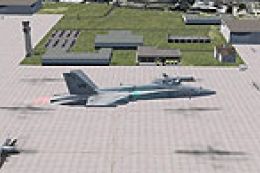
MCAS Miramar (KNKX), San Diego, California (CA). An improved version with add…
FSX Scenery
Miramar Airport (SA14), Argentina. By Sergio Esteban Fernandez. Installation:…
Be the first to leave a comment on this download.
Be the first to share your thoughts on this download.