


 United States of America
  FSX Scenery
Naples Municipal Airport
Immerse yourself in a carefully overhauled representation of Naples Municipal…
Visalia Municipal Airport (KVIS) in central California gets a sharper, more true-to-life layout with resized, accurately placed buildings, refined taxiways and parking, and a newly modeled southern ramp for general aviation activity. Built from satellite-referenced alignment and default library objects, the scenery enhances ground operations and visuals in Microsoft Flight Simulator X.
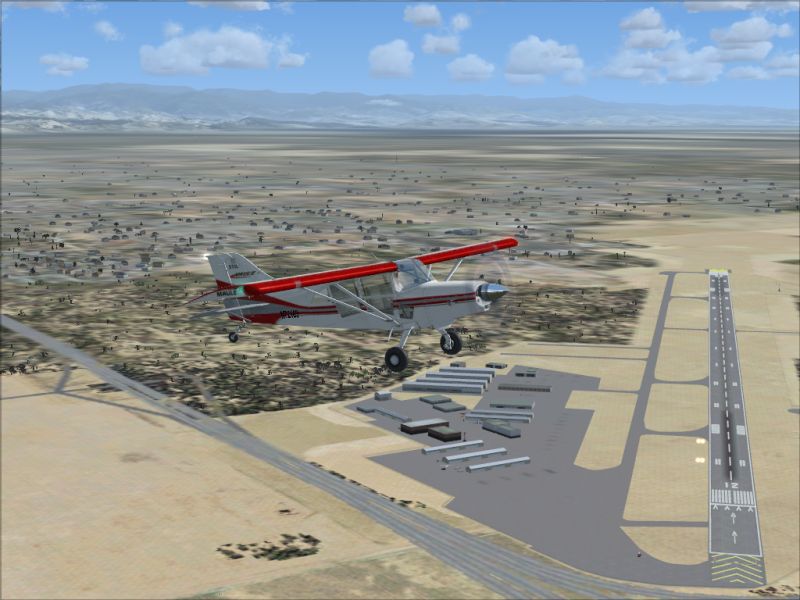
Experience an updated rendition of Visalia Municipal Airport (KVIS) in central California, tailored for Microsoft Flight Simulator X. This freeware scenery pack incorporates carefully reworked buildings, refined parking layouts, and a newly modeled southern parking ramp. Aircraft operators who frequently fly out of Tulare County will notice an immersive improvement in ground layout and visual alignment, courtesy of detailed research and accurate satellite information.
All primary structures at KVIS are resized and positioned according to their real-world footprints. [Resizing refers to the process of adjusting 3D models to match real-life dimensions] These modifications aim to reflect the actual look and feel of each terminal, hangar, and ancillary building while staying true to the real airport layout.
Parking spots receive deeper attention in this update. The reworked positions ensure smooth AI aircraft operations on the tarmac. This enhancement also supports more structured ground traffic flow, helping virtual pilots taxi more intuitively after landing or before takeoff.
An additional parking ramp has been constructed at the southernmost segment of the airport. This extra area provides further flexibility and realism, especially for general aviation enthusiasts who favor operating smaller aircraft in and out of Visalia.
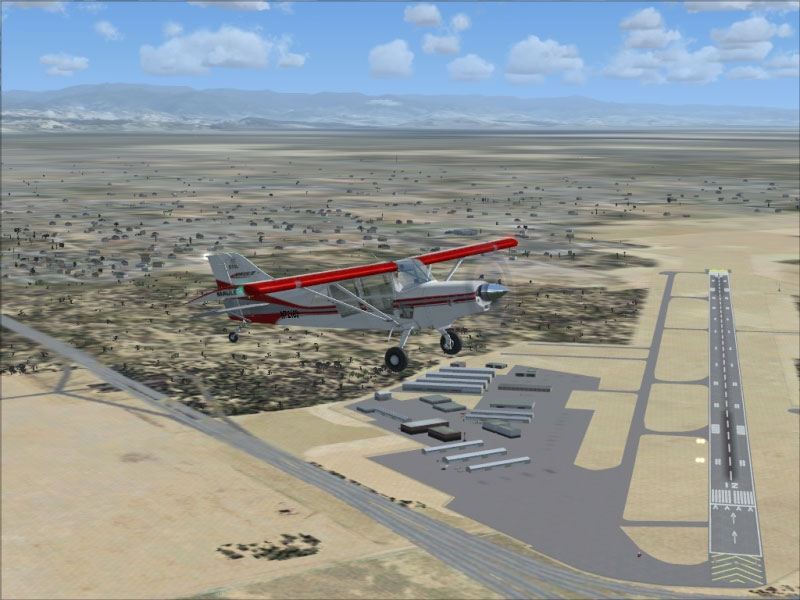
Visalia Municipal Airport Scenery.
The team utilized Google Earth snapshots to align ground features with genuine dimensions. This step ensures taxiways, aprons, and parking stands appear precisely where they belong. [Satellite-based reference involves overlaying aerial visuals on the simulator’s airport layout for pinpoint accuracy]
To maintain optimal performance and ensure seamless integration, various models from the default Microsoft Flight Simulator X scenery libraries are applied throughout the airport grounds. For an ideal visual experience, consider selecting scenery complexity settings at or above NORMAL in your simulator options.
This package contains two BGL files, KVIS_ADE.BGL and KVIS_ADE_CVX.BGL. These manage layout details and terrain adjustments, resulting in a cohesive environment ready for virtual flight operations at KVIS.
KVIS_ADE.BGL and KVIS_ADE_CVX.BGL into your “Flight Simulator X / Addon Scenery / Scenery” folder.KVIS_ADE.BGL and KVIS_ADE_CVX.BGL from the “Flight Simulator X / Addon Scenery / Scenery” folder.These BGL files were constructed and assembled with Airport Design Editor [Airport Design Editor is a specialized tool for creating or modifying airfield layouts]. Special thanks go to Phillip Coyle for applying advanced techniques to bring this airport scenery to life.
This freeware add-on is distributed as-is, and you assume all risks in its use. Although it should function correctly, the developer does not guarantee compatibility with every setup or device. No formal support is offered for these files, and user discretion is advised when installing any third-party modification.
— By Phillip Coyle
Free for all simmers · 316.16 KB · Scanned clean
Download speed: Free tier is capped at 0.5 Mbps. PRO members download at full line speed.
FSX\Addon Scenery\ containing scenery and texture sub-folders.readme.txt or README file. It tells you exactly where files go, what dependencies are needed, and any quirks specific to this add-on.Use these coordinates to fly directly to this location once the mod is installed.
36.31860000,-119.39220000
Launch FSX or Prepar3D and use Flights → Load to open the downloaded .pln file. Your aircraft will be positioned at this location.
The archive kvis_sce.zip has 6 files and directories contained within it.
This list displays the first 500 files in the package. If the package has more, you will need to download it to view them.
| Filename/Directory | File Date | File Size |
|---|---|---|
| KVIS_ADE.BGL | 11.30.08 | 16.98 kB |
| KVIS_ADE_CVX.bgl | 11.30.08 | 551 B |
| KVIS_Scenery.jpg | 11.30.08 | 306.74 kB |
| Readme.txt | 11.30.08 | 4.25 kB |
| flyawaysimulation.txt | 10.29.13 | 959 B |
| Go to Fly Away Simulation.url | 01.22.16 | 52 B |
More FSX & P3D add-ons hand-picked based on this download.
FSX Scenery
Immerse yourself in a carefully overhauled representation of Naples Municipal…
 FSX Scenery
Morristown Municipal Airport serves Morristown and Morris County and is owned…
 FSX Scenery
Pueblo Municipal Airport. Pueblo Memorial is the airport located in Pueblo, C…
 FSX Scenery
Orofino Municipal Airport (S68), Orofino, Idaho (ID). Includes photoreal terr…
 FSX Scenery
Chilliwack Municipal Airport (CYCW), British Columbia, Canada. Enhances the a…
 FSX Scenery
Flying Cloud Municipal Airport (KFCM), Minnesota. Flying Cloud, now with an e…
 FSX Scenery
La Crosse Municipal Airport (KLSE), La Crosse, Wisconsin (WI). This scenery i…
 FSX Scenery
Lebanon Municipal Airport (KLEB), Lebanon, New Hampshire (NH). An improved ve…
Be the first to leave a comment on this download.
Be the first to share your thoughts on this download.