


 United States of America
  FSX Scenery
Metz Nancy Lorraine
Metz Nancy Lorraine (LFJL), France, v3. By Alexandre Remy. Installation: Befo…
Metz X scenery recreates Metz Airport (3CA7) in California’s Monterey region with custom 3D models, hand-drawn textures, and a precisely aligned satellite ground base for a convincing airfield environment in Microsoft Flight Simulator X. It corrects the default runway placement and refines approach terrain near runway 33 with adjusted mesh for more authentic sightlines.
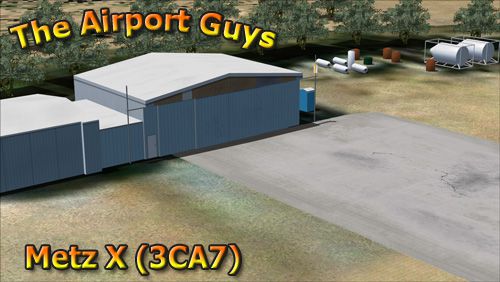
Metz X, Metz X is a comprehensive scenery package for Metz airport (3CA7) in the Monterrey region of California (CA). Includes custom made models with hand-drawn textures inside Flight Simulator, giving you the most realistic version of Metz airport available for FSX today. Also includes a satellite ground image that aligns perfectly with the models, making this scenery very life-like. Due to the inaccurate placement of the airport in the default FSX, the runway has been moved to its correct spot. Accordingly, the terrain mesh has been modified for the approach end of runway 33 so that the hill that juts out isn't as obtrusive and is more like as it is in the real world. By The Airport Guys.
Screenshot of Metz X Scenery.
Thank you for downloading Metz X by The Airport Guys. We hope that you enjoy our product and will come back for more!
Installation:
To install this scenery, simply run the installer that is included. IMPORTANT: You MUST activate the scenery within the scenery library for it to work.
Acknowledgements/Credits:
* Jon Masterson and the ScruffyDuck Co for the excellent Airport Design Editor v1.47 ProKey.
* Luis Sa and PTSim for the invaluable SBuilderX 3.13.
* All of our beta-testers who give their time and effort to ensure that you have a quality product.
Free for all simmers · 6.27 MB · Scanned clean Oct 2026
Download speed: Free tier is capped at 0.5 Mbps (this file takes approximately 2 mins at the cap). PRO members download at full line speed.
FSX\Addon Scenery\ containing scenery and texture sub-folders.readme.txt or README file. It tells you exactly where files go, what dependencies are needed, and any quirks specific to this add-on.Use these coordinates to fly directly to this location once the mod is installed.
36.30000000,-121.14000000
Launch FSX or Prepar3D and use Flights → Load to open the downloaded .pln file. Your aircraft will be positioned at this location.
The archive metz_x.zip has 7 files and directories contained within it.
This list displays the first 500 files in the package. If the package has more, you will need to download it to view them.
| Filename/Directory | File Date | File Size |
|---|---|---|
| Metz X Installer.exe | 08.21.11 | 5.97 MB |
| logo.jpg | 08.21.11 | 85.70 kB |
| Metz X.pdf | 08.22.11 | 348.88 kB |
| EULA.rtf | 08.21.11 | 1.71 kB |
| readme.txt | 08.22.11 | 1.30 kB |
| flyawaysimulation.txt | 10.29.13 | 959 B |
| Go to Fly Away Simulation.url | 01.22.16 | 52 B |
Only PRO members can place votes.
More FSX & P3D add-ons hand-picked based on this download.
FSX Scenery
Metz Nancy Lorraine (LFJL), France, v3. By Alexandre Remy. Installation: Befo…
FSX Scenery
Skara Scenery Bonaire X. Flamingo International Airport or Bonaire Internatio…
 FSX Scenery
Iwo Jima Scenery 1945 Update. This is a complete scenery with added effects a…
FSX Scenery
Kjeller Area Scenery X, Norway. Scenery around Kjeller airport with photoreal…
 FSX Scenery
FSX Loney's Alaska For FSX. This is a compilation of the author's Alaskan sce…
 FSX Scenery
For users of Flight Simulator X (and FSX: Steam Edition) and/or Prepar3D, ter…
 FSX Scenery
This freeware release by developer Aime Leclercq introduces revised highways …
 FSX Scenery
Team GEX Enhanced Autogen World. This package upgrades 522 world wide autogen…
Be the first to leave a comment on this download.
Be the first to share your thoughts on this download.