


 FSX Civil Aircraft
MEA Airbus A330 Repaint
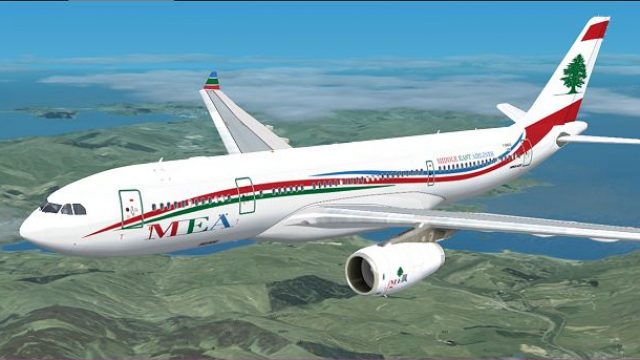
MEA Airbus A330. Includes four different repaints for the new MEA A332 RR. OD…
Middle East Airlines’ Airbus A330-200 “Wave” livery brings flowing fuselage curves, crisp MEA insignia, and authentic airline markings to the Thomas Ruth widebody, adding a modern look that stands out on approach or taxi. Built for Microsoft Flight Simulator X, it requires the Thomas Ruth A330-200 base package.
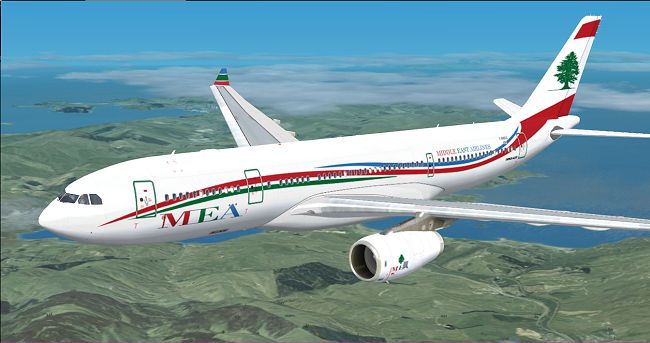
This repaint showcases a distinctive "Wave" scheme for Middle East Airlines (MEA) and is designed exclusively for the Thomas Ruth Airbus A330-200 freeware model in Microsoft Flight Simulator X. It features vibrant curves along the fuselage that capture the eye, while retaining the airline’s classic markings. Created by Jon Murchison, this add-on provides realistic MEA insignia on an aircraft known for its widebody precision and smooth flight characteristics. Please note that you will need the original Thomas Ruth A330 package, which can be obtained from the Fly Away Simulation library.
This Wave version emphasizes a fluid aesthetic along the forward and rear fuselage sections, reflecting a modernized brand identity. The Airbus A330-200, renowned for its efficient twin-engine configuration and extended range capabilities, is an optimal platform for this repaint. The artwork replicates the flowing stripes while preserving details such as operational markings and window placements.
Because Middle East Airlines has long been associated with refined branding, this repaint highlights the airline’s emphasis on elegance and attention to detail. The unique wave motif stands out at altitude and during airport taxi procedures, ensuring it aligns with the real-world visual style. The textures maintain an authentic feel for enhanced immersion, especially when flown on regional routes that MEA frequently operates.
All credit goes to Thomas Ruth for his highly regarded A330 base model, which has a reputation for accurate flight dynamics and well-crafted exterior geometry. The new "Wave" textures come courtesy of Jon Murchison, who meticulously prepared every curve, stripe, and logo to match real-world references. Both developers have contributed significantly to the flight simulation community, providing freeware that amplifies realism within FSX.
...\SimObjects\Airplanes\Tom_A330-200.[fltsim.X] title=MEA 2 A330-200 sim=TomA332 model=RR panel= sound= texture=MEA2 kb_checklists= kb_reference= atc_id= atc_airline=Middle East Airlines atc_flight_number=1123 atc_heavy=1 ui_manufacturer=Airbus ui_type="A330-200" ui_variation="MEA - Wave" description=
Once the configuration updates are complete, reload Microsoft Flight Simulator X to locate this MEA - Wave variant in your aircraft selection menu. Selecting it allows you to appreciate the sweeping exterior lines, especially during exterior camera views.
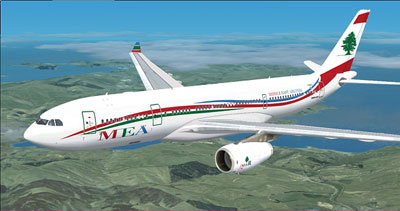
This release solely provides the texture files; you must download the complementary Thomas Ruth A330 model from the Fly Away Simulation library. Once installed, the result is an emblematic portrayal of Middle East Airlines’ colorful wave design for any user seeking to expand their jetliner collection.
Free for all simmers · 2.17 MB · Scanned clean
Download speed: Free tier is capped at 0.5 Mbps. PRO members download at full line speed.
This add-on may require the following files to function properly. If this is a repaint, the dependency below is likely the base aircraft package.
texture.{airline}) inside FSX\SimObjects\Airplanes\{base-aircraft}\.aircraft.cfg in Notepad. Add a new [fltsim.X] section per the readme.readme.txt or README file. It tells you exactly where files go, what dependencies are needed, and any quirks specific to this add-on.The archive mea2.zip has 25 files and directories contained within it.
This list displays the first 500 files in the package. If the package has more, you will need to download it to view them.
| Filename/Directory | File Date | File Size |
|---|---|---|
| MEA2.jpg | 03.21.09 | 149.76 kB |
| README _INSTALL.txt | 03.21.09 | 1.36 kB |
| A321_1_L.dds | 03.12.09 | 1.00 MB |
| A321_2_L.dds | 03.12.09 | 256.12 kB |
| A330_VC01.dds | 03.12.09 | 1.00 MB |
| A330_VC01L.dds | 03.12.09 | 1.00 MB |
| Airbus_A321_1_L.dds | 03.12.09 | 1.00 MB |
| Airbus_A321_2_L.dds | 03.12.09 | 1.00 MB |
| Airbus_A321_3_L.dds | 03.12.09 | 4.12 kB |
| Airbus_A321_4_L.dds | 03.12.09 | 1.00 MB |
| glass.dds | 03.12.09 | 64.12 kB |
| glass_spec.dds | 03.12.09 | 4.12 kB |
| main.dds | 03.21.09 | 4.00 MB |
| main_bump.dds | 03.12.09 | 4.00 MB |
| main_light.dds | 03.12.09 | 1.00 MB |
| main_spec.dds | 03.12.09 | 64.12 kB |
| texture.cfg | 03.12.09 | 165 B |
| thumbnail.jpg | 03.21.09 | 29.17 kB |
| VCblend.dds | 03.12.09 | 1.12 kB |
| wing_bump.dds | 03.12.09 | 1.00 MB |
| wing_l.dds | 03.20.09 | 1.00 MB |
| wing_r.dds | 03.20.09 | 1.00 MB |
| wing_spec.dds | 03.12.09 | 64.12 kB |
| flyawaysimulation.txt | 10.29.13 | 959 B |
| Go to Fly Away Simulation.url | 01.22.16 | 52 B |
More FSX & P3D add-ons hand-picked based on this download.
FSX Civil Aircraft
MEA Airbus A330. Includes four different repaints for the new MEA A332 RR. OD…
 FSX Civil Aircraft
This freeware repaint depicts the Middle East Airlines (MEA) scheme applied t…
 FSX Civil Aircraft
Textures only for the payware Wilco/feelThere PIC A330-200 model. Repaint by …
 FSX Civil Aircraft
MEA Airbus A320. Includes three different repaints for the new MEA A320 IAE. …
 FSX Civil Aircraft
MEA Airbus A321. Includes six different repaints for the new MEA A321 IAE. Ni…
 FSX Civil Aircraft
MEA Airbus A321, registration F-ORMI. Textures for the default Airbus A321. B…
 FSX Civil Aircraft
Airbus NEO livery for the payware Blackbox Simulations A330 Prologue. This is…
 FSX Civil Aircraft
Air France Airbus A330-200 (new livery). Textures only for Thomas Ruth's A330…
Be the first to leave a comment on this download.
Be the first to share your thoughts on this download.