

 FSX Civil Aircraft
MEA Airbus A330 Repaint
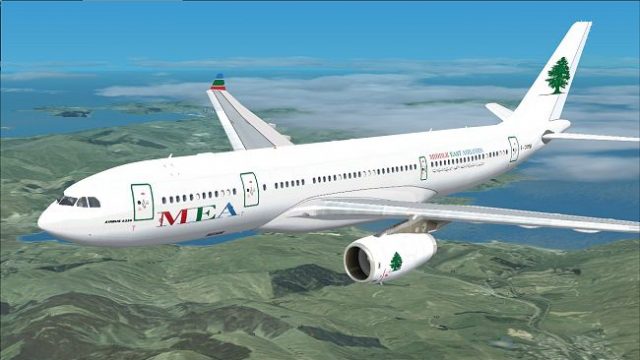
MEA Airbus A330. Includes four different repaints for the new MEA A332 RR. OD…
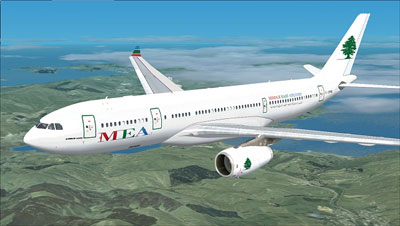
Middle East Airlines’ Airbus A330-200 livery brings crisp fuselage titles and the signature tail emblem to Microsoft Flight Simulator X, matching the real-world Rolls-Royce engine configuration for accurate fleet styling. It requires Thomas Ruth’s freeware A330 base model to supply the virtual cockpit, sounds, and core aircraft files.
 Rate
Rate
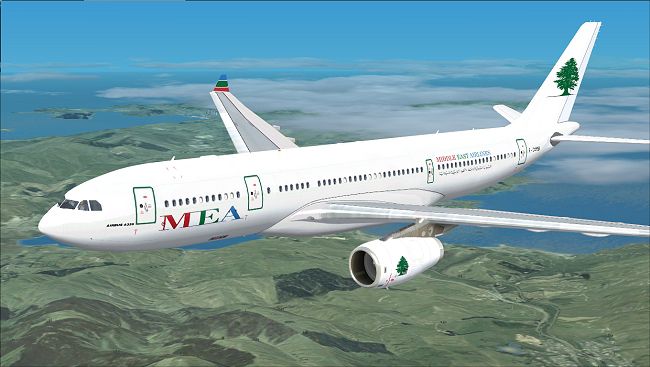
This freeware repaint depicts the Middle East Airlines (MEA) scheme applied to an Airbus A330 wide-body jet, intended for use within Microsoft Flight Simulator X. Developed by Jon Murchison, it requires the base model from Thomas Ruth, which can be located in the Fly Away Simulation library. The package includes only the external textures and will not function without the original A330 files.
The Airbus A330 family is recognized for its twin-engined, medium-to-long-range capabilities and comfortable cabin layout. This particular variant, the A330-200, accommodates intercontinental operations thanks to its efficient engine and aerodynamic design. MEA, short for Middle East Airlines, is the national carrier of Lebanon and has historically employed this airframe for extensive regional and international routes. Known for a blend of reliability and efficiency, the A330 meets the airline’s demands for flexible seat capacity and cargo potential.
This repaint strives to capture the precise MEA livery details, reflecting the recognizable fuselage markings and tail fin emblem. The aircraft.cfg entries ensure correct loading of textures, while the Rolls-Royce engine configuration (model=RR in the configuration) aligns with MEA’s real-world fleet layout. Meanwhile, cockpit and sound configurations inherit settings from Thomas Ruth’s A330 model, preserving consistency with the base package.
[fltsim.X]
title=MEA A330-200
sim=TomA332
model=RR
panel=
sound=
texture=MEA1
kb_checklists=
kb_reference=
atc_id=
atc_airline=Middle East Airlines
atc_flight_number=1123
atc_heavy=1
ui_manufacturer=Airbus
ui_type="A330-200"
ui_variation="MEA - PLAIN"
description=
Only the livery files are provided here. Thomas Ruth’s original A330 files are vital for a complete installation. The base model can be acquired as freeware from the Fly Away Simulation library, ensuring essential cockpit, sound, and flight dynamics are fully integrated.
Free for all simmers · 2.17 MB · Scanned clean Oct 2026
Download speed: Free tier is capped at 0.5 Mbps. PRO members download at full line speed.
This file is a repaint — the package below is the base model it paints onto. Install it first, or the textures will have nothing to load onto.
texture.{airline}) inside FSX\SimObjects\Airplanes\{base-aircraft}\.aircraft.cfg in Notepad. Add a new [fltsim.X] section per the readme.readme.txt or README file. It tells you exactly where files go, what dependencies are needed, and any quirks specific to this add-on.The archive mea-1.zip has 26 files and directories contained within it.
This list displays the first 500 files in the package. If the package has more, you will need to download it to view them.
| Filename/Directory | File Date | File Size |
|---|---|---|
| MEA.jpg | 03.20.09 | 158.76 kB |
| README _INSTALL.txt | 03.20.09 | 1.35 kB |
| A321_1_L.dds | 03.12.09 | 1.00 MB |
| A321_2_L.dds | 03.12.09 | 256.12 kB |
| A330_VC01.dds | 03.12.09 | 1.00 MB |
| A330_VC01L.dds | 03.12.09 | 1.00 MB |
| Airbus_A321_1_L.dds | 03.12.09 | 1.00 MB |
| Airbus_A321_2_L.dds | 03.12.09 | 1.00 MB |
| Airbus_A321_3_L.dds | 03.12.09 | 4.12 kB |
| Airbus_A321_4_L.dds | 03.12.09 | 1.00 MB |
| glass.dds | 03.12.09 | 64.12 kB |
| glass_spec.dds | 03.12.09 | 4.12 kB |
| main.dds | 03.20.09 | 4.00 MB |
| main_bump.dds | 03.12.09 | 4.00 MB |
| main_light.dds | 03.12.09 | 1.00 MB |
| main_spec.dds | 03.12.09 | 64.12 kB |
| texture.cfg | 03.12.09 | 165 B |
| thumbnail.jpg | 03.20.09 | 28.00 kB |
| Thumbs.db | 03.12.09 | 7.00 kB |
| VCblend.dds | 03.12.09 | 1.12 kB |
| wing_bump.dds | 03.12.09 | 1.00 MB |
| wing_l.dds | 03.20.09 | 1.00 MB |
| wing_r.dds | 03.20.09 | 1.00 MB |
| wing_spec.dds | 03.12.09 | 64.12 kB |
| flyawaysimulation.txt | 10.29.13 | 959 B |
| Go to Fly Away Simulation.url | 01.22.16 | 52 B |
Only PRO members can place votes.
More FSX & P3D add-ons hand-picked based on this download.
FSX Civil Aircraft
MEA Airbus A330. Includes four different repaints for the new MEA A332 RR. OD…
 FSX Civil Aircraft
This repaint showcases a distinctive "Wave" scheme for Middle East Airlines (…
 FSX Civil Aircraft
Textures only for the payware Wilco/feelThere PIC A330-200 model. Repaint by …
 FSX Civil Aircraft
MEA Airbus A320. Includes three different repaints for the new MEA A320 IAE. …
 FSX Civil Aircraft
MEA Airbus A321. Includes six different repaints for the new MEA A321 IAE. Ni…
 FSX Civil Aircraft
MEA Airbus A321, registration F-ORMI. Textures for the default Airbus A321. B…
 FSX Civil Aircraft
Airbus NEO livery for the payware Blackbox Simulations A330 Prologue. This is…
 FSX Civil Aircraft
This freeware package introduces a faithful Airbus A330-300 simulation for Mi…
Read what other simmers think, or add your own.

I just wanted to ask, if I have FSX deluxe can I add these free add-ons or I need the steam edition? Thanks for your help