


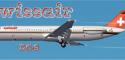
FS2004 Swissair Douglas DC-9-51
Swissair Douglas DC-9-51 HB-ISP in classic colors brings authentic short-haul jet era style to FS2004, with a detailed FFX/SGA model by Erick Cantu and crisp repaint work by Ashley Flynn. Requires the base DC-9-51 package, delivering accurate exterior textures and a convincing virtual cockpit experience for vintage Swiss routes.

- Type:Complete with Base Model
- File: sr-dc9.zip
- Size:1.01 MB
- Scan:
Clean (11d)

- Access:Freeware
- Content:Everyone

 Description
 Comments
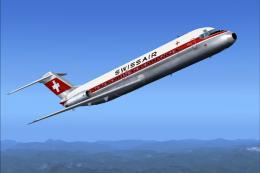
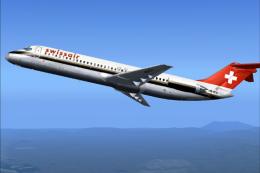
 Swissair Douglas DC-9-51, registration HB-ISP (old colors). Model by FFX/SGA. Repainted by Ashley Flynn.
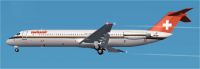
Side profile view of Swissair Douglas DC-9-51.
DC-9-51 model by Erick Cantu.
I would also like to state that my repaint is exactly that, a repaint!. I will not add a new panel to my planes...etc. The reason for this is because if I was to create panels....etc for just one repaint, the file size would be so big that I wouldn't be able to share my repaints with you all (I use a 56k modem). WHAT THIS BASICALLY MEANS IS THAT I DO NOT WANT COMPLAINTS ABOUT THE PLANE NOT HAVING A CUSTOM PANEL, OR ANY MOANING ABOUT WHAT ASPECTS THE PLANE LACKS!. I JUST REPAINT PLANES, I DON'T EDIT THEM AND I DON'T CREATE PANELS!. I hope that this is simplistic enough for those of you who keep requesting a custom panel...etc.
I hope that you enjoy the repaint.
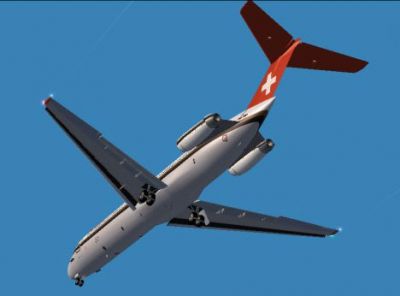
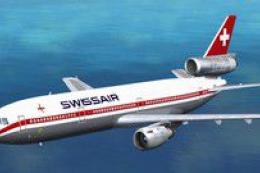
Screenshot of Swissair Douglas DC-9-51 in flight.
Images & Screenshots

The archive sr-dc9.zip has 64 files and directories contained within it.
File Contents
This list displays the first 500 files in the package. If the package has more, you will need to download it to view them.
| Filename/Directory | File Date | File Size |
|---|---|---|
| AIRCRAFT.CFG | 11.21.03 | 12.19 kB |
| dc9-51.air | 02.20.03 | 8.15 kB |
| MODEL | 11.20.03 | 0 B |
| DC9_50.MDL | 02.18.03 | 621.65 kB |
| MODEL.CFG | 12.07.02 | 23 B |
| panel | 11.20.03 | 0 B |
| panel.cfg | 09.02.02 | 31 B |
| sound | 11.20.03 | 0 B |
| sound.cfg | 10.07.01 | 34 B |
| texture.swissair | 11.21.03 | 0 B |
| CONE_L.BMP | 02.16.03 | 256.07 kB |
| CONE_T.BMP | 02.16.03 | 64.07 kB |
| DC9_50_L.bmp | 02.18.03 | 1.00 MB |
| DC9_50_T.bmp | 11.21.03 | 4.00 MB |
| ENGINE_LEFT_L.BMP | 02.16.03 | 256.07 kB |
| ENGINE_LEFT_T.bmp | 11.21.03 | 1.00 MB |
| ENGINE_RIGHT_L.BMP | 02.16.03 | 256.07 kB |
| ENGINE_RIGHT_T.bmp | 11.21.03 | 1.00 MB |
| EXHAUST_l.BMP | 02.16.03 | 256.07 kB |
| EXHAUST_t.BMP | 02.16.03 | 64.07 kB |
| FLAPS_T.bmp | 02.16.03 | 256.07 kB |
| FLAPTRACKS_L.BMP | 02.16.03 | 256.07 kB |
| FLAPTRACKS_T.BMP | 02.16.03 | 256.07 kB |
| FRAMES_L.BMP | 02.16.03 | 256.07 kB |
| FRAMES_T.BMP | 02.18.03 | 64.07 kB |
| GEARLEGS_L.BMP | 02.16.03 | 256.07 kB |
| GEARLEGS_T.bmp | 02.16.03 | 32.07 kB |
| INTAKE_L.bmp | 02.16.03 | 256.07 kB |
| INTAKE_t.BMP | 02.16.03 | 32.07 kB |
| LEFTGEARDOOR_L.BMP | 02.16.03 | 256.07 kB |
| LEFTGEARDOOR_T.bmp | 11.21.03 | 256.07 kB |
| MAINWHEELS_L.BMP | 02.16.03 | 256.07 kB |
| MAINWHEELS_T.BMP | 02.16.03 | 4.07 kB |
| NOSEGEARDOORINNER_L.BMP | 02.16.03 | 256.07 kB |
| NOSEGEARDOORINNER_T.bmp | 11.21.03 | 256.07 kB |
| NOSEGEARDOOR_L.BMP | 02.16.03 | 256.07 kB |
| NOSEGEARDOOR_T.bmp | 11.21.03 | 256.07 kB |
| NOSEWHEEL_L.BMP | 02.16.03 | 256.07 kB |
| NOSEWHEEL_T.BMP | 02.16.03 | 4.07 kB |
| OLEO_L.BMP | 02.16.03 | 256.07 kB |
| OLEO_T.bmp | 02.16.03 | 128.07 kB |
| PYLON_L.BMP | 02.16.03 | 256.07 kB |
| PYLON_T.BMP | 02.18.03 | 256.07 kB |
| REVERSERGUIDE_l.BMP | 02.16.03 | 256.07 kB |
| REVERSERGUIDE_t.BMP | 02.16.03 | 64.07 kB |
| REVERSER_l.BMP | 02.16.03 | 256.07 kB |
| REVERSER_t.BMP | 02.16.03 | 64.07 kB |
| RIGHTGEARDOOR_L.BMP | 02.16.03 | 256.07 kB |
| RIGHTGEARDOOR_T.bmp | 11.21.03 | 256.07 kB |
| SPOILERS_T.BMP | 02.16.03 | 64.07 kB |
| STAB_L.BMP | 02.16.03 | 256.07 kB |
| STAB_T.bmp | 11.21.03 | 1.00 MB |
| TAIL_L.BMP | 02.16.03 | 256.07 kB |
| TAIL_T.bmp | 11.21.03 | 1.00 MB |
| Thumbs.db | 11.21.03 | 26.00 kB |
| WING_L.bmp | 02.16.03 | 256.07 kB |
| WING_T.bmp | 11.21.03 | 1.00 MB |
| swissair DC-9-51 | 11.21.03 | 0 B |
| swissair DC-9.jpg | 11.21.03 | 33.44 kB |
| fsscr001.jpg | 11.21.03 | 20.11 kB |
| READ ME.txt | 11.21.03 | 916 B |
| Animation4.gif | 11.21.03 | 90.56 kB |
| flyawaysimulation.txt | 10.29.13 | 959 B |
| Go to Fly Away Simulation.url | 01.22.16 | 52 B |

Installation Instructions
Most of the freeware add-on aircraft and scenery packages in our file library come with easy installation instructions which you can read above in the file description. For further installation help, please see our Flight School for our full range of tutorials or view the README file contained within the download. If in doubt, you may also ask a question or view existing answers in our dedicated Q&A forum.
Related Add-ons
Some mods you may like
0 comments
Leave a Response