

 FS2004 Civil Jet Aircraft
Swissair Douglas DC-9-30 (NC)
Enhance your Microsoft Flight Simulator 2004 setup with this freeware texture…
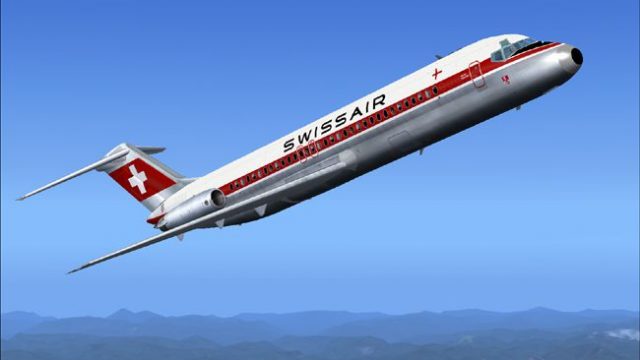
Swissair’s classic Douglas DC-9-30 livery returns with crisp retro markings and carefully matched colors, recreating the airline’s short-haul jet era in Microsoft Flight Simulator 2004. High-resolution textures align with the SGA model and credible flight dynamics for authentic takeoff, cruise, and landing, and requires the SGA DC9-30 base package.
 Rate
Rate
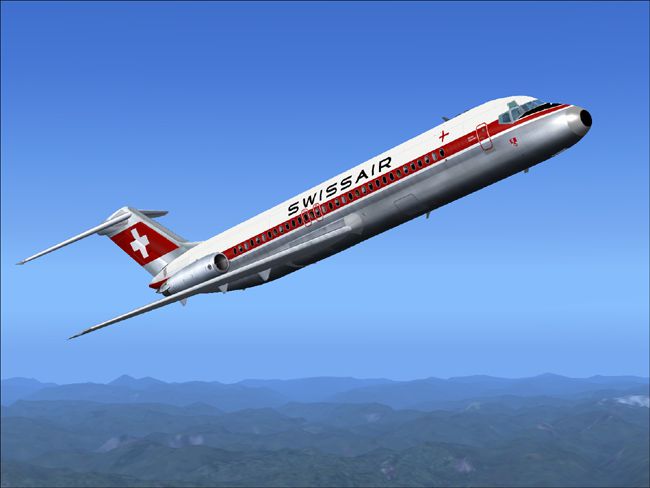
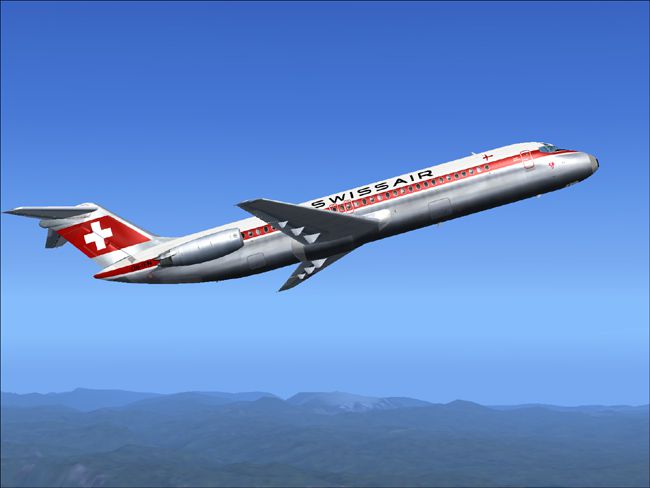
This add-on brings back the time-honored Swissair DC-9-30 paint scheme for Microsoft Flight Simulator 2004 enthusiasts. Created by Henry William, this freeware package showcases the classic Swissair look from decades past. It requires the SGA DC9-30 (SGA930.zip) base model by Erick Cantu, with flight dynamics developed by Fraser W. Turner. Installation steps are outlined below, and once complete, you can immerse yourself in the retro charm of Swissair’s short-haul operations at every virtual airport you visit.
The Douglas DC-9-30 model is part of McDonnell Douglas’ iconic short-to-medium range lineup, renowned for reliable performance and straightforward handling. Swissair, which served as Switzerland’s national carrier for many years, operated these compact jets on various intra-European routes. This repaint accurately reflects the airline’s distinctive older color scheme, including the minimalist livery that many aviation aficionados remember from the mid-20th century. Every logo and fuselage detail is meticulously reproduced to bring an authentic Swissair atmosphere to your simulator.
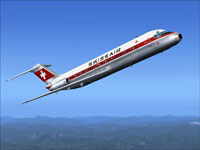
Screenshot of Swissair Douglas DC-9-30 in the air.
[fltsim.X]
title=SGA DC-9-30 Swissair OC
sim=SGA DC9_30
model=
panel=
sound=
texture=swissoc
checklists=
atc_id=N940N
atc_id_color=0xffffffff
atc_airline=swissair
atc_flight_number=935
ui_manufacturer=Douglas
ui_type=DC-9-31
ui_variation=Swissair O.C.
description=Model: Erick Cantu
Flight Dynamics V9.1.0: Fraser W. Turner

visual_damage=0
atc_heavy=0
atc_id_font=Verdana,-11,1,600,0
atc_parking_codes=
atc_parking_types=
This repaint stands as an homage to Swissair’s heritage and the Douglas DC-9-30’s enduring legacy. After following these simple steps, you can relive a pivotal chapter in European aviation history through the lens of Henry William’s carefully detailed artwork.
Free for all simmers · 2.72 MB · Scanned clean Oct 2026
Download speed: Free tier is capped at 0.5 Mbps. PRO members download at full line speed.
This file is a repaint — the package below is the base model it paints onto. Install it first, or the textures will have nothing to load onto.
FS9\Aircraft\, FS9\Addon Scenery\, FS9\Gauges\, or FS9\Effects\.readme.txt or README file. It tells you exactly where files go, what dependencies are needed, and any quirks specific to this add-on.The archive srodc9hw.zip has 24 files and directories contained within it.
This list displays the first 500 files in the package. If the package has more, you will need to download it to view them.
| Filename/Directory | File Date | File Size |
|---|---|---|
| 1.jpg | 10.30.04 | 95.79 kB |
| 2.jpg | 10.30.04 | 85.57 kB |
| small.gif | 10.30.04 | 3.07 kB |
| readme.txt | 10.30.04 | 1.57 kB |
| texture.swissoc | 10.31.04 | 0 B |
| CONE_L.BMP | 08.08.03 | 5.43 kB |
| CONE_T.BMP | 08.08.03 | 5.43 kB |
| DC9_B_L.BMP | 05.19.04 | 256.07 kB |
| DC9xINTERIOR_L.BMP | 05.19.04 | 256.07 kB |
| DC9xINTERIOR_T.BMP | 01.28.04 | 1.00 MB |
| ENGINES_L.BMP | 05.19.04 | 256.07 kB |
| INTAKE_L.bmp | 08.08.03 | 5.43 kB |
| INTAKE_t.BMP | 08.10.03 | 42.78 kB |
| WING_LEFT_L.BMP | 05.19.04 | 256.07 kB |
| WING_RIGHT_L.BMP | 05.19.04 | 256.07 kB |
| WING_RIGHT_T.BMP | 09.24.03 | 1.00 MB |
| WING_LEFT_T.BMP | 10.24.04 | 4.00 MB |
| DC9_B_T.bmp | 10.24.04 | 4.00 MB |
| engines_t.bmp | 10.27.04 | 4.00 MB |
| 30fuse_l.bmp | 10.28.04 | 4.00 MB |
| 30fuse_t.bmp | 10.28.04 | 4.00 MB |
| DC-9-30 Swissair old colors | 10.30.04 | 0 B |
| flyawaysimulation.txt | 10.29.13 | 959 B |
| Go to Fly Away Simulation.url | 01.22.16 | 52 B |
Only PRO members can place votes.
More FS2004 add-ons hand-picked based on this download.
FS2004 Civil Jet Aircraft
Enhance your Microsoft Flight Simulator 2004 setup with this freeware texture…
 FS2004 Civil Jet Aircraft
Swissair Douglas DC-9-51, registration HB-ISP (old colors). Model by FFX/SGA.…
 FS2004 Civil Jet Aircraft
This freeware release brings fresh updates to a classic tri-engine wide-body …
 FS2004 Civil Jet Aircraft
Experience a thoroughly detailed Swissair tri-engine experience with this fre…
 FS2004 Civil Jet Aircraft
This freeware package offers a full-featured Swissair McDonnell Douglas MD-11…
 FS2004 Civil Jet Aircraft
Experience a timeless Swissair McDonnell Douglas MD-83, registration HB-IND, …
 FS2004 Civil Jet Aircraft
Experience a piece of classic Swiss aviation history with this freeware repai…
 FS2004 Civil Jet Aircraft
Experience the Swissair McDonnell Douglas MD-11 (HB-GHU) in FS2004 with a det…
Be the first to leave a comment on this download.
Be the first to share your thoughts on this download.