
 FSX General Aviation Aircraft
Blue And White Cessna 152
This lively repaint package offers a detailed blue-and-white paint scheme lab…
Cessna 152 Aerobat repaint in a crisp red-over-white scheme adds standout ramp presence with fictional registration N2746W, while preserving sharp panel lines and rivet detail. Built for Microsoft Flight Simulator X, it includes 1024 DXT3 and 2048 32-bit no-mips texture options and requires the freeware Rancho JEN Cessna base model.
 Rate
Rate
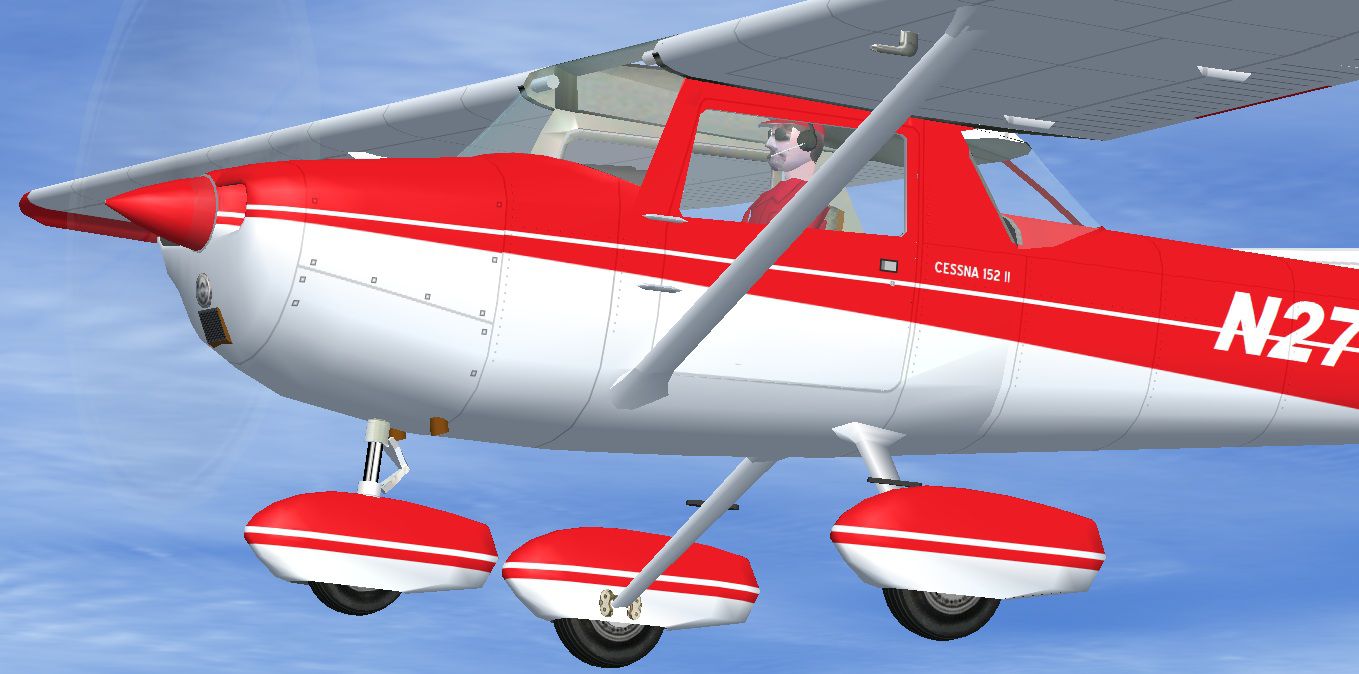
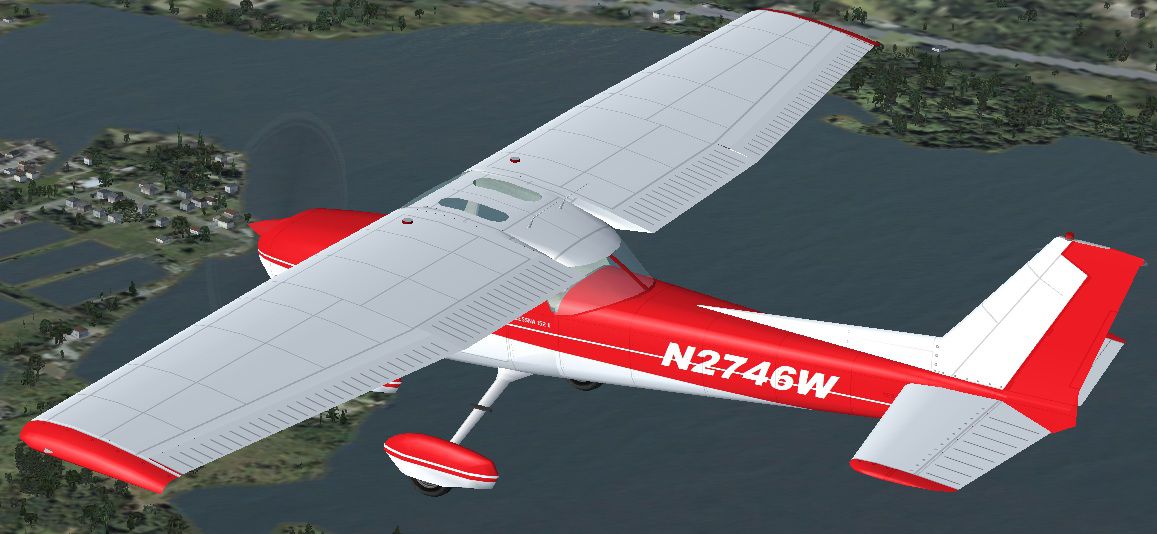
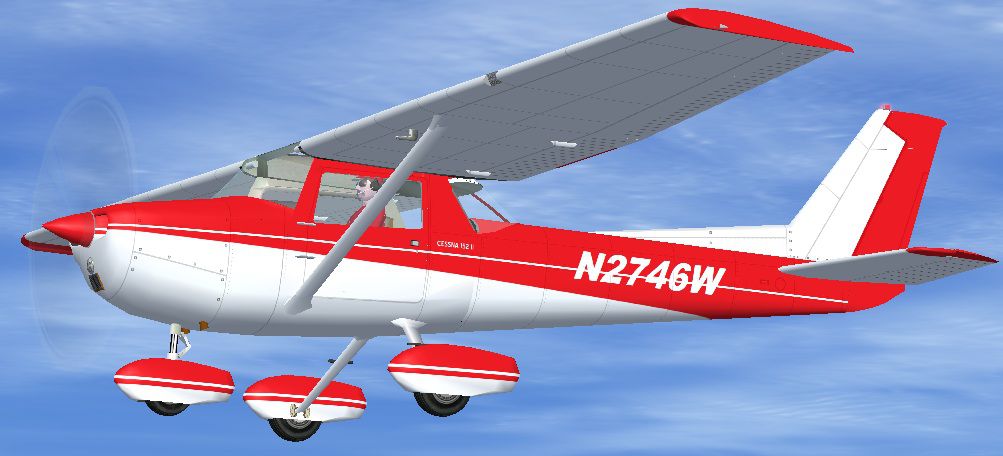
This repaint set features a distinctive red-on-white finish for the Cessna 152, fictional registration N2746W, designed for Microsoft Flight Simulator X. Developed initially by Rancho JEN, it has been updated for FSX compatibility by Mark Rooks. This texture package, created by Tom Tiedman, provides two resolution options for users seeking either enhanced performance or superior graphical detail. A separate download of the freeware Rancho JEN Cessna base model is required (available in the Fly Away Simulation library), as this package does not include the original aircraft model.
The real-world Cessna 152, derived from the earlier Cessna 150, remains popular for flight training and personal flying. To emulate that iconic look, these textures apply a vibrant red accent over a clean white base. This unique paint job adds a fun twist to the typical trainer profile, showcasing fictional tail number N2746W. The included high-quality markings capture the essential rivet lines and panel details that enthusiasts enjoy examining up close.
Both variants utilize a “no mips” configuration to maintain consistent clarity. You may choose to install just one or both texture folders in your aircraft directory, depending on your preference.

Visual showcase of the fictional N2746W livery.
Add the following lines into your aircraft.cfg file in proper sequential order:
[fltsim.X] title=Cessna 152 Aerobat Red and White (32 bit 2048) sim=Cessna 152 model=F panel= sound= texture=Red and White (32 bit 2048) kb_checklists= ui_manufacturer=Cessna ui_type=152 Aerobat ui_variation=Rancho JEN Red and White (32 bit 2048) atc_airline= atc_id=N2746W atc_flight_number= description=Red and white repaint by Tom Tiedman 10-10-2011. [fltsim.X] title=Cessna 152 Aerobat Red and White (DXT3 1024) sim=Cessna 152 model=F panel= sound= texture=Red and White (DXT3 1024) kb_checklists= ui_manufacturer=Cessna ui_type=152 Aerobat ui_variation=Rancho JEN Red and White (DXT3 1024) atc_airline= atc_id=N2746W atc_flight_number= description=Red and white repaint by Tom Tiedman 10-10-2011.
This repaint has been meticulously prepared by Tom Tiedman. Thanks also to Mark Rooks for adapting the Rancho JEN Cessna 150 to function as a 152 in FSX, and to Rancho JEN for the original design. Be sure to have the base model installed, available in the Fly Away Simulation archive. With these files, you will experience a vibrant new livery on a classic Cessna airframe—a timeless staple of general aviation.
Free for all simmers · 2.04 MB · Scanned clean Oct 2026
Download speed: Free tier is capped at 0.5 Mbps. PRO members download at full line speed.
This file is a repaint — the package below is the base model it paints onto. Install it first, or the textures will have nothing to load onto.
texture.{airline}) inside FSX\SimObjects\Airplanes\{base-aircraft}\.aircraft.cfg in Notepad. Add a new [fltsim.X] section per the readme.readme.txt or README file. It tells you exactly where files go, what dependencies are needed, and any quirks specific to this add-on.The archive fsx_cessna_152_red_and_white.zip has 30 files and directories contained within it.
This list displays the first 500 files in the package. If the package has more, you will need to download it to view them.
| Filename/Directory | File Date | File Size |
|---|---|---|
| file_id.diz | 10.13.11 | 495 B |
| Original J.E. Narcizo Readme.txt | 10.13.10 | 1.95 kB |
| READ ME and INSTALLATION.txt | 10.13.11 | 2.00 kB |
| Screenshot 1.jpg | 10.12.11 | 112.21 kB |
| Screenshot 2.jpg | 10.12.11 | 171.92 kB |
| texture.Red and White (32 bit 2048) | 10.13.11 | 0 B |
| JEN_C150_fuse.bmp | 10.12.11 | 16.00 MB |
| JEN_C150_glass.bmp | 10.07.11 | 17.05 kB |
| JEN_C150_Parts.bmp | 10.12.11 | 1.00 MB |
| JEN_C150_Prop1.bmp | 10.07.11 | 17.05 kB |
| JEN_C150_Prop2.bmp | 10.07.11 | 17.05 kB |
| JEN_C150_spinner.bmp | 10.12.11 | 64.07 kB |
| JEN_C150_spinner1.bmp | 10.12.11 | 64.07 kB |
| JEN_C150_wheel.bmp | 10.11.11 | 256.07 kB |
| JEN_cromo.bmp | 10.07.11 | 21.43 kB |
| thumbnail.jpg | 10.12.11 | 185.43 kB |
| texture.Red and White (DXT3 1024) | 10.13.11 | 0 B |
| JEN_C150_fuse.bmp | 10.12.11 | 1.00 MB |
| JEN_C150_glass.bmp | 10.07.11 | 17.05 kB |
| JEN_C150_Parts.bmp | 10.12.11 | 256.07 kB |
| JEN_C150_Prop1.bmp | 10.07.11 | 17.05 kB |
| JEN_C150_Prop2.bmp | 10.07.11 | 17.05 kB |
| JEN_C150_spinner.bmp | 10.12.11 | 16.07 kB |
| JEN_C150_spinner1.bmp | 10.12.11 | 16.07 kB |
| JEN_C150_wheel.bmp | 10.11.11 | 256.07 kB |
| JEN_cromo.bmp | 10.07.11 | 21.43 kB |
| thumbnail.jpg | 10.12.11 | 185.43 kB |
| thumbnail.jpg | 10.12.11 | 185.43 kB |
| flyawaysimulation.txt | 10.29.13 | 959 B |
| Go to Fly Away Simulation.url | 01.22.16 | 52 B |
Only PRO members can place votes.
More FSX & P3D add-ons hand-picked based on this download.
FSX General Aviation Aircraft
This lively repaint package offers a detailed blue-and-white paint scheme lab…
 FSX General Aviation Aircraft
This repaint package features a fictional registration, N6539H, over a sleek …
 FSX General Aviation Aircraft
Enhance your hangar in Microsoft Flight Simulator X with this fictional N7279…
 FSX General Aviation Aircraft
This free repaint brings a custom light blue and white color scheme to the cl…
 FSX General Aviation Aircraft
Cessna 152 flyable blank white textures for the Just Flight/FS Insider freewa…
 FSX General Aviation Aircraft
This release offers a specialized blank white repaint for a freeware Rancho J…
 FSX General Aviation Aircraft
Red And White Cessna 172. Default Cessna 172SP Skyhawk repaint textures for t…
 FSX General Aviation Aircraft
Red And White Cessna 182. A repaint of the default C182. By Ahmetandtolga Oza…
Be the first to leave a comment on this download.
Be the first to share your thoughts on this download.