
 FSX General Aviation Aircraft
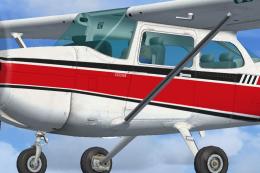
Red And White Cessna 172
Red And White Cessna 172. Default Cessna 172SP Skyhawk repaint textures for t…
Red-and-white Cessna 182 repaint refreshes the default Skylane with a clean, high-visibility scheme that looks sharp in daylight and on the ramp, while keeping original flight dynamics and a familiar virtual cockpit. Designed for Microsoft Flight Simulator X, it requires the stock Cessna 182 and installs as an additional livery for general aviation flying.
 Rate
Rate
Red And White Cessna 182. A repaint of the default C182. By Ahmetandtolga Ozanalp.
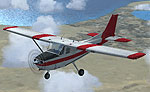
Red and white Cessna 182 in flight.
[fltsim.3]

title=Cessna Skyhawk 172SP Paint4

sim=Cessna172SP

model=

panel=

sound=

texture=4

kb_checklists=Cessna172SP_check

kb_reference=Cessna172SP_ref

atc_id=N52KA

atc_id_color=0xffffffff

ui_manufacturer="Cessna"

ui_type="C172SP Skyhawk"

ui_variation=" Used Trainer"

ui_typerole="Single Engine Prop"

ui_createdby="Microsoft Corporation"

description="A stable and trustworthy plane, most pilots have logged at least a few hours in a Cessna 172, since it's the most widely available aircraft in the rental fleet, and is used by most flight schools. Since the first prototype was completed in 1955, more than 35,000 C172s have been produced, making it the world's most popular single-engine plane. One of Cessna's first tricycle-gear airplanes, the 172 quickly became the favorite of a growing class of business pilots. Its reliability and easy handling (along with thoughtful engineering and structural updates) have ensured its continued popularity for decades."
Free for all simmers · 2.63 MB · Scanned clean Nov 2026
Download speed: Free tier is capped at 0.5 Mbps. PRO members download at full line speed.
texture.{airline}) inside FSX\SimObjects\Airplanes\{base-aircraft}\.aircraft.cfg in Notepad. Add a new [fltsim.X] section per the readme.readme.txt or README file. It tells you exactly where files go, what dependencies are needed, and any quirks specific to this add-on.The archive 182.zip has 9 files and directories contained within it.
This list displays the first 500 files in the package. If the package has more, you will need to download it to view them.
| Filename/Directory | File Date | File Size |
|---|---|---|
| 2010-11-3_0-20-10-781.BMP | 11.03.10 | 3.00 MB |
| C172_T.dds | 11.03.10 | 1.00 MB |
| C172_T_Spec.dds | 11.03.10 | 1.00 MB |
| Fresnel_Ramp.dds | 11.03.10 | 640 B |
| Prop_C172.dds | 11.03.10 | 17.05 kB |
| Readme.txt | 11.03.10 | 983 B |
| texture.cfg | 08.14.06 | 137 B |
| flyawaysimulation.txt | 10.29.13 | 959 B |
| Go to Fly Away Simulation.url | 01.22.16 | 52 B |
Only PRO members can place votes.
More FSX & P3D add-ons hand-picked based on this download.
FSX General Aviation Aircraft
Red And White Cessna 172. Default Cessna 172SP Skyhawk repaint textures for t…
 FSX General Aviation Aircraft
The default C172 with red and white textures as N1272T. Repaint by Tom Tiedma…
 FSX General Aviation Aircraft
This repaint set features a distinctive red-on-white finish for the Cessna 15…
 FSX General Aviation Aircraft
This alluring freeware release, crafted specifically for Microsoft Flight Sim…
 FSX General Aviation Aircraft
A Cessna 185 modified for Flight Simulator X by Mark Rooks. Screenshot of Ces…
 FSX General Aviation Aircraft
This repaint offers a striking red and white color scheme for Premier Aircraf…
 FSX General Aviation Aircraft
This freeware repaint merges a classic red and white color layout with the Pr…
 FSX General Aviation Aircraft
Cessna 182 Skylane. This is the default Flight Simulator 2004 Cessna 182 Skyl…
Be the first to leave a comment on this download.
Be the first to share your thoughts on this download.