


FSX Ballina Byron Gateway Airport Scenery
Ballina Byron Gateway Airport scenery brings Northern Rivers, New South Wales to life in FSX with a detailed terminal, hangars, custom lighting and markings, and more than 350 bespoke objects including the Big Prawn landmark. Photoreal ground textures cover over 100 square kilometers at 1 m/px, with sharper 60 cm/px surfaces on the airfield.
 Australia
 Experience an enhanced rendition of Ballina Byron Gateway Airport in New South Wales, Australia, featuring a meticulously designed environment by Anthony Lynch. This scenery set offers a complete package (covering both Parts 1 and 2) tailored for Microsoft Flight Simulator X flyers seeking a detailed airport model, custom buildings, and over 100 square kilometers of photoreal ground imagery around Ballina and adjoining regions.
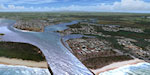
Aerial view of Ballina Byron Gateway scenery.
Geographic Insights of the Northern Rivers Region
Ballina Byron Gateway Airport sits approximately 700 kilometers north of Sydney and roughly 200 kilometers south of Brisbane. It serves as a pivotal hub for the Northern Rivers area, with Ballina offering a coastal tourism hotspot close to the Richmond River. The airport sits 30 kilometers from Byron Bay, renowned for its scenic coastline and vibrant holiday sector. Locals often highlight the “Big Prawn” attraction, which has been faithfully included in the scenery.
Airport and Runway Configuration
The airport is equipped with a 1900-meter runway regularly hosting Boeing 737, Airbus A320, and Saab 340 flights. It accommodates daily services from airlines such as Virgin Australia, Jetstar, and Rex, connecting Sydney, Melbourne, Newcastle, and surrounding destinations. The RPT apron provides space for two aircraft simultaneously, reflecting the airport’s steady schedule and expanding tourism traffic.
Regional Operators and On-Site Businesses
Several aviation-related enterprises operate here, including Aussie Air Flight School, Byron Bay Air Charter (using the Cessna 310), and Classic Aero Adventure Flights (offering Winjeel flights). Additional services range from helicopter tours with Air T&G to maintenance and manufacturing facilities such as Aeroweld and Lightwing. These add realism to ground operations within the simulator, enhancing immersion.
Photoreal Surfaces and Landmarks
Within a 100-square-kilometer radius, you will find photoreal coverage at 1-meter-per-pixel resolution extending from the airport to Ballina town and beyond, including the new Pacific Highway bypass. The airport itself uses a higher 60-centimeter-per-pixel texture set, ensuring crisp visuals of runways, aprons, and terminal buildings. Though this scenery integrates best with Orbx Australia, default simulator terrain remains fully compatible.
Advanced Technical Features
- Custom Lighting and Markings
- Accurate night lighting, complete with newly crafted FSX-native T-VASIS approach lighting, plus detailed taxiway and runway edge illumination.
- Immersive Autogen and Models
- Over 350 tailored objects, including signage, vehicles, landscaping, and local landmarks, deliver a realistic streetscape and airfield atmosphere.
- Highly Detailed Structures
- Airport terminals, hangars, and support buildings integrate custom textures for extra authenticity around the apron and surrounding sites.
About the Developer
This package (Ants Aussie Airports 14: Ballina) was created by Anthony Lynch. It brings together both parts of his original release for convenient installation. Whether exploring commercial routes or practicing circuit work, this freeware upgrade promises a refined experience around one of New South Wales’ key coastal gateways without compromising performance.
Ready to download Ballina Byron Gateway Airport Scenery?
Free for all simmers · 273.02 MB · Scanned clean Sep 2026
File information
Download speed: Free tier is capped at 0.5 Mbps (this file takes approximately 1h 16m at the cap). PRO members download at full line speed.
Requires dependencies
This add-on may require the following files to function properly. If this is a repaint, the dependency below is likely the base aircraft package.
How to install this mod
FSX / P3D
scenery
How to install this mod
-
Extract the downloaded archive
Use 7-Zip (free) or WinRAR to extract the ZIP to a temporary folder. Don't install while still zipped — the simulator can't read inside ZIP files. -
Place scenery in Addon Scenery
Create a folder underFSX\Addon Scenery\containingsceneryandtexturesub-folders. -
Activate in Scenery Library
In FSX, go to Settings → Scenery Library → Add Area. Higher priority means it overrides lower entries for the same location. -
Always read the included readme
Every mod ships with areadme.txtorREADMEfile. It tells you exactly where files go, what dependencies are needed, and any quirks specific to this add-on.
Finding the scenery
Use these coordinates to fly directly to this location once the mod is installed.
-28.83390000,153.56210000
Launch FSX or Prepar3D and use Flights → Load to open the downloaded .pln file. Your aircraft will be positioned at this location.
What’s inside this archive
The archive ballina-complete.zip has 7 files and directories contained within it.
File Contents
This list displays the first 500 files in the package. If the package has more, you will need to download it to view them.
| Filename/Directory | File Date | File Size |
|---|---|---|
| AntsBNA1.exe | 06.12.12 | 138.27 MB |
| AntsBNA1.png | 06.11.12 | 23.57 kB |
| AntsBNA2.exe | 06.12.12 | 134.77 MB |
| AntsBNA2.png | 06.11.12 | 23.57 kB |
| Go to Fly Away Simulation.url | 08.22.19 | 52 B |
| Readme.txt | 06.11.12 | 8.29 kB |
| flyawaysimulation.txt | 10.02.20 | 1.20 kB |
Rate this add-on
PRO perkOnly PRO members can place votes.
0 comments
Be the first to leave a comment on this download.
No comments yet
Be the first to share your thoughts on this download.