


FSX CA Yuba County Airport Scenery
Yuba County Airport (KMYV) scenery refreshes Marysville, California with corrected runways, taxiways, and parking aligned to satellite imagery, plus an added apron around runway 5/23 and extra default library details for a busier ramp. Built for FSX and requires at least NORMAL scenery settings for most objects.
 United States of America
 Images & Screenshots
1 total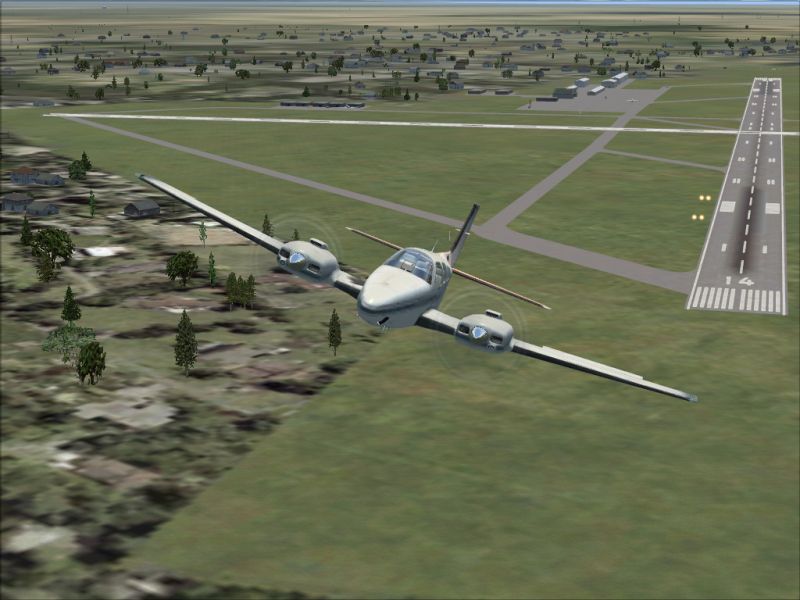
Yuba County Airport (KMYV), Marysville, CA. This scenery package updates Yuba County airport in northern California. Parking, taxiways and runways were all updated using real satellite images from Google Earth. The apron from the real world Yuba County Airport that is around runway 5/23 was added. Various objects from the default scenery libraries were also added. By Phillip Coyle.
Yuba County Airport Scenery.
====================
Note - Compilation
====================
The BGL files in this scenery package were designed and compiled using Airport Design Editor.
================
Note - Scenery
================
This packages uses scenery from the default FSX libraries. In order for the majority of these objects to appear, you must have scenery settings of at least NORMAL.
==============
Installation
==============
Installation is quick and easy:
1. Copy the two BGL files (KMYV_ADE.BGL and KMYV_ADE_CVX.BGL) Into your Flight Simulator X / Addon Scenery / Scenery folder.
2. That's it! Load up Flight Simulator X and changes will be present.
================
Uninstallation
================
Uninstallation is even quicker and easier than installing:
1. Remove the two BGL files (KMYV_ADE.BGL and KMYV_ADE_CVX.BGL) from your Flight Simulator X / Addon Scenery / Scenery folder.
2. Load Flight Simulator X and changes will be present.
============
Disclaimer
============
This is a freeware package, USE AT YOUR OWN RISK! I am not reasponsible for any damage caused to your computer.
No support is offered for these files.
Phillip Coyle
Ready to download CA Yuba County Airport Scenery?
Free for all simmers · 300.73 KB · Scanned clean Sep 2026
File information
Download speed: Free tier is capped at 0.5 Mbps. PRO members download at full line speed.
How to install this mod
FSX / P3D
scenery
How to install this mod
-
Extract the downloaded archive
Use 7-Zip (free) or WinRAR to extract the ZIP to a temporary folder. Don't install while still zipped — the simulator can't read inside ZIP files. -
Place scenery in Addon Scenery
Create a folder underFSX\Addon Scenery\containingsceneryandtexturesub-folders. -
Activate in Scenery Library
In FSX, go to Settings → Scenery Library → Add Area. Higher priority means it overrides lower entries for the same location. -
Always read the included readme
Every mod ships with areadme.txtorREADMEfile. It tells you exactly where files go, what dependencies are needed, and any quirks specific to this add-on.
Finding the scenery
Use these coordinates to fly directly to this location once the mod is installed.
39.09780000,-121.56960000
Launch FSX or Prepar3D and use Flights → Load to open the downloaded .pln file. Your aircraft will be positioned at this location.
What’s inside this archive
The archive kmyv_sce.zip has 6 files and directories contained within it.
File Contents
This list displays the first 500 files in the package. If the package has more, you will need to download it to view them.
| Filename/Directory | File Date | File Size |
|---|---|---|
| KMYV_ADE_CVX.bgl | 07.01.08 | 589 B |
| KMYV_ADE.BGL | 07.01.08 | 11.28 kB |
| Readme.txt | 06.29.08 | 3.07 kB |
| KMYV_Scenery.jpg | 07.01.08 | 293.25 kB |
| flyawaysimulation.txt | 10.29.13 | 959 B |
| Go to Fly Away Simulation.url | 01.22.16 | 52 B |
Rate this add-on
PRO perkOnly PRO members can place votes.
0 comments
Be the first to leave a comment on this download.
No comments yet
Be the first to share your thoughts on this download.