


 FS2004 Civil Jet Aircraft
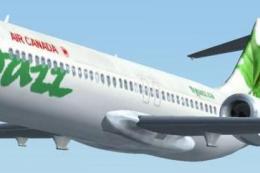
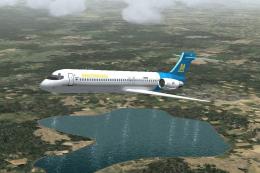
FS2004/FS2002 Project SkyWorks Boeing 717-200 Air Canada Jazz - Green
Discover a refined rendition of the Boeing 717-200 presented in the distincti…
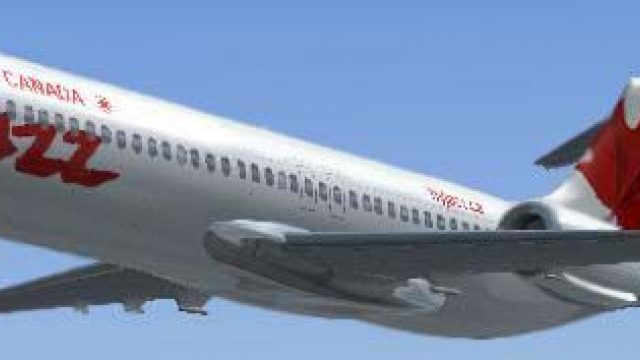
Project SkyWorks’ Air Canada Jazz red Boeing 717-200 brings a crisp regional jet to life in Microsoft Flight Simulator 2004 and Microsoft Flight Simulator 2002, with smooth control-surface animations, spinning fans, working thrust reversers, operable doors, and clear windows. A full dynamic panel and virtual cockpit support authentic short-haul workflows.
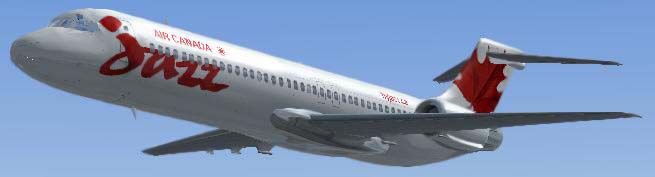
Experience the sleek short-haul Boeing 717-200 in Air Canada Jazz’s distinctive red livery, fully tailored for Microsoft Flight Simulator 2004 and Microsoft Flight Simulator 2002. With an array of advanced animations and a dynamically rendered panel, this freeware release provides a comprehensive package for those seeking a realistic regional jet simulation.
Originally derived from the popular McDonnell Douglas MD-95 program, the Boeing 717-200 stands out as a twin-engine, short-to-medium range airliner ideally suited for regional operations. Its design prioritizes efficient performance on domestic routes, and it often accommodates around 100 passengers. This configuration has earned it recognition for reliable service and straightforward cockpit management systems. By integrating these characteristics in the simulated environment, Project SkyWorks delivers an engaging experience for virtual aviators.
This package marks the inaugural release by Project SkyWorks (PSW). Model Designer Rob Tarlton and Executive Painter Tom Tarlton spearheaded the technical and visual aspects, while Fahim Safi crafted the refined Air Canada Jazz paintwork. The result is a polished tribute to the real aircraft’s efficient profile, highlighted by subtle shading and accurate color replication of Jazz’s red scheme.
Project SkyWorks has incorporated a broad spectrum of moving components to replicate the Boeing 717-200’s operational intricacies. Users can explore the following features in this meticulous freeware model:
Furthermore, the aircraft includes a Full Dynamic Panel and Cockpit that place all essential controls within easy view, supporting a realistic workflow for takeoffs, en-route navigation, and final approaches.
Air Canada Jazz, known for its regional service connecting smaller destinations to major hubs, is instantly recognizable by its lively branding. This red rendition of the Jazz logo accentuates the Boeing 717-200’s streamlined fuselage, offering sim pilots an eye-catching livery with accurate lettering and emblem placement. By blending the efficient contours of the 717 airframe with Air Canada Jazz’s vibrant aesthetics, this model stands out on ramps and taxiways alike.

Free for all simmers · 9.07 MB · Scanned clean
Download speed: Free tier is capped at 0.5 Mbps (this file takes approximately 3 mins at the cap). PRO members download at full line speed.
FS9\Aircraft\, FS9\Addon Scenery\, FS9\Gauges\, or FS9\Effects\.readme.txt or README file. It tells you exactly where files go, what dependencies are needed, and any quirks specific to this add-on.The archive psw712jzr.zip has 80 files and directories contained within it.
This list displays the first 500 files in the package. If the package has more, you will need to download it to view them.
| Filename/Directory | File Date | File Size |
|---|---|---|
| acjazzr.JPG | 10.08.03 | 14.77 kB |
| aircraft.cfg | 10.08.03 | 17.44 kB |
| Boeing 717-200.air | 06.12.03 | 8.69 kB |
| model | 10.08.03 | 0 B |
| B717_200.mdl | 09.01.03 | 1.40 MB |
| model.cfg | 07.24.03 | 27 B |
| panel | 10.08.03 | 0 B |
| panel.cfg | 08.22.03 | 30 B |
| Thumbs.db | 09.21.03 | 9.00 kB |
| readme.txt | 10.08.03 | 2.66 kB |
| sound | 10.08.03 | 0 B |
| baapdis.wav | 04.18.01 | 13.69 kB |
| baglide.wav | 04.18.01 | 7.19 kB |
| ban11.wav | 04.18.01 | 55.23 kB |
| ban12.wav | 04.18.01 | 72.23 kB |
| ban13.wav | 04.18.01 | 63.23 kB |
| ban14.wav | 04.18.01 | 66.19 kB |
| ban1shut.wav | 04.18.01 | 206.75 kB |
| ban1strt.wav | 08.22.01 | 389.31 kB |
| ban21.wav | 04.18.01 | 54.19 kB |
| ban22.wav | 04.18.01 | 56.69 kB |
| ban23.wav | 04.18.01 | 67.19 kB |
| ban24.wav | 04.18.01 | 56.69 kB |
| ban2shut.wav | 04.18.01 | 259.75 kB |
| ban2strt.wav | 04.18.01 | 62.25 kB |
| ban2t.wav | 04.18.01 | 114.81 kB |
| baover.wav | 04.18.01 | 22.23 kB |
| bbn11.wav | 04.18.01 | 47.23 kB |
| bbn12.wav | 04.18.01 | 53.73 kB |
| bbn13.wav | 04.18.01 | 45.23 kB |
| bbn14.wav | 04.18.01 | 59.69 kB |
| bbn1shut.wav | 04.18.01 | 212.25 kB |
| bbn1strt.wav | 08.22.01 | 342.81 kB |
| bbn21.wav | 04.18.01 | 62.19 kB |
| bbn22.wav | 04.18.01 | 70.19 kB |
| bbn23.wav | 04.18.01 | 63.19 kB |
| bbn24.wav | 04.18.01 | 69.69 kB |
| bbn2shut.wav | 04.18.01 | 254.25 kB |
| bbn2strt.wav | 04.18.01 | 50.25 kB |
| bbn2t.wav | 04.18.01 | 119.31 kB |
| bmflaps.wav | 04.18.01 | 73.81 kB |
| bmgeardn.wav | 04.18.01 | 119.19 kB |
| bmgearup.wav | 04.18.01 | 122.19 kB |
| bmgwarn.wav | 04.18.01 | 14.73 kB |
| sound.cfg | 09.01.03 | 12.64 kB |
| xban11.wav | 04.18.01 | 52.23 kB |
| xban12.wav | 04.18.01 | 72.23 kB |
| xban13.wav | 04.18.01 | 50.73 kB |
| xban14.wav | 04.18.01 | 63.69 kB |
| xban1shut.wav | 04.18.01 | 212.25 kB |
| xban1strt.wav | 08.22.01 | 496.81 kB |
| xban21.wav | 04.18.01 | 54.19 kB |
| xban22.wav | 04.18.01 | 46.69 kB |
| xban23.wav | 04.18.01 | 47.19 kB |
| xban24.wav | 04.18.01 | 49.69 kB |
| xban2shut.wav | 04.18.01 | 227.75 kB |
| xban2strt.wav | 04.18.01 | 60.75 kB |
| xban2t.wav | 04.18.01 | 96.81 kB |
| xbbn11.wav | 04.18.01 | 68.73 kB |
| xbbn12.wav | 04.18.01 | 69.23 kB |
| xbbn13.wav | 04.18.01 | 63.23 kB |
| xbbn14.wav | 04.18.01 | 60.69 kB |
| xbbn1shut.wav | 04.18.01 | 220.25 kB |
| xbbn1strt.wav | 08.22.01 | 460.81 kB |
| xbbn21.wav | 04.18.01 | 51.19 kB |
| xbbn22.wav | 04.18.01 | 47.19 kB |
| xbbn23.wav | 04.18.01 | 70.19 kB |
| xbbn24.wav | 04.18.01 | 67.69 kB |
| xbbn2shut.wav | 04.18.01 | 217.75 kB |
| xbbn2strt.wav | 04.18.01 | 58.25 kB |
| xbbn2t.wav | 04.18.01 | 119.31 kB |
| Texture | 10.08.03 | 0 B |
| B717_decals.bmp | 10.06.03 | 5.33 MB |
| b717_texture1_t.bmp | 10.07.03 | 5.33 MB |
| b717_texture2_t.bmp | 10.07.03 | 5.33 MB |
| b717_texture3_t.bmp | 10.07.03 | 5.33 MB |
| acjazzr.gif | 10.08.03 | 4.80 kB |
| file_id.diz | 10.08.03 | 523 B |
| flyawaysimulation.txt | 10.29.13 | 959 B |
| Go to Fly Away Simulation.url | 01.22.16 | 52 B |
More FS2004 add-ons hand-picked based on this download.
FS2004 Civil Jet Aircraft
Discover a refined rendition of the Boeing 717-200 presented in the distincti…
 FS2004 Civil Jet Aircraft
Take a flight in one of Boeing's newest additions,the Boeing 717-200.This is …
 FS2004 Civil Jet Aircraft
Additional textures for Air Canada Jazz (regular and colorful schemes). Requi…
 FS2004 Civil Jet Aircraft
Additional textures for Air Canada Jazz (regular scheme missing in JZA_B462.Z…
 FS2004 Civil Jet Aircraft
Take a flight in the one of the newist edditions to the Boeing fleet, The 717…
 FS2004 Civil Jet Aircraft
Features include opening passenger door, working forward airstairs, dynamic v…
 FS2004 Civil Jet Aircraft
The first Italian virtual airline since 1996. Updated visual model originally…
 FS2004 Civil Jet Aircraft
A new aircraft.cfg for the Perfect Flight B717-200, changed to more closely m…
Read what other simmers think, or add your own.

It's okay. It's a cute plane, but the printing on one side is a mirror image of the other. Just doesn't look authentic.