


 United Kingdom
  FSX Scenery
FSX Skara Bonaire X
Skara Scenery Bonaire X. Flamingo International Airport or Bonaire Internatio…
Chesterfield Parish Church scenery recreates the UK landmark with its 228‑foot Crooked Spire, bringing a distinctive VFR reference point and local character to the landscape. Designed for FSX with compatibility for FS2004, it places the church at the correct coordinates for easy spotting on short touring flights across Derbyshire.
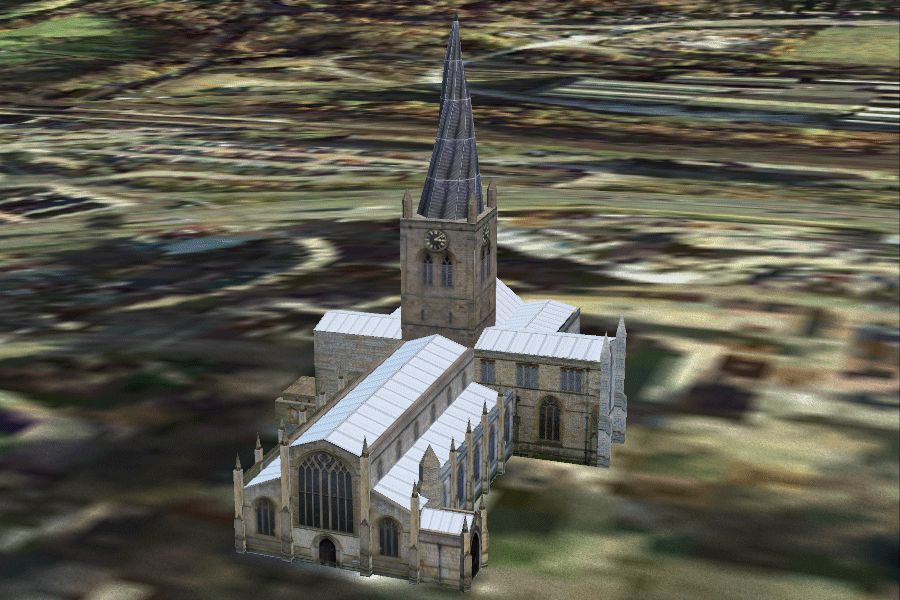
Chesterfield Parish Curch, UK. Chesterfield Parish church stands 228 feet to the tip of the 'Crooked Spire'. Legend has it that a virgin once got married in the church and it was so surprised that it turned to have a look. It is said that if a virgin ever gets married in the church again the spire will become straight. The reason for the deformation is of course the use of green wood by inexperienced craftsmen. By Chris Brown.
Chesterfield Parish Curch Scenery.
ABOUT THESE FILES:
These files are distributed as freeware, and must not be distributed for profit.
INSTALLATION:
- Unzip the chstrfld folder including Scenery and Textures together with all their contents into the FSX (or FS2004) Addon Scenery folder found in the root directory of FSX.
- run FSX, Open the settings menu and select the Scenery Library. Select 'Add Area'. From the Addon Scenery folder select chstrfld and click OK. FSX will up date when you click OK, FS2004 will have to be restarted to activate the folder.
The scenery should run fine in FS2004 but I haven't tested it.
SCENERY:
Chesterfield Parish church stands 228 feet to the tip of the 'Crooked Spire'. Legend has it that a virgin once got married in the church and it was so surprised that it turned to have a look. It is said that if a virgin ever gets married in the church again the spire will become straight. The reason for the deformation is of course the use of green wood by inexperienced craftsmen.
Found in FSX at N53* 14.16 W1* 25.49.
If you want a little tour and have my Hardwick Hall, Haddon Hall and Chatsworth House: Take off from Rwy 28 at Sheffield City Airport. At the end of the runway turn left onto a heading of 185. If you're doing about 100 knots you should hit Chesterfield Church in about 5 minutes. Turn onto a new heading of 135 and you should fly over Hardwick hall in about 4 mins. Turn right onto 280 for about 8 minutes and Haddon Hall should be straight ahead. Turn onto 035 to overfly Chatsworth House and continue on until you pass over Sheffield City Centre and return to the airport with a right turn onto 075.
Check out my other scenery in the Castles and Halls series:
Chatsworth House, Belton House, Haddon Hall, Hardwick Hall, Laycock Abbey, Castle Howard, Harewood House. Sheffield City Centre is an ongoing project. Search for chris brown and you should find the whole collection.
Free for all simmers · 1.18 MB · Scanned clean
Download speed: Free tier is capped at 0.5 Mbps. PRO members download at full line speed.
FSX\Addon Scenery\ containing scenery and texture sub-folders.readme.txt or README file. It tells you exactly where files go, what dependencies are needed, and any quirks specific to this add-on.Use these coordinates to fly directly to this location once the mod is installed.
53.23600000,-1.42500000
Launch FSX or Prepar3D and use Flights → Load to open the downloaded .pln file. Your aircraft will be positioned at this location.
The archive chstrfld.zip has 10 files and directories contained within it.
This list displays the first 500 files in the package. If the package has more, you will need to download it to view them.
| Filename/Directory | File Date | File Size |
|---|---|---|
| README.TXT | 01.29.08 | 2.64 kB |
| FILE_ID.DIZ | 01.28.08 | 612 B |
| chstrfld.gif | 01.28.08 | 388.54 kB |
| chestfld.bmp | 01.27.08 | 1.00 MB |
| chstfld2.bmp | 01.27.08 | 1.00 MB |
| chstfld3.bmp | 01.28.08 | 257.05 kB |
| tree.bmp | 10.14.06 | 257.05 kB |
| chstrfld.bgl | 01.28.08 | 134.06 kB |
| flyawaysimulation.txt | 10.29.13 | 959 B |
| Go to Fly Away Simulation.url | 01.22.16 | 52 B |
More FSX & P3D add-ons hand-picked based on this download.
FSX Scenery
Skara Scenery Bonaire X. Flamingo International Airport or Bonaire Internatio…
 FSX Scenery
Iwo Jima Scenery 1945 Update. This is a complete scenery with added effects a…
FSX Scenery
Kjeller Area Scenery X, Norway. Scenery around Kjeller airport with photoreal…
 FSX Scenery
FSX Loney's Alaska For FSX. This is a compilation of the author's Alaskan sce…
 FSX Scenery
For users of Flight Simulator X (and FSX: Steam Edition) and/or Prepar3D, ter…
 FSX Scenery
This freeware release by developer Aime Leclercq introduces revised highways …
 FSX Scenery
Team GEX Enhanced Autogen World. This package upgrades 522 world wide autogen…
 FSX Scenery
Princess Juliana International Airport (TNCM) in Saint Marteen, Netherlands A…
Be the first to leave a comment on this download.
Be the first to share your thoughts on this download.