

 FSX Scenery
FSX Skara Bonaire X
Skara Scenery Bonaire X. Flamingo International Airport or Bonaire Internatio…
Ruapehu Volcano scenery brings New Zealand’s dramatic stratovolcano to life with a detailed summit, crater lake, and surrounding ring plain that stand out in low-level VFR or high-altitude overflights. Designed for FSX and FS2004, it adds a distinctive natural landmark for alpine routes and regional exploration.
 Rate
Rate
 New Zealand
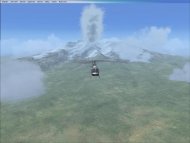
Free for all simmers · 1.72 MB · Scanned clean Oct 2026
Download speed: Free tier is capped at 0.5 Mbps. PRO members download at full line speed.
FSX\Addon Scenery\ containing scenery and texture sub-folders.readme.txt or README file. It tells you exactly where files go, what dependencies are needed, and any quirks specific to this add-on.Use these coordinates to fly directly to this location once the mod is installed.
-39.28000000,175.57000000
Launch FSX or Prepar3D and use Flights → Load to open the downloaded .pln file. Your aircraft will be positioned at this location.
The archive ruapehu.zip has 12 files and directories contained within it.
This list displays the first 500 files in the package. If the package has more, you will need to download it to view them.
| Filename/Directory | File Date | File Size |
|---|---|---|
| Cntrl_Ruapehu.fx | 01.05.07 | 275 B |
| Cntrl_RuapehuSteam.FX | 01.05.07 | 281 B |
| effects.CFG | 01.05.07 | 942 B |
| fx_Ruapehu.fx | 01.07.07 | 3.79 kB |
| fx_Ruapehusteam.FX | 01.07.07 | 2.61 kB |
| Quake.wav | 01.05.07 | 332.86 kB |
| ReadMe.txt | 01.08.07 | 2.38 kB |
| Ruapehu Volcano Tour.PLN | 01.07.07 | 5.15 kB |
| Ruapehu.BGL | 01.05.07 | 632 B |
| Ruapehu.jpg | 01.07.07 | 3.80 MB |
| flyawaysimulation.txt | 10.29.13 | 959 B |
| Go to Fly Away Simulation.url | 01.22.16 | 52 B |
Only PRO members can place votes.
More FSX & P3D add-ons hand-picked based on this download.
FSX Scenery
Skara Scenery Bonaire X. Flamingo International Airport or Bonaire Internatio…
 FSX Scenery
Iwo Jima Scenery 1945 Update. This is a complete scenery with added effects a…
FSX Scenery
Kjeller Area Scenery X, Norway. Scenery around Kjeller airport with photoreal…
 FSX Scenery
This scenery contains high resolution ground scenery for the airport of Honol…
 FSX Scenery
This is the fourth and final part of my LA-basin sceneries. It works equally …
 FSX Scenery
The addon contains all seasons textures, night lights and water textures.No a…
 FSX Scenery
FSX Loney's Alaska For FSX. This is a compilation of the author's Alaskan sce…
 FSX Scenery
For users of Flight Simulator X (and FSX: Steam Edition) and/or Prepar3D, ter…
Read what other simmers think, or add your own.

Hi. I have installed this addon and double checked all the files are in the correct places. I have flown this flight plan twice now but no 'boom'. There is lots of steam but no eruption at 1700 local time. I flew a cessna that has a clock so I also know the time is correct. Any ideas please? Regards Bob