


 United States of America
  FSX Scenery
Saratoga County Airport V2
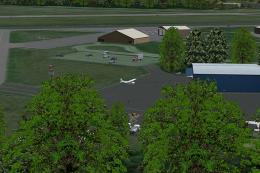
Saratoga County Airport, New York (5B2) v2.0 for FSX Acceleration. Located in…
Saratoga County Airport (5B2) scenery refreshes the Saratoga Springs, New York airfield in FSX with corrected runway markings, reworked and expanded aprons, added GA parking for AI, and extra parking lots. New buildings, a flagpole, plus static aircraft and vehicles enhance ramp atmosphere using only standard objects with no extra libraries required.
Saratoga County Airport (5B2), Saratoga Springs, New York (NY). Features corrected aprons, added parking, buildings, static planes, etc. By Jim Cook.
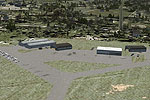
Saratoga County Airport Scenery.
This is a re-worked version of the Saratoga County Airport using Flight 1's Instant Scenery and AFX.
Several aprons added or changed, parking lots added, buildings added, and static planes and vehicles added.
I added a flagpole and additional GA parking for AI. Runway markings corrected per Google Earth.
I use Ultimate Terrain USA and FSGenesis landclass. I also checked the airport with Scenery Tech landclass and that works fine also.
All objects are standard FSX objects, no additional libraries needed.
INSTALLATION:
Simply extract the files AFX_5B2_JC.bgl and 5B2_JC.bgl to your FSX Addon Scenery/Scenery folder.
Enjoy!
Jim Cook
Free for all simmers · 7.48 KB · Scanned clean
Download speed: Free tier is capped at 0.5 Mbps. PRO members download at full line speed.
FSX\Addon Scenery\ containing scenery and texture sub-folders.readme.txt or README file. It tells you exactly where files go, what dependencies are needed, and any quirks specific to this add-on.Use these coordinates to fly directly to this location once the mod is installed.
43.05170000,-73.86140000
Launch FSX or Prepar3D and use Flights → Load to open the downloaded .pln file. Your aircraft will be positioned at this location.
The archive saratoga.zip has 5 files and directories contained within it.
This list displays the first 500 files in the package. If the package has more, you will need to download it to view them.
| Filename/Directory | File Date | File Size |
|---|---|---|
| 5B2_read_me.txt | 04.16.08 | 756 B |
| 5B2_JC.bgl | 04.16.08 | 1.17 kB |
| AFX_5B2_JC.bgl | 04.15.08 | 10.67 kB |
| flyawaysimulation.txt | 10.29.13 | 959 B |
| Go to Fly Away Simulation.url | 01.22.16 | 52 B |
More FSX & P3D add-ons hand-picked based on this download.
FSX Scenery
Saratoga County Airport, New York (5B2) v2.0 for FSX Acceleration. Located in…
 FSX Scenery
Saratoga County Airport, New York (NY) v2.0 ADE fix. Reworked ADE file to fix…
 FSX Scenery
USS Saratoga CV-3. This is a true FSX scenery object compiled with Xtomdl. It…
 FSX Scenery
USS Saratoga. This is a tweak of Paul Clawson's Saratoga static scenery add-o…
 FSX Scenery
Aspen-Pitkin County Airport Scenery (KASE), Colorado (CO). This scenery adds …
 FSX Scenery
Westchester County Airport (KPHN), White Plains, New York (NY). An improved v…
 FSX Scenery
Essex County Airport NJ (IATA: CDW, ICAO: KCDW, FAA LID: CDW) is a public air…
 FSX Scenery
Charles M. Schulz - Sonoma County Airport (KSTS), Santa Rosa, California (CA)…
Be the first to leave a comment on this download.
Be the first to share your thoughts on this download.