


 United States of America
  FSX Scenery
NAS Pensacola
NAS Pensacola (KNPA), Florida (FL). An improved version with added parking, r…
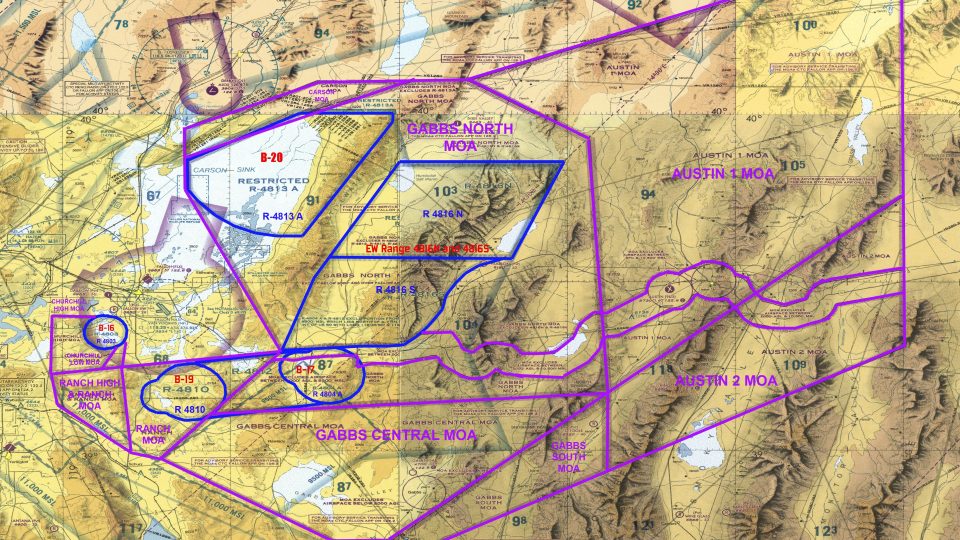
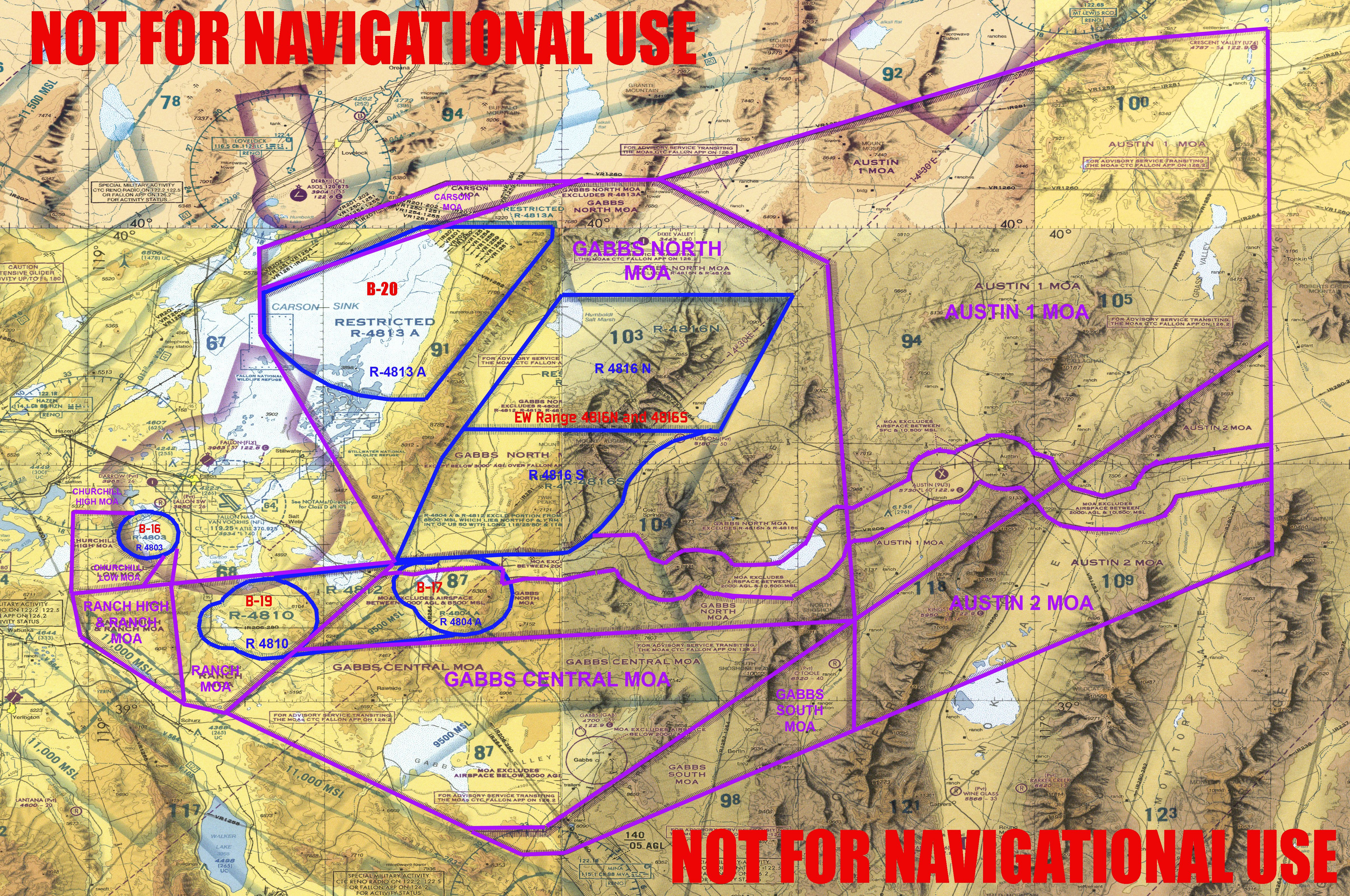
NAS Fallon scenery recreates the US Navy’s premier air tactics hub in Nevada for FSX, featuring the air station, B-16/17 and B-19/20 ranges, instrumented EW sites, and detailed Military Operating Areas for realistic training missions. Range NDBs and GPS-friendly beacons help locate targets, while optional detail layers support varied performance.
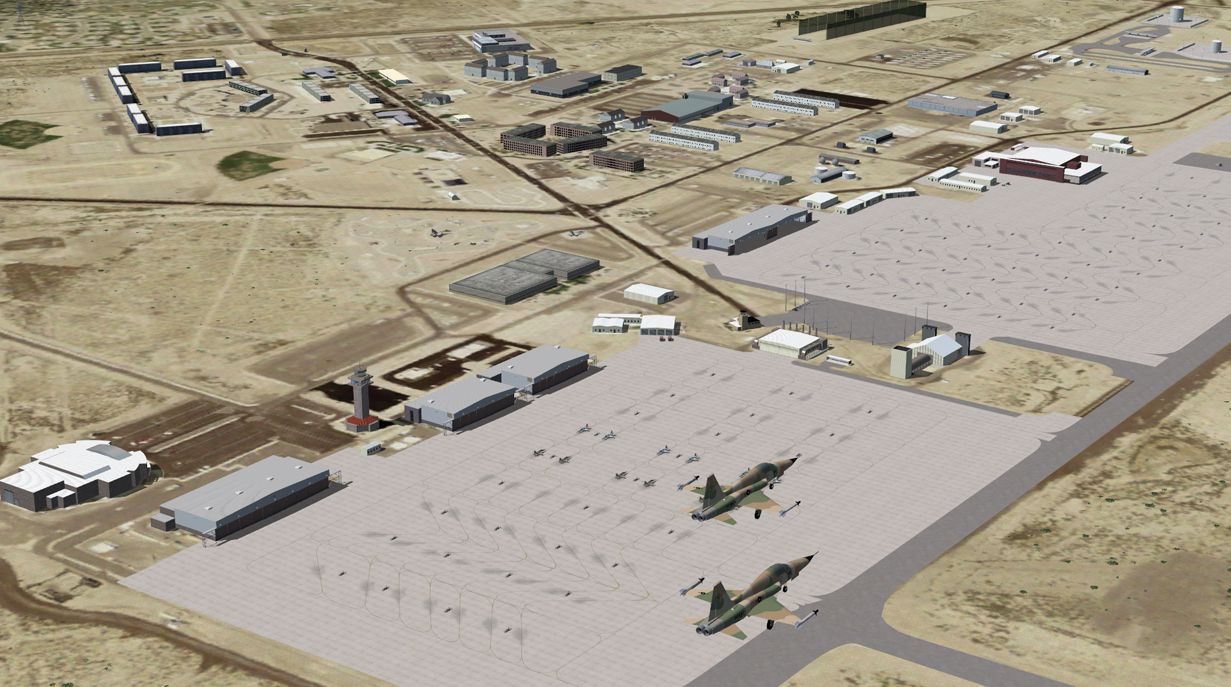
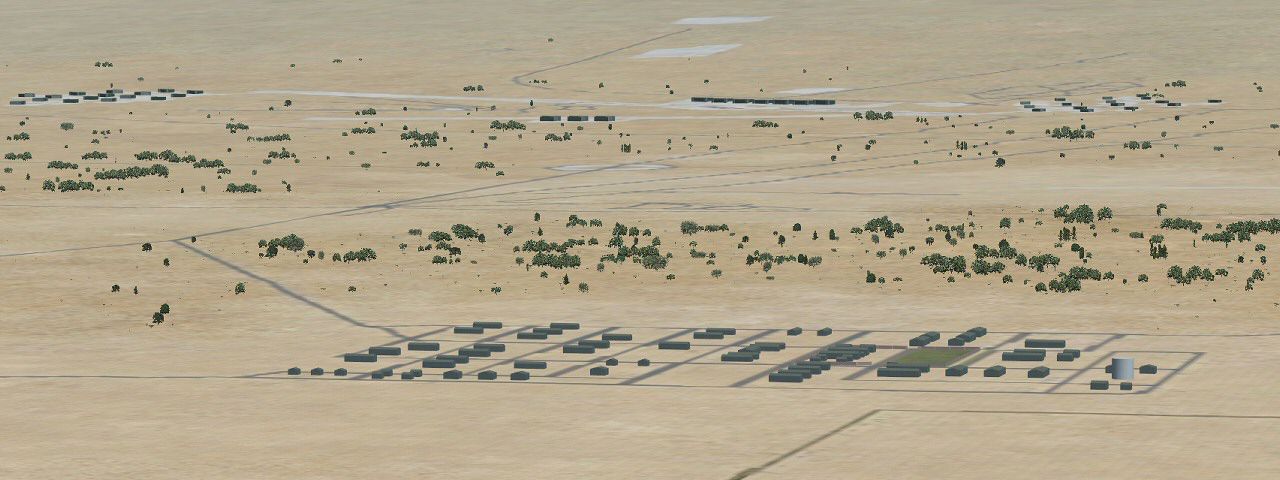
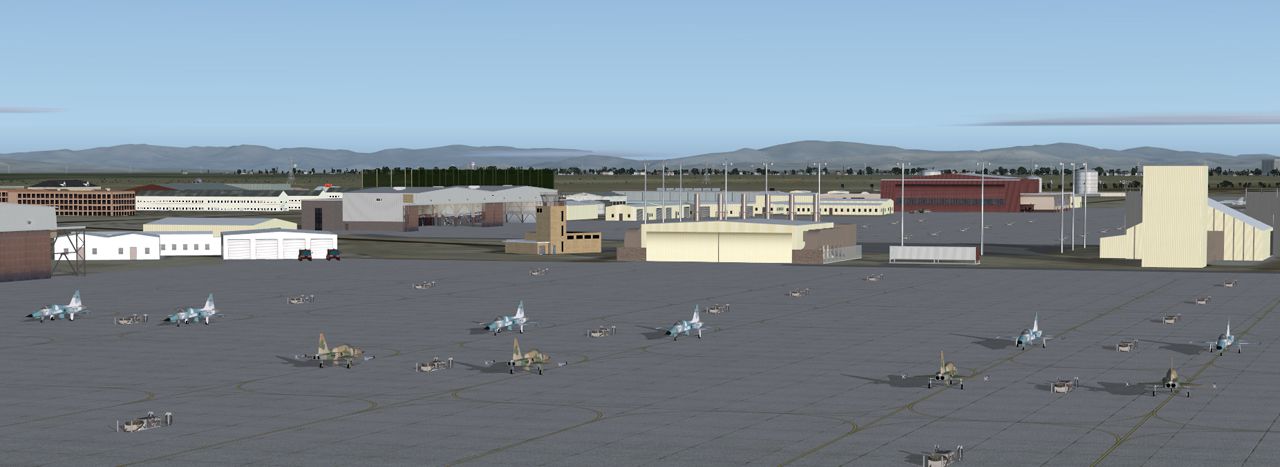
NAS Fallon, Nevada (NV). Now where else in the world can someone do a vertical assault before the crack of dawn, slide into one of the most versatile fighter aircraft made right after breakfast, get in a SAED run before lunch, partake in a close air support function on the same flight, then merge for the first dogfight before high tea, and spend the afternoon in a Hawkeye watching an excercise (if he hasn't chosen the air conditioned comfort of a TACTS classroom). Oh... and rescue those skiers that were caught when that snow shelf collapsed... and get his/her fighter repaired? Nowhere else but Naval Air Station Fallon Nevada. Fallon is the epicenter of US Navy Air Tactics development and training. Since 1944, with only one break in action, NAS Fallon has been used by the US Navy to teach aircraft battle tactics, including torpedo bombing and progressing all the way up to present day laser guided weapons. The ranges are instrumented so well that participants can see the action played back with very little loss of fidelity. This scenery contains the Air Station itself, B-16 and 17 ranges, B-19 and 20 ranges, and modeled instrumentation on the EW ranges and all of the Military Operating areas that Fallon manages. By Jim Dhaenens.
Screenshot of NAS Fallon Scenery.
This scenery has the capability to make your screaming FSX designed ubercomputer...whine and whimper. I rarely get stutters, but if they become intolerable, I've left a few fallback positions from which one can enjoy passable gameplay without getting rid of all the detail. Here's a listing of what can be removed for gameplay:
Lighting.bgl: Some folks don't like the FX_Landing effect based lights. If you don't you can remove this. knfltb.bgl: all the tarmac boses, the refueling stations, and a few more extras are in this file. It may be removed. statac.bgl: These are the static AC (F5's) on the tarmac.
Yes, the blast marks on the tarmac(s) start flashing at 5500 Ft. God bless 'em.
Credits:
Guy Dilotte allowed the use of his static F-5 aircraft in this scenery. Thanks Guy!
All other original models and textures are by Jim Dhaenens.
Extras:
There is a file in the downloaded folder called Tgt Source files. It contains the gmax files for all of the targets. These are for use by mission designers. They'll have a good idea what to do with 'em.
The knflmoa.jpg file is a marked up chart with the locations of the ranges and MOA's noted.
So you don't have to hunt(too long) for the ranges, I have put an NDB at each range. The KHZ setting of the NDB's is keyed to the range number. B-16 is 316.0 khz, B-17 is 317.0 khz, B-19 is 319.0 khz and B-20 is 320.0 khz. These NDB's show up on GPS as well.
Installation:
1. Deactivate and remove your current (if you have one) knfl folder.
2. Place the KNFL_FSXr in tour Addon Scenery folder.
3. Activate your new scenery with Flight Simulator.
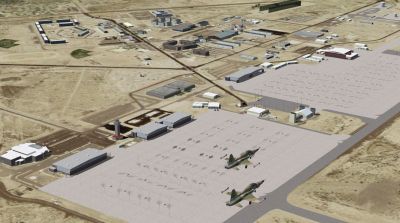
Screenshot of NAS Fallon Scenery.
Free for all simmers · 60.08 MB · Scanned clean Oct 2026
Download speed: Free tier is capped at 0.5 Mbps (this file takes approximately 17 mins at the cap). PRO members download at full line speed.
FSX\Addon Scenery\ containing scenery and texture sub-folders.readme.txt or README file. It tells you exactly where files go, what dependencies are needed, and any quirks specific to this add-on.Use these coordinates to fly directly to this location once the mod is installed.
39.41660000,-118.70050000
Launch FSX or Prepar3D and use Flights → Load to open the downloaded .pln file. Your aircraft will be positioned at this location.
The archive nasfalon.zip has 106 files and directories contained within it.
This list displays the first 500 files in the package. If the package has more, you will need to download it to view them.
| Filename/Directory | File Date | File Size |
|---|---|---|
| nasfallon | 01.29.12 | 0 B |
| knflmoa.jpg | 09.30.09 | 9.72 MB |
| knflthumb.jpg | 09.30.09 | 43.03 kB |
| KNFL_FSX | 01.29.12 | 0 B |
| Scenery | 01.29.12 | 0 B |
| AFX_KN17.bgl | 09.30.09 | 2.67 kB |
| AFX_KNFL.bgl | 09.30.09 | 55.10 kB |
| cvxFALLON NAS.BGL | 08.17.09 | 13.22 kB |
| knflMulti.bgl | 08.02.09 | 44.05 MB |
| knflp.bgl | 09.30.09 | 53.28 kB |
| knfltb.bgl | 09.24.09 | 8.29 kB |
| lighting.bgl | 09.27.09 | 1.87 kB |
| nflib.bgl | 09.30.09 | 4.83 MB |
| nflib.txt | 09.30.09 | 3.12 kB |
| sarMulti.bgl | 08.04.09 | 1.36 MB |
| Texture | 01.29.12 | 0 B |
| 003000223232113an.agn | 09.27.09 | 220 B |
| 003000223232130an.agn | 09.27.09 | 124 B |
| 003000223232131an.agn | 09.27.09 | 420 B |
| 003000223232133an.agn | 09.27.09 | 376 B |
| 003000223232310an.agn | 09.27.09 | 124 B |
| 003000223232311an.agn | 09.27.09 | 404 B |
| 003000223232331an.agn | 09.27.09 | 140 B |
| 003000223233002an.agn | 09.27.09 | 328 B |
| 003000223233003an.agn | 09.27.09 | 176 B |
| 003000223233020an.agn | 09.27.09 | 208 B |
| 003000223233021an.agn | 09.27.09 | 236 B |
| 003000223233022an.agn | 09.27.09 | 228 B |
| 003000223233023an.agn | 09.27.09 | 132 B |
| 003000223233030an.agn | 09.27.09 | 472 B |
| 003000223233032an.agn | 09.27.09 | 216 B |
| 003000223233200an.agn | 09.27.09 | 288 B |
| 003000223233201an.agn | 09.27.09 | 364 B |
| 003000223233202an.agn | 09.27.09 | 208 B |
| 003000223233203an.agn | 09.27.09 | 220 B |
| 003000223233210an.agn | 09.27.09 | 132 B |
| 003000223233212an.agn | 09.27.09 | 288 B |
| 003000223233221an.agn | 09.27.09 | 168 B |
| almwht.dds | 09.21.09 | 64.12 kB |
| asr9.dds | 08.04.09 | 128.12 kB |
| baroof.dds | 05.24.09 | 32.12 kB |
| barracks.dds | 09.21.09 | 128.12 kB |
| barracks5.dds | 09.26.09 | 512.12 kB |
| concrete.dds | 03.15.08 | 128.12 kB |
| denvcoru.dds | 08.03.09 | 512.12 kB |
| dkblock.dds | 09.13.09 | 128.12 kB |
| dkblocka.dds | 09.14.09 | 128.12 kB |
| dscrub.dds | 09.26.09 | 8.12 kB |
| emercbl.dds | 05.28.09 | 128.12 kB |
| emercbl_n.dds | 05.28.09 | 128.12 kB |
| equip.dds | 09.20.09 | 128.12 kB |
| equip_N.dds | 09.20.09 | 128.12 kB |
| genhgr1.dds | 08.15.09 | 128.12 kB |
| genhgrside.dds | 08.03.09 | 512.12 kB |
| Glasscolor.dds | 07.24.09 | 16.12 kB |
| Glasspec.dds | 07.24.09 | 16.12 kB |
| gray.dds | 09.28.09 | 128.12 kB |
| graybrick.dds | 08.01.09 | 32.12 kB |
| grnscrn.dds | 09.24.09 | 256.12 kB |
| h5intex.dds | 09.17.09 | 1.00 MB |
| h5intex_N.dds | 09.20.09 | 512.12 kB |
| helospot_H.dds | 12.25.08 | 128.12 kB |
| hgrdoor34.dds | 09.15.09 | 128.12 kB |
| hgrdoor5.dds | 09.13.09 | 128.12 kB |
| hgrinside2.dds | 07.26.09 | 128.12 kB |
| hhtex.dds | 07.30.09 | 128.12 kB |
| lights1.dds | 11.06.08 | 32.12 kB |
| ltblock.dds | 09.13.09 | 128.12 kB |
| maroonpnl.dds | 07.27.09 | 32.12 kB |
| nflhgr1door.dds | 07.27.09 | 16.12 kB |
| NFLOGOS.dds | 09.15.09 | 256.12 kB |
| nfltwr.dds | 09.16.09 | 256.12 kB |
| nfltwr_n.dds | 07.25.09 | 256.12 kB |
| nsawc.dds | 09.16.09 | 128.12 kB |
| pbupnlllg.dds | 08.04.09 | 128.12 kB |
| pbupnllltan.dds | 09.16.09 | 128.12 kB |
| pbupnllwht.dds | 07.26.09 | 128.12 kB |
| pbuwht.dds | 09.13.09 | 128.12 kB |
| red.dds | 09.20.09 | 4.12 kB |
| rwytex.dds | 05.28.09 | 128.12 kB |
| sa6.dds | 08.11.09 | 128.12 kB |
| stucco2.dds | 04.13.08 | 128.12 kB |
| tanbrick.dds | 09.30.09 | 32.12 kB |
| tiremarks1.dds | 03.08.08 | 256.12 kB |
| windowall.dds | 08.01.09 | 128.12 kB |
| r17-1.jpg | 09.30.09 | 391.52 kB |
| readme.txt | 09.30.09 | 3.63 kB |
| Tgt Source files | 01.29.12 | 0 B |
| sa6.dds | 08.11.09 | 128.12 kB |
| sa6.gmax | 08.11.09 | 349.00 kB |
| sa6atnk.gmax | 08.16.09 | 394.00 kB |
| sa6r.gmax | 08.11.09 | 478.00 kB |
| targets.txt | 09.30.09 | 590 B |
| TGT hgrs.gmax | 08.12.09 | 63.50 kB |
| tgtbld1.gmax | 08.16.09 | 112.00 kB |
| tgtbld2.gmax | 08.16.09 | 109.00 kB |
| tgtbld3.gmax | 08.16.09 | 109.00 kB |
| tgtbld4.gmax | 08.16.09 | 109.00 kB |
| tgtbld5.gmax | 08.16.09 | 109.00 kB |
| tgtnk1.gmax | 08.16.09 | 120.50 kB |
| tgtnk2.gmax | 08.16.09 | 120.50 kB |
| tgtnk3.gmax | 08.16.09 | 122.00 kB |
| za5.jpg | 09.30.09 | 361.85 kB |
| za7.jpg | 09.27.09 | 753.07 kB |
| flyawaysimulation.txt | 10.29.13 | 959 B |
| Go to Fly Away Simulation.url | 01.22.16 | 52 B |
Only PRO members can place votes.
More FSX & P3D add-ons hand-picked based on this download.
FSX Scenery
NAS Pensacola (KNPA), Florida (FL). An improved version with added parking, r…
 FSX Scenery
NAS Corpus Christi, Texas (TX). Just as Whiting field serves both primary and…
 FSX Scenery
NAS North Island (KNZY), v1.01. After a hard day of trapping it's nice to hav…
 FSX Scenery
NAS Key West (KNQX), Key West, Florida (FL). Features removed and replaced st…
 FSX Scenery
NAS Whidbey Island (KNUW), Oak Harbor, Washington (WA). An improved version w…
 FSX Scenery
NAS Patuxent River (KNHK), Maryland (MD). An improved version with added park…
 FSX Scenery
NAS Jacksonville (KNIP), Florida (FL). This is the third rendition of NAS Jac…
 FSX Scenery
This enhanced freeware package focuses on NAS North Island (KNZY), a prominen…
Read what other simmers think, or add your own.

The statac.bgl file is missing, therefore the static F-5 aircraft in this scenery are not visible.

I live in Fallon and the scenery looks very good to me. A nit: The Aggressors are using F/A-18's now, not F-5's. There are a couple of C-130's here also. Overall very nice. Thank you.

Downloaded Fallon scenery. Great scenery but I'm missing the F-5 (AC) statac.bgl and cannot locate the file.