

 FSX Historic & Vintage Aircraft
Martin-Baker MB.5
First flown in 1944, the Martin-Baker M.B.5 was the fifth in a series of expe…
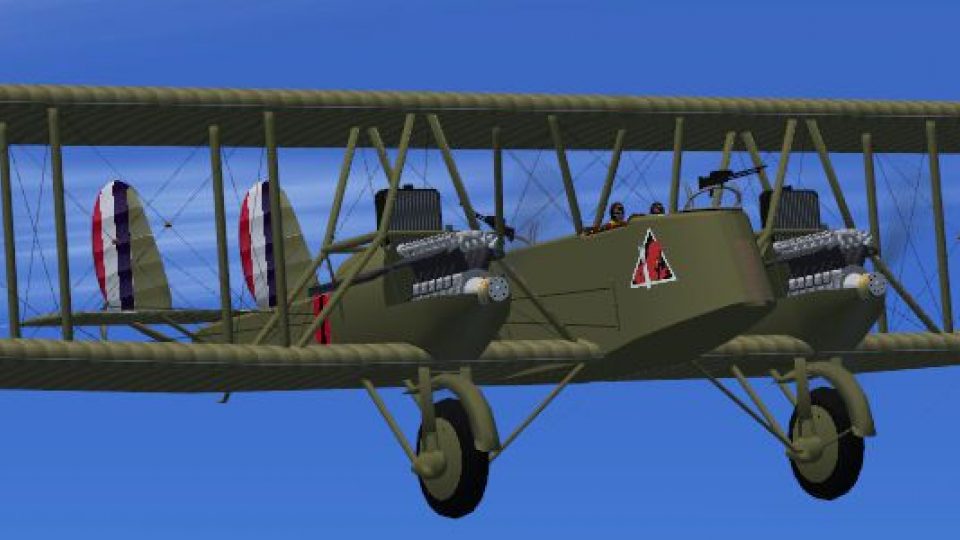
Martin MB-2 Bomber brings a landmark 1920s U.S. biplane to FSX Acceleration, complete with period-correct struts and rigging, smooth animations, and DXT5 textures. A photo-based virtual cockpit features animated controls, clickable 3D switches, and a 96th Bomber Squadron Langley Field livery for authentic early-bomber flying.
 Rate
Rate
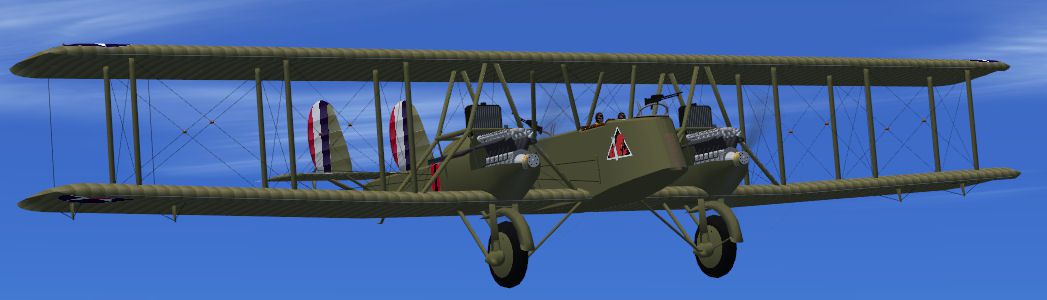
Martin MB-2 Bomber. The Martin MB2 was the first all-American bomber design produced in quantity. It first flew in 1920. This is the plane Gen. Billy Mitchell used to prove an airplane could sink a battleship. It saw service until it was replaced by the Keystone Bombers in the late 20's. This is a native FSX Acceleration project. It has the usual animations and DXT5.dds textures. The VC is based on a real photo and has animated flight controls. The gauges are default except for some original 3D switches. There is no 2D panel. The livery is for the 96th Bomber Squadron based at Langley field. By Paul Clawson.
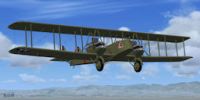
Screenshot of Martin MB-2 Bomber in flight.
The Martin MB-2 was the first All American bomber to be produced in quantity. It first flew in 1920 and stayed in service until being replaced by the Keystone bombers of the late 1920's. This was the airplane Gen. Billy Mitchell used to prove an airplane could sink a battleship.
Only about the first 5 were labeled the MB-2; later serial numbers were called the NBS-1 which stood for Night Bomber Short Range. I found this interesting because none of the drawings or photo's I have show hide nor hair of nav lights, landing lights, cockpit lights, etc. The one photo I have of the cockpit does not show any light switches.
I enjoy designing vintage aircraft that are full of struts and guy wires. However, the MB-2 had so many it got a bit tedious. I developed a real appreciation of those early airmen that flew this bomber; it had no windscreen what so ever. Even though it had a top speed of only 99mph one would hope their standard kit included floss to remove bugs from the teeth! Perhaps this explains why the only flight picture I have that shows the front gunner , he had his back to the slip screen.
This is a native FSX Acceleration model. It has the usual animations including some control wires. The textures are in DXT5.dds format. The VC is based on a real photo. It has animated flight controls. Some of the switches are original 3D jobs (I am still learning at age 78) and the rest are default. There is no 2D panel. Please note that the pilot sat on the right side, but the throttles are on the left.
The livery is for the 96th Bomber Squadron based at Langley field.
Airplanes like this are usually not of universal interest to the flight sim community, but, it meets my criteria of interest in that it has never been modeled before and it is one I wiil fly long after finishing the project.
INSTALLATION: Unzip MB-2vX.zip into a temporary folder. Copy the folder Martin MB-2 into the Airplanes folder of FSX. Open the gauges folder and copy the one file into the Gauges folder of FSX. There are some 3D swithches; a couple of "push to start" and 4 ignition switches as shown in the cockpit photo I have. These switches are all mouse clickable. Please note that if you kill the engines with the ignition switches you must click them back to the "On" position before starting with the "push to start" switches.
Enjoy! Paul Clawson
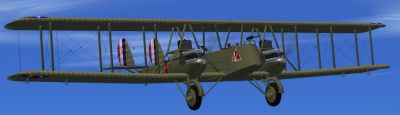
Screenshot of Martin MB-2 Bomber in flight.
Free for all simmers · 8.04 MB · Scanned clean Oct 2026
Download speed: Free tier is capped at 0.5 Mbps (this file takes approximately 2 mins at the cap). PRO members download at full line speed.
SimObjects\Airplanes\, Addon Scenery\, Effects\, or Gauges\.readme.txt or README file. It tells you exactly where files go, what dependencies are needed, and any quirks specific to this add-on.The archive mb-2vx.zip has 67 files and directories contained within it.
This list displays the first 500 files in the package. If the package has more, you will need to download it to view them.
| Filename/Directory | File Date | File Size |
|---|---|---|
| File_id.diz | 03.01.11 | 634 B |
| gauges | 02.21.11 | 0 B |
| RPM2.CAB | 02.20.11 | 88.79 kB |
| Martin MB-2 | 02.21.11 | 0 B |
| Aircraft.cfg | 03.01.11 | 15.78 kB |
| MB-2.air | 05.17.09 | 6.27 kB |
| model | 02.21.11 | 0 B |
| MB-2.mdl | 02.28.11 | 905.23 kB |
| MB-2_Interior.mdl | 02.28.11 | 874.08 kB |
| model.cfg | 02.28.11 | 47 B |
| panel | 02.21.11 | 0 B |
| panel.cfg | 02.21.11 | 1.46 kB |
| sound | 02.21.11 | 0 B |
| canopy_latch_close.wav | 04.09.03 | 95.79 kB |
| canopy_latch_open.wav | 04.09.03 | 84.69 kB |
| comet_flaps.wav | 04.17.03 | 179.34 kB |
| comet_geardown.wav | 05.07.03 | 51.12 kB |
| comet_gearup.wav | 05.07.03 | 49.96 kB |
| comet_noncombust_left.wav | 03.14.03 | 27.19 kB |
| comet_noncombust_right.wav | 03.14.03 | 28.25 kB |
| comet_prop_left.wav | 03.14.03 | 340.18 kB |
| comet_prop_right.wav | 03.14.03 | 233.58 kB |
| comet_rpm1_left.wav | 03.14.03 | 281.81 kB |
| comet_rpm1_right.wav | 03.14.03 | 281.51 kB |
| comet_rpm2_left.wav | 03.14.03 | 315.56 kB |
| comet_rpm2_right.wav | 03.14.03 | 314.87 kB |
| comet_rpm3_left.wav | 03.14.03 | 343.76 kB |
| comet_rpm3_right.wav | 03.14.03 | 343.56 kB |
| comet_rpm4_left.wav | 03.14.03 | 327.76 kB |
| comet_rpm4_right.wav | 03.14.03 | 327.28 kB |
| comet_shutdown_left.wav | 03.14.03 | 61.88 kB |
| comet_shutdown_right.wav | 03.14.03 | 68.38 kB |
| comet_starter_left.wav | 05.15.03 | 14.18 kB |
| comet_starter_right.wav | 05.15.03 | 11.68 kB |
| comet_startup_left.wav | 03.14.03 | 115.13 kB |
| comet_startup_right.wav | 03.14.03 | 120.88 kB |
| sound.cfg | 05.16.03 | 9.85 kB |
| xcomet_noncombust_left.wav | 03.14.03 | 27.19 kB |
| xcomet_noncombust_right.wav | 03.14.03 | 28.25 kB |
| xcomet_prop_left.wav | 03.14.03 | 340.18 kB |
| xcomet_prop_right.wav | 03.14.03 | 233.58 kB |
| xcomet_rpm1_left.wav | 03.14.03 | 315.05 kB |
| xcomet_rpm1_right.wav | 03.14.03 | 326.60 kB |
| xcomet_rpm2_left.wav | 03.14.03 | 315.66 kB |
| xcomet_rpm2_right.wav | 03.14.03 | 282.20 kB |
| xcomet_rpm3_left.wav | 03.14.03 | 242.09 kB |
| xcomet_rpm3_right.wav | 03.14.03 | 242.81 kB |
| xcomet_rpm4_left.wav | 03.14.03 | 325.10 kB |
| xcomet_rpm4_right.wav | 03.14.03 | 325.30 kB |
| xcomet_shutdown_left.wav | 03.14.03 | 79.13 kB |
| xcomet_shutdown_right.wav | 03.14.03 | 79.13 kB |
| xcomet_starter_left.wav | 03.26.03 | 26.36 kB |
| xcomet_starter_right.wav | 03.26.03 | 44.11 kB |
| xcomet_startup_left.wav | 03.14.03 | 161.63 kB |
| xcomet_startup_right.wav | 03.14.03 | 161.63 kB |
| texture | 03.01.11 | 0 B |
| Lib.dds | 02.21.11 | 256.12 kB |
| MB-2_trans.dds | 02.28.11 | 64.12 kB |
| MB2_1.dds | 02.21.11 | 4.00 MB |
| MB2_2.dds | 02.21.11 | 4.00 MB |
| prop_MB2.dds | 02.21.11 | 64.12 kB |
| thumbnail.jpg | 02.10.11 | 8.70 kB |
| MB-2.jpg | 02.21.11 | 59.11 kB |
| Readme.txt | 03.01.11 | 2.95 kB |
| MB-2vX | 02.28.11 | 0 B |
| flyawaysimulation.txt | 10.29.13 | 959 B |
| Go to Fly Away Simulation.url | 01.22.16 | 52 B |
Only PRO members can place votes.
More FSX & P3D add-ons hand-picked based on this download.
FSX Historic & Vintage Aircraft
First flown in 1944, the Martin-Baker M.B.5 was the fifth in a series of expe…
 FSX Historic & Vintage Aircraft
The Northrop BT1 first flew in 1936 and was assigned to both the USS Yorktown…
 FSX Historic & Vintage Aircraft
FSX Native B-26B/C Martin Marauder by Milton Shupe, Tom Falley, Martial Feron…
 FSX Historic & Vintage Aircraft
Paintshop Pro paintkit for FSX SP2/A Martin B-26 B/C Marauder bomber by W. E.…
 FSX Historic & Vintage Aircraft
Now version 3.14 (V3.1406). This package includes the latest Douglas C-47 Sky…
 FSX Historic & Vintage Aircraft
This is A.F. Scrub's Submarine MK-22 Spitfire Updated For Flight Simulator X.…
 FSX Historic & Vintage Aircraft
Note this aircraft originally was made by Gary Herbert due to the fact that h…
 FSX Historic & Vintage Aircraft
An FSX-native Boeing-Stearman Model 75 freeware aircraft add-on with a range …
Be the first to leave a comment on this download.
Be the first to share your thoughts on this download.