


 United Kingdom
  FSX Scenery
London City Airport
Scenery London City Airport, UK. Scenery for LCY featuring new over-dock apro…
London Stansted Airport (EGSS) scenery brings John Young’s detailed terminal and airfield layout into FSX with reworked ground polygons, restored AI traffic support, and an updated airport file for smoother operations. It requires the original FS2004 EGSSJY7 scenery package, then applies improved aprons and compatibility tweaks while preserving the signature building textures.
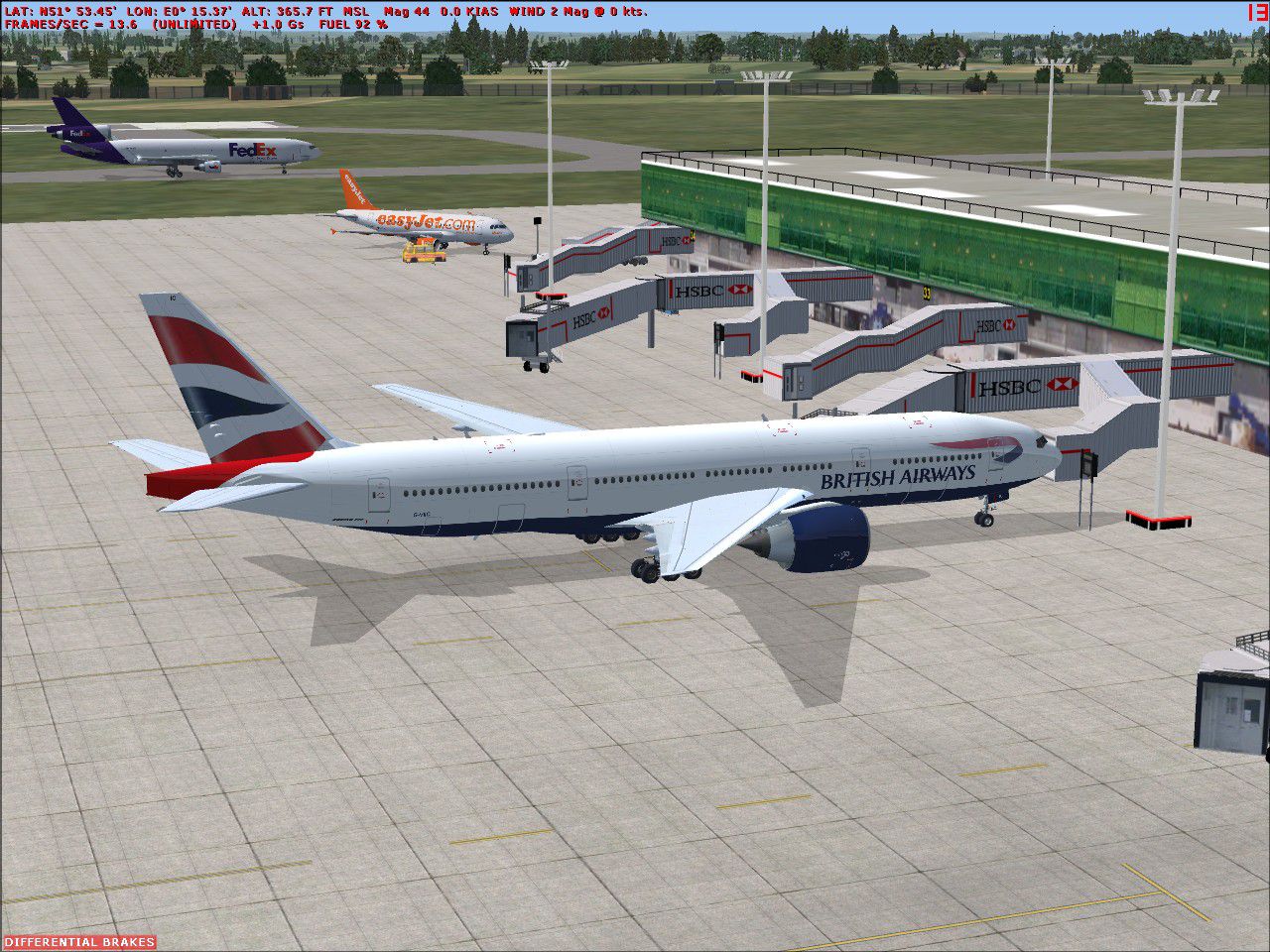
London Stansted Airport UK. Modifications to John Young's London Stansted FS2004 scenery (EGSSJY7.ZIP) to make it work in FSX. By P. Nigel Grant/John Young.
London Stansted Airport Scenery.
John Young’s scenery for London Stansted Airport (EGSS) for FS2004 (version7), has always been one of my favourite sceneries.
Imagine my disappointment when this scenery would not work properly in FSX – most of the buildings reproduced okay but the ground polygons were all messed up and AI traffic had disappeared.
For my own use, I have had a try at modifying EGSS to make it work in FSX, quite a lot of work to do this, using trial and error to determine which field files to remove and a complete re-vamp of the AFCAD into an ADE file, with a few shortcuts along the way.
Without going round the scenery inch by inch, most of the buildings seem to transfer without trouble, and a bit like my CYVR, the building textures look even better in FSX. I have had to apply some aprons to the various industrial and commercial sites around the airport, their original aprons were embedded within some of the field files I removed, most of the buildings are there and I have not touched any of these, but the various aprons will not necessarily be correct or complete. Unfortunately this patch eliminates John’s great photo-scenery of the airport’s environs.
I am pleased to report that John Young has given me permission to share this patch with others. The zip file egss_FSX, of which this text is a part, provides the files and instructions to modify John’s FS2004 scenery, to allow it to function in FSX.
The London Stansted Airport (version7) scenery by John Young can be downloaded from FlightSim.com (egssjy7.zip). I am not aware of any other sites carrying this download.
To use this scenery in FSX you need to do the following two steps:
1. Remove the five bgl files from the EGSS scenery folder, as listed in the attached text file – “remove”. I suggest you create a folder called “removals” in this scenery folder and just move the five files into there.
2. Move the three attached bgl files into the EGSS scenery folder.
Problems
Sorry but you are on your own with this modification. Please do not contact John Young for problems in FSX, this patch is not his work. Please do not contact me for problems in FSX, this was produced for my own use and it does the job for me.
Credits
Of course John Young for his original magnificent rendering of Stansted.
Scruffy Duck for his Airport Design Editor program (ADE), an eminent replacement to Lee Swordy’s AFCAD program.
Luis Sa for his SBuilderX program.
I hope you enjoy this little conversion.
P Nigel Grant
Vancouver
Free for all simmers · 382.42 KB · Scanned clean
Download speed: Free tier is capped at 0.5 Mbps. PRO members download at full line speed.
This add-on may require the following files to function properly. If this is a repaint, the dependency below is likely the base aircraft package.
FSX\Addon Scenery\ containing scenery and texture sub-folders.readme.txt or README file. It tells you exactly where files go, what dependencies are needed, and any quirks specific to this add-on.Use these coordinates to fly directly to this location once the mod is installed.
51.88500000,0.23500000
Launch FSX or Prepar3D and use Flights → Load to open the downloaded .pln file. Your aircraft will be positioned at this location.
The archive egss_fsx.zip has 13 files and directories contained within it.
This list displays the first 500 files in the package. If the package has more, you will need to download it to view them.
| Filename/Directory | File Date | File Size |
|---|---|---|
| Add_to_Scenery_folder | 08.14.08 | 0 B |
| CVX_Stanstead.BGL | 08.10.08 | 421 B |
| EGSS_ADE_PNG.BGL | 08.13.08 | 15.51 kB |
| EGSS_png_EXCL.BGL | 08.02.08 | 112 B |
| EGSS.jpg | 08.15.08 | 355.34 kB |
| egss_FSX.gif | 08.18.08 | 13.09 kB |
| File_ID.diz | 08.18.08 | 156 B |
| readme.doc | 08.17.08 | 32.00 kB |
| readme.txt | 08.17.08 | 2.97 kB |
| remove.txt | 08.14.08 | 85 B |
| egss_FSX | 08.18.08 | 0 B |
| flyawaysimulation.txt | 10.29.13 | 959 B |
| Go to Fly Away Simulation.url | 01.22.16 | 52 B |
More FSX & P3D add-ons hand-picked based on this download.
FSX Scenery
Scenery London City Airport, UK. Scenery for LCY featuring new over-dock apro…
 FSX Scenery
London City Airport Update (EGLC), UK. Version 2 with accurate touchdown zone…
 FSX Scenery
Groton New London Airport (KGON), Connecticut (CT). Updates the default airpr…
 FSX Scenery
This rendition of the scenery of London City Airport includes: animated peopl…
 FSX Scenery
This scenery for London Heathrow Airport contains realistic renditions of ter…
 FSX Scenery
London Helipad (EGLW), UK. By Craig Tomkins. Instructions: MUST HAVE FSX SP2 …
FSX Scenery
East London Harbor, South Africa. By Frits Beyer. Copy East London Harbor fol…
 FSX Scenery
Scenery London Hatfield, UK. Fictional re-opening of Hatfield, northeast of L…
Read what other simmers think, or add your own.

Loading instructions are vague , remove 5 replace with 3 bgl... does not say where to exactly find the EGSS folder in scenery. So could not use.
