

 FSX Scenery
London City Airport Update
London City Airport Update (EGLC), UK. Version 2 with accurate touchdown zone…
London City Airport (EGLC) scenery refreshes LCY in FSX with an updated over-dock apron, current taxiway and runway layout, and expanded parking to match the modern airfield closely within ADE9x limits. It requires no additional object libraries, delivering a detailed, true-to-life airport environment straight from the base simulator.
 Rate
Rate
 United Kingdom
Scenery London City Airport, UK. Scenery for LCY featuring new over-dock apron. High level of detail, as true to life as ADE9x allows - no additional add-ons required. By John Ball.
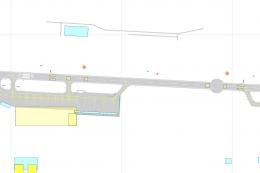
Overview of London City Airport Scenery.
Up to date scenery for LCY including the new parking areas and taxiway to runway. Made using AD9x only - no additional objects required.
NB runway is slightly wider than real life, to accomodate the UK style touchdown zone 'brackets' - at 100 feet runway width they go outside the edge lines. As close to UK marking as possible although from threshold LCY touchdown zone is actually marked slightl differently in real life.
INSTALLATION:
Paste all EGLC_ADEX files (5 of them) into your -
MAIN FSX /
Addon Scenery /
Scenery directory
Start FSX, go to EGLC London City, UK.
Free for all simmers · 907.01 KB · Scanned clean Oct 2026
Download speed: Free tier is capped at 0.5 Mbps. PRO members download at full line speed.
FSX\Addon Scenery\ containing scenery and texture sub-folders.readme.txt or README file. It tells you exactly where files go, what dependencies are needed, and any quirks specific to this add-on.Use these coordinates to fly directly to this location once the mod is installed.
51.50527800,0.05527800
Launch FSX or Prepar3D and use Flights → Load to open the downloaded .pln file. Your aircraft will be positioned at this location.
The archive loncitynewade9.zip has 9 files and directories contained within it.
This list displays the first 500 files in the package. If the package has more, you will need to download it to view them.
| Filename/Directory | File Date | File Size |
|---|---|---|
| EGLC_ADEX_JB.xml | 06.16.10 | 159.64 kB |
| EGLC_ADEX_JB_CVX.bgl | 06.16.10 | 467 B |
| EGLC_ADEX_JB.ad2 | 06.16.10 | 406.56 kB |
| EGLC_ADEX_JB.ad2.bak | 06.16.10 | 405.74 kB |
| EGLC_ADEX_JB.BGL | 06.16.10 | 18.64 kB |
| LCY MAP.bmp | 09.11.10 | 3.82 MB |
| README LCY.txt | 09.11.10 | 640 B |
| flyawaysimulation.txt | 10.29.13 | 959 B |
| Go to Fly Away Simulation.url | 01.22.16 | 52 B |
Only PRO members can place votes.
More FSX & P3D add-ons hand-picked based on this download.
FSX Scenery
London City Airport Update (EGLC), UK. Version 2 with accurate touchdown zone…
 FSX Scenery
This rendition of the scenery of London City Airport includes: animated peopl…
 FSX Scenery
London Stansted Airport UK. Modifications to John Young's London Stansted FS2…
 FSX Scenery
Groton New London Airport (KGON), Connecticut (CT). Updates the default airpr…
 FSX Scenery
This scenery for London Heathrow Airport contains realistic renditions of ter…
 FSX Scenery
London Helipad (EGLW), UK. By Craig Tomkins. Instructions: MUST HAVE FSX SP2 …
FSX Scenery
East London Harbor, South Africa. By Frits Beyer. Copy East London Harbor fol…
 FSX Scenery
Scenery London Hatfield, UK. Fictional re-opening of Hatfield, northeast of L…
Be the first to leave a comment on this download.
Be the first to share your thoughts on this download.