


 FSX Civil Aircraft
DHL (DHL Air) Boeing 767-3JHF
Complete package for FSX only of the Skyspirit2010 B767-300F in DHL (DHL Air)…
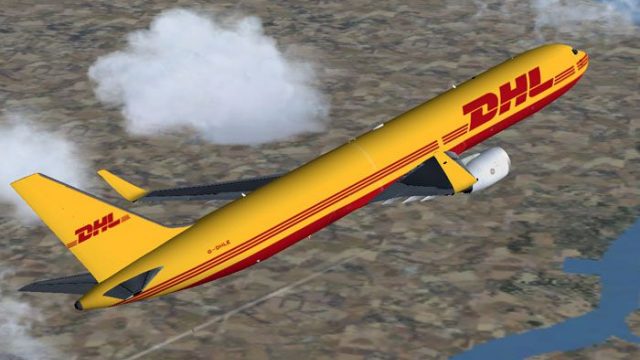
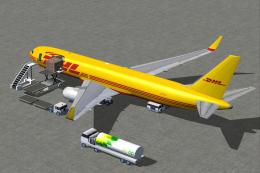
DHL Boeing 767-300ER G-DHLE brings a crisp cargo operator repaint to the iFDG and CamSim model for FSX, paired with Albaro Villegas flight dynamics. Blended winglets, animated ground servicing, and included night effects add extra realism in the virtual cockpit and on the ramp, and requires the base iFDG and CamSim 767 package.

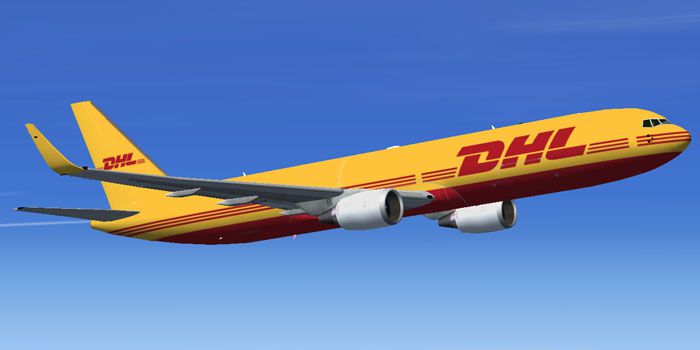
DHL Boeing 767-300ER, registration G-DHLE . Repaint of iFDG / CamSim design. Model by Albert Bouwman. Textures by Ben Hewitt, Ben Jones, Camil Valiquette. FDE by Albaro Villegas, with blended winglets and animated ground servicing (AGS). Repaint by Mohammed Al-Khalifa.

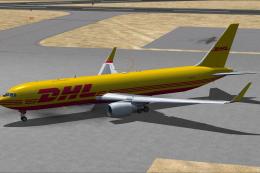
DHL Boeing 767-300ER in flight.
INSTALLATIONS:
1- Unzip and copy "iFDG-CamSim DHL 763W" folder in your FSX /Airplane folder.
2- Unzip the Effects767.zip (night effects) in your FSX main folder.(Should goes in Effects folder)
OR...
If you already have this aircraft:
1- Copy txture.D0 to "iFDG-CamSim .... 763" folder.
2- Copy and paste the following text into your "iFDG-CamSim .... 763" aircraft.cfg file, following the last existing similiar entry and changing .x to the next highest number in sequence.
[fltsim.x]

	title=DHL B767-300 Ge AGS Winglets

	sim=763geER

	model=

	panel=

	sound=

	texture=D0

	kb_checklists=

	kb_reference=

	atc_id=G-DHLE

	atc_airline=DHL

	atc_flight_number=

	ui_manufacturer=Boeing

	ui_type=Boeing 767-300 ER

	ui_variation= DHL

	description=MODEL BY ALBERT BOUWMAN, TEXTURES BY BEN HEWITT,BEN JONES, CAMIL VALIQUETTE, FDE BY ALBARO VILLEGAS

	atc_heavy=1

	atc_id_color=0000000000

	visual_damage=0

	prop_anim_ratio=1.76
That's it
Enjoy Flying.
Mohammed Al-Khaalifa
++++++++++++++++++++++++++++++++++++++++++++++++++++
CAMSIM Aviation Simulation ==========================
Aircraft: ifdg American Airlines Boeing 767-300ER,Blended Winglets and AGS add by CamSim
----------------------------------------
Animations Info:
This aircraft come with Animated Ground Servicing (AGS)
Press Shift+E to open / close the passenger doors.
Press Shift+D to open / close the cargo doors
Press Shift+C to start / end the animations
To fully used your animation make sure that you add these commands in Options:
1- Wing fold/unfold = SHIFT + C
2- Tail hook up/down = SHIFT + D
DHL Boeing 767-300ER in flight.
Free for all simmers · 3.24 MB · Scanned clean
Download speed: Free tier is capped at 0.5 Mbps. PRO members download at full line speed.
FSX\SimObjects\Airplanes\. The folder must contain an aircraft.cfg file. Effects go into FSX\Effects\; gauges go into FSX\Gauges\.readme.txt or README file. It tells you exactly where files go, what dependencies are needed, and any quirks specific to this add-on.The archive dhl_763w.zip has 54 files and directories contained within it.
This list displays the first 500 files in the package. If the package has more, you will need to download it to view them.
| Filename/Directory | File Date | File Size |
|---|---|---|
| dhl_763w | 11.16.10 | 0 B |
| DHL2.jpg | 11.16.10 | 103.95 kB |
| Effects-767.zip | 08.13.08 | 2.40 kB |
| file_id.diz | 11.16.10 | 323 B |
| iFDG-CamSim DHL 763W | 11.16.10 | 0 B |
| 763geER.air | 07.02.03 | 8.26 kB |
| 763geER_notes.txt | 01.31.03 | 0 B |
| Aircraft.cfg | 11.16.10 | 11.92 kB |
| iFDG 767 README.txt | 07.04.03 | 4.41 kB |
| model | 11.16.10 | 0 B |
| 767ge.mdl | 08.13.08 | 2.65 MB |
| 767ge.OUT | 04.02.10 | 60.39 kB |
| Model.cfg | 06.12.03 | 24 B |
| Panel | 11.16.10 | 0 B |
| panel.cfg | 03.24.10 | 40 B |
| sound | 11.16.10 | 0 B |
| Sound.cfg | 03.24.10 | 42 B |
| texture.D0 | 11.16.10 | 0 B |
| 763fuse_t.bmp | 11.16.10 | 5.33 MB |
| 763winglets_t.bmp | 04.08.10 | 341.43 kB |
| 767cargobay_t.bmp | 08.13.08 | 256.07 kB |
| 767enginecone_t.bmp | 08.13.08 | 64.07 kB |
| 767enginefanfast_t.bmp | 08.13.08 | 64.07 kB |
| 767enginefan_t.bmp | 08.11.08 | 64.07 kB |
| 767gearbay_t.bmp | 08.13.08 | 64.07 kB |
| 767geardoors_t.bmp | 10.30.10 | 341.40 kB |
| 767gear_t.bmp | 08.13.08 | 64.07 kB |
| 767ge_t.bmp | 11.13.10 | 5.33 MB |
| 767lwing_t.bmp | 08.11.08 | 1.00 MB |
| 767pw_t.bmp | 08.10.08 | 1.00 MB |
| 767rwing_t.bmp | 08.11.08 | 1.00 MB |
| 767wheelfast_t.bmp | 08.13.08 | 16.07 kB |
| 767wheelslow_t.bmp | 08.13.08 | 16.07 kB |
| 767windowframe_t.bmp | 08.13.08 | 64.07 kB |
| 767window_t.bmp | 08.13.08 | 16.07 kB |
| 767wings_t.bmp | 08.07.08 | 256.07 kB |
| 767_enginefan_t.bmp | 08.13.08 | 256.07 kB |
| 767_enginefast_t.bmp | 08.13.08 | 64.07 kB |
| 767_ht_t.bmp | 08.07.08 | 256.07 kB |
| 767_landinglight_t.bmp | 08.13.08 | 16.07 kB |
| 767_tails_t.bmp | 10.29.10 | 1.33 MB |
| 767_winglets_t.bmp | 11.16.10 | 1.33 MB |
| 787ext_t.bmp | 08.13.08 | 1.00 MB |
| Antennes_t.bmp | 08.13.08 | 256.07 kB |
| apu intake_t.bmp | 10.30.10 | 85.40 kB |
| interior2_t.bmp | 08.13.08 | 256.07 kB |
| interior_t.bmp | 08.13.08 | 256.07 kB |
| thumbnail.jpg | 10.29.10 | 48.28 kB |
| Thumbs.db | 05.09.10 | 5.00 kB |
| Read Me_FSX.txt | 11.16.10 | 3.42 kB |
| thumbnail.gif | 11.16.10 | 5.59 kB |
| Thumbs.db | 10.02.10 | 28.00 kB |
| flyawaysimulation.txt | 10.29.13 | 959 B |
| Go to Fly Away Simulation.url | 01.22.16 | 52 B |
More FSX & P3D add-ons hand-picked based on this download.
FSX Civil Aircraft
Complete package for FSX only of the Skyspirit2010 B767-300F in DHL (DHL Air)…
 FSX Civil Aircraft
DHL Cargo Boeing 767-300 ER with blended winglets and Animated Ground Servici…
 FSX Civil Aircraft
DHL Air Boeing 767-300F with winglets. FSX version of the original DHL v2 win…
 FSX Civil Aircraft
Thomson Airways Boeing 767-300ER GE. Thomson Airways is the largest charter a…
 FSX Civil Aircraft
Boeing 767-300ER Winglet. B767-300ER winglet base models by AI Aardvark. Incl…
 FSX Civil Aircraft
FSX El Al Boeing 767-300ER PW, registration 4X-EAB. Model by Project Open Sky…
 FSX Civil Aircraft
Jet2.com Boeing 767-300ER RR. Jet2.com is a low-cost airline based in Leeds/B…
 FSX Civil Aircraft
LOT Polish Airlines Boeing 767-300ER, registration SP-LPC. Textures only; req…
Be the first to leave a comment on this download.
Be the first to share your thoughts on this download.