

 FS2004 Civil Jet Aircraft
Air Canada Boeing 767-300 PW
This freeware release features a complete Boeing 767-300 PW in Air Canada’s l…
Air Canada’s Boeing 767-200 with Pratt & Whitney engines brings efficient, believable AI traffic to Microsoft Flight Simulator 2004, combining a crisp exterior with six LOD stages to keep busy hubs smooth. The package includes model, textures, and tuned flight dynamics for stable gate, taxi, approach, and runway exit behavior.
 Rate
Rate
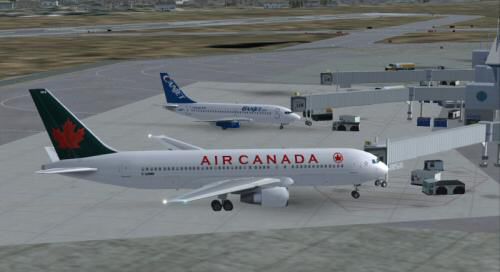
This freeware package features a meticulously crafted Air Canada Boeing 767-200 model equipped with Pratt & Whitney engines. Designed for seamless integration into Microsoft Flight Simulator 2004, it delivers a fully optimized AI aircraft that maintains a visually appealing presence while also preserving performance. Painted by Shane Strong, with the underlying model by Craig Crawley and a paint kit from Boback Shahsafdari and Peter Pavlin (AI Aardvark), this file incorporates every component needed for immediate deployment in any AI traffic setup.
The 767-200, offered by Boeing since the early 1980s, is known for its wide-body configuration and reliable twin-engine layout. Air Canada’s variant, employing PW (Pratt & Whitney) powerplants, is regularly employed for medium-range and certain long-haul routes. Because of this aircraft’s structural efficiency, it’s well-suited for extensive operation within AI flight plans, ensuring a realistic depiction of Air Canada traffic.
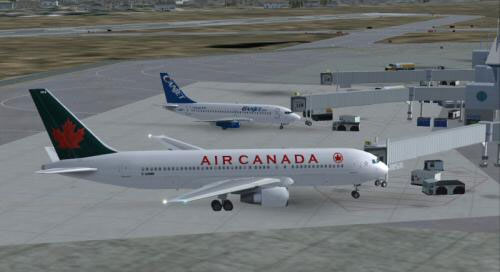
Air Canada Boeing 767-200 PW at the gate.
This aircraft incorporates six distinct levels of detail (LOD). When the model is viewed from a distance, the simulator transitions to simpler geometry to lessen the computational load. As a result, large-scale traffic scenarios remain smooth, with better performance in busy airports. This LOD implementation is especially beneficial for simmers who enjoy detailed AI traffic or airport environments crowded with multiple aircraft.
1. Extract the "AIA_767_300_GE_Alitalia" folder (as provided) into your existing FS2004 aircraft directory. Despite the folder name, it is configured for this Air Canada livery.
2. Integrate this Boeing 767-200 model into your chosen flight plans. Use traffic management tools or manual edits to your AI schedules.
3. If necessary, consult community guides for details on assigning timetables or customizing routes.
By default, the package activates the FS2004 FDE. If you intend to use it within FS2002, rename or store the existing aircraft.cfg and .air files for future restoration. Then copy the FS2002-specific .cfg and .air files into the main folder, replacing the current entries. Special recognition goes to Koji (Mr Hiro) Tanaka for providing this FS2002-compatible configuration.
The default model is non-reflective. If you desire a reflective exterior, open the aircraft.cfg file and switch:
However, the supplied textures do not contain an active reflective channel, so there will be no visible difference unless you apply relevant reflective textures.
This aircraft was conceptualized exclusively for AI use, ensuring it displays appropriately at gates, during taxi, and on approach. It does not rely on excessive polygon counts, so major hubs can populate many instances of this plane while still retaining manageable frame rates. This focus on visual economy helps avoid bottlenecks if multiple 767-200s spawn at once.
Ensuring smooth AI behavior means balancing flight parameters. The FDEs in this package aim to facilitate traffic flow by touching down close to the runway threshold and promptly vacating, thereby minimizing go-arounds. If you need additional flare during landings, adjust the cruise lift, parasite drag, or induced drag in the aircraft.cfg file to achieve more float-like touchdowns.
Free for all simmers · 443.49 KB · Scanned clean Oct 2026
Download speed: Free tier is capped at 0.5 Mbps. PRO members download at full line speed.
FS9\Aircraft\, FS9\Addon Scenery\, FS9\Gauges\, or FS9\Effects\.readme.txt or README file. It tells you exactly where files go, what dependencies are needed, and any quirks specific to this add-on.The archive aiac7672.zip has 13 files and directories contained within it.
This list displays the first 500 files in the package. If the package has more, you will need to download it to view them.
| Filename/Directory | File Date | File Size |
|---|---|---|
| 767200.gif | 12.04.03 | 5.58 kB |
| 767200.jpg | 12.04.03 | 19.16 kB |
| aia_767_300_pw.air | 06.12.03 | 8.69 kB |
| Aircraft.cfg | 12.03.03 | 13.82 kB |
| FILE_ID.diz | 12.04.03 | 591 B |
| aia_767_200_pw.mdl | 11.09.03 | 532.69 kB |
| model.cfg | 11.13.03 | 31 B |
| README.txt | 12.04.03 | 4.66 kB |
| sound.cfg | 06.16.99 | 32 B |
| AIA_767_200_pw_l.bmp | 11.25.03 | 256.07 kB |
| AIA_767_200_pw_t.bmp | 12.03.03 | 1.00 MB |
| flyawaysimulation.txt | 10.29.13 | 959 B |
| Go to Fly Away Simulation.url | 01.22.16 | 52 B |
Only PRO members can place votes.
More FS2004 add-ons hand-picked based on this download.
FS2004 Civil Jet Aircraft
This freeware release features a complete Boeing 767-300 PW in Air Canada’s l…
 FS2004 Civil Jet Aircraft
This repaint brings the Air Canada Boeing 767-375 (PW engines) into Microsoft…
 FS2004 Civil Jet Aircraft
Delta 75th anniversary. Model by iFDG. Livery by Michael Pearson. Screenshot …
 FS2004 Civil Jet Aircraft
For use with IF76ACOC.ZIP. Fixed textures for the iFDG 767-200 Air Canada Cla…
 FS2004 Civil Jet Aircraft
For use with IF76ACOC.ZIP. Includes replacement texture. Model by iFDG. Liver…
 FS2004 Civil Jet Aircraft
Textures only; requires SB757200.ZIP. Aircraft by Mike Stone. Livery by Rick …
 FS2004 Civil Jet Aircraft
Model by Project Open Sky. Livery by Pantee Farhangi. Screenshot of Northwest…
 FS2004 Civil Jet Aircraft
Enhance your Microsoft Flight Simulator 2004 experience by adding a revitaliz…
Be the first to leave a comment on this download.
Be the first to share your thoughts on this download.