

 FS2004 Civil Jet Aircraft
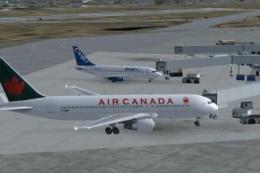
Air Canada Boeing 767-200 PW
This freeware package features a meticulously crafted Air Canada Boeing 767-2…
Air Canada’s “Free Spirit” Boeing 767-300 with Pratt & Whitney engines brings a frame-friendly widebody to AI traffic in FS2004, using six LOD stages to keep busy airports smooth. Choose reflective or non-reflective model variants, with flight dynamics tuned for efficient taxi and quick runway exits, plus optional legacy FS2002 configuration.
 Rate
Rate
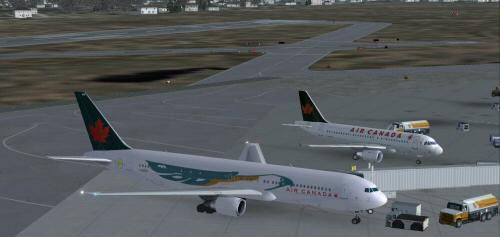
This freeware release features a complete Boeing 767-300 PW in Air Canada’s livery, nicknamed “Free Spirit.” It is finely suited for AI usage with multiple levels of detail to ensure consistent performance. Created by developers Shane Strong (texture artist), Craig Crawley (model designer), and utilizing a paint kit by Boback Shahsafdari and Peter Pavlin (AI Aardvark), this package integrates seamlessly into FS2004 and includes optional configurations for legacy FS2002 setups.
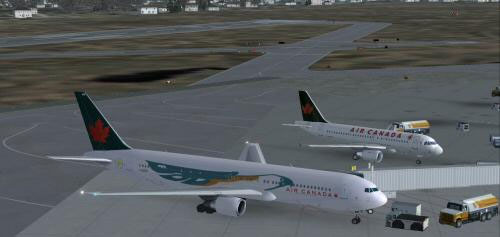
Air Canada Boeing 767-300 PW at the gate.
Air Canada, recognized as Canada’s flagship airline, commonly operates the Boeing 767 series across medium and long-haul routes. Reflecting this operational background, the model in this package emphasizes both visual detail and frame-rate efficiency. The wide-body 767 design, introduced by Boeing in the early 1980s, proved highly successful for major carriers seeking versatility and reliability, which Air Canada leveraged on various transcontinental flights.
In order to reduce the load on your simulator, the aircraft uses six distinct LOD models. Each tier of detail is automatically deployed based on distance. At closer ranges, the simulator displays maximum detail, while at farther ranges it renders a simpler shape. This feature ensures that even with multiple 767s arriving or departing simultaneously, FS2004 retains smoother performance.
Two separate model options—reflective and non-reflective—come included. By default, the non-reflective model is active. If you prefer a reflective exterior, modify the aircraft.cfg entry from model=no_refl to model=reflective. Keep in mind that the default textures in this package lack a reflective channel, so changes may not be visually discernible unless additional reflective textures are installed.
To deploy the aircraft in FS2004 (or FS2002), follow these steps:
If you are unfamiliar with assigning AI aircraft to flightplans, consult detailed FAQ resources typically found within your flight simulator's community or help sections. Once linked to your AI traffic engine, this 767-300 will appear as scheduled, taxiing and flying around airports where Air Canada would naturally operate.
Although FS2004 Flight Dynamics (FDE) files are active by default, you can revert to FS2002’s configuration if needed. First, back up the FS2004 aircraft.cfg and .air files and then copy the FS2002-specific FDE from the provided archive, overwriting the defaults. Created with input from Koji (Mr Hiro) Tanaka, these FS2002 files ensure correct behavior in earlier simulator environments.
The included FDE is balanced for AI functions. This means the aircraft tends to execute short landings and exit runways quickly, keeping AI traffic flowing. If you need more pronounced “float” during approach, adjustments to cruise_lift, parasite_drag, and induced_drag in the aircraft.cfg can refine touchdown characteristics. Since the Boeing 767 remains a popular choice for both passenger and cargo carriers, proper AI settings will help maintain realism in busy virtual hubs without compromising performance.
Free for all simmers · 466.47 KB · Scanned clean Oct 2026
Download speed: Free tier is capped at 0.5 Mbps. PRO members download at full line speed.
FS9\Aircraft\, FS9\Addon Scenery\, FS9\Gauges\, or FS9\Effects\.readme.txt or README file. It tells you exactly where files go, what dependencies are needed, and any quirks specific to this add-on.The archive aiac767f.zip has 13 files and directories contained within it.
This list displays the first 500 files in the package. If the package has more, you will need to download it to view them.
| Filename/Directory | File Date | File Size |
|---|---|---|
| aia_767_300_pw.air | 06.12.03 | 8.69 kB |
| Aircraft.cfg | 12.04.03 | 13.69 kB |
| FILE_ID.diz | 12.04.03 | 603 B |
| freesprit.gif | 12.04.03 | 4.77 kB |
| freesprit.jpg | 12.04.03 | 16.56 kB |
| aia_767_300_pw.mdl | 10.07.03 | 531.83 kB |
| model.cfg | 10.08.03 | 31 B |
| README.txt | 12.04.03 | 4.66 kB |
| sound.cfg | 06.16.99 | 32 B |
| aia_767_300_pw_l.bmp | 10.27.03 | 341.43 kB |
| aia_767_300_pw_t.bmp | 12.04.03 | 1.00 MB |
| flyawaysimulation.txt | 10.29.13 | 959 B |
| Go to Fly Away Simulation.url | 01.22.16 | 52 B |
Only PRO members can place votes.
More FS2004 add-ons hand-picked based on this download.
FS2004 Civil Jet Aircraft
This freeware package features a meticulously crafted Air Canada Boeing 767-2…
 FS2004 Civil Jet Aircraft
This repaint brings the Air Canada Boeing 767-375 (PW engines) into Microsoft…
 FS2004 Civil Jet Aircraft
Delta 75th anniversary. Model by iFDG. Livery by Michael Pearson. Screenshot …
 FS2004 Civil Jet Aircraft
Air Canada Boeing 767-300 GE (new colors). Model by AI Aardvark. Repaint by B…
 FS2004 Civil Jet Aircraft
Air Canada unveiled this new livery on 19 October 2004 at a gala event which …
 FS2004 Civil Jet Aircraft
This complete freeware package features an Air Canada Boeing 767-300 designed…
 FS2004 Civil Jet Aircraft
This repaint presents the Air Canada Boeing 767-300 in a format compatible wi…
 FS2004 Civil Jet Aircraft
Fix for use with AI76ACAN.ZIP. Model by AI Aardvark. Repaint by Brian Suter. …
Be the first to leave a comment on this download.
Be the first to share your thoughts on this download.