

 FS2004 Civil Jet Aircraft
South African Airways Boeing 747-SP PW
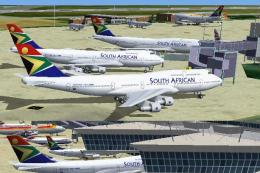
This repaint set offers a meticulously aligned South African Airways Boeing 7…
South African Airways “Springbok” textures refresh the Project AI Boeing 747-200 Pratt & Whitney AI aircraft with corrected fuselage alignment, cleaner tail logos, and consistent shading that suits classic long-haul traffic scenes in Microsoft Flight Simulator 2004. Requires the Project AI B742PW base model and integrates smoothly into custom AI flight plans.
 Rate
Rate

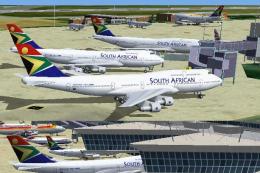
Enhance your Microsoft Flight Simulator 2004 experience by adding a revitalized South African Airways livery to the Project AI Boeing 747-200 Pratt & Whitney model. Built for AI traffic, these textures reshape the classic “Springbok” identity and refresh alignment details across the fuselage while preserving each technical characteristic of the aircraft. Below, you will find a concise overview of the texture package, along with guidance on installation and utilization. This repaint originates from Project AI, with creative refinements contributed by Andre Vermeulen.
The Boeing 747-200 forms part of the famous 747 series recognized for its upper-deck hump and large passenger capability. Operated by many global carriers, the 747-200 helped pioneer modern intercontinental travel and served as a workhorse for South African Airways (often referred to by its callsign “Springbok”). Noted for its extensive routes across the African continent and beyond, this national airline showcases a distinctive tail design and branding that is featured in this repaint.
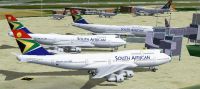
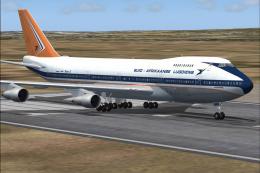
Screenshot showcasing the repaint at an airport stand.
This repaint requires the Project AI B742PW base model, which is available at the Fly Away Simulation library. After acquiring the model, follow these steps:
[fltsim.0]
title=PAI B742PW SAA
sim=pai747v6
model=
panel=
sound=
texture=SAA-South African Airways B742 PW Springbok
kb_checklists=
kb_reference=
atc_id=
atc_id_color=0xffffffff
atc_airline=SPRINGBOK
atc_flight_number=
atc_parking_codes=SAA,ZADM,AFRG
atc_parking_types=GATE,RAMP
ui_manufacturer=Project AI
ui_type=BOEING 747-200
ui_variation=South African Airways
atc_heavy=1
description=Project AI B742PW Only for use with AI Traffic!
Flight simulation enthusiasts who want custom traffic patterns can incorporate these repaints into personalized AI flight plans. This allows the repainted aircraft to appear on typical routes flown by this national carrier. Those familiar with flight scheduling software may integrate realistic departure and arrival times to replicate SAA’s original network.
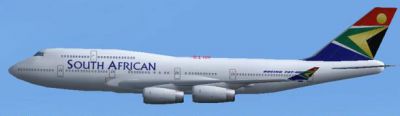
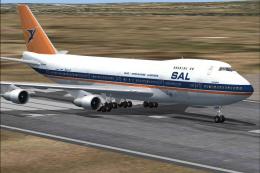
Side profile displaying the adjusted tail and fuselage layout.
Free for all simmers · 277.44 KB · Scanned clean Oct 2026
Download speed: Free tier is capped at 0.5 Mbps. PRO members download at full line speed.
FS9\Aircraft\, FS9\Addon Scenery\, FS9\Gauges\, or FS9\Effects\.readme.txt or README file. It tells you exactly where files go, what dependencies are needed, and any quirks specific to this add-on.The archive paib742.zip has 9 files and directories contained within it.
This list displays the first 500 files in the package. If the package has more, you will need to download it to view them.
| Filename/Directory | File Date | File Size |
|---|---|---|
| 747200master.bmp | 01.08.04 | 44.19 kB |
| FAJSSAA.JPG | 01.09.04 | 95.50 kB |
| FILE_ID.DIZ | 01.09.04 | 206 B |
| Readme.txt | 01.09.04 | 2.51 kB |
| Texture.SAA-South African Airways B742 PW Springbok | 01.09.04 | 0 B |
| PAI_742PW_L.BMP | 07.24.03 | 512.07 kB |
| PAI_742PW_T.BMP | 01.09.04 | 1.00 MB |
| flyawaysimulation.txt | 10.29.13 | 959 B |
| Go to Fly Away Simulation.url | 01.22.16 | 52 B |
Only PRO members can place votes.
More FS2004 add-ons hand-picked based on this download.
FS2004 Civil Jet Aircraft
This repaint set offers a meticulously aligned South African Airways Boeing 7…
 FS2004 Civil Jet Aircraft
Enhance your Microsoft Flight Simulator 2004 activities with this meticulousl…
 FS2004 Civil Jet Aircraft
This retro package offers a meticulous recreation of South African Airways’ B…
 FS2004 Civil Jet Aircraft
Experience an authentic recreation of South African Airways’ Boeing 747-200 i…
 FS2004 Civil Jet Aircraft
This freeware repaint offers a detailed rendition of South African Airways’ B…
 FS2004 Civil Jet Aircraft
This is a repaint of Erick Cantu's new Boeing 737-200 in the colors of South …
 FS2004 Civil Jet Aircraft
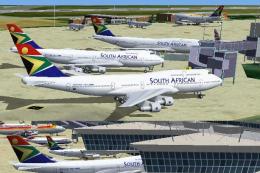
Textures only. Original by Project AI. Repainted by Andre Vermeulen. Screensh…
 FS2004 Civil Jet Aircraft
This freeware texture set brings the classic South African Airways (SAA) live…
Be the first to leave a comment on this download.
Be the first to share your thoughts on this download.