

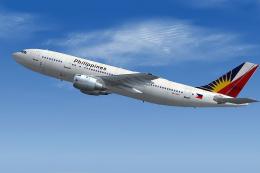
 FS2004 Civil Jet Aircraft
Philippine Airlines A300B4-200
This freeware package delivers a faithful representation of the Airbus A300B4…
Philippine Airlines’ MD-11 brings a detailed wide-cabin trijet to FS2004, featuring animated control surfaces and flaperons, wing views, reflective exterior textures, and a full night-lighting suite. A six-screen virtual cockpit with digital avionics, dual flight management, and robust autopilot behavior supports convincing long-range operations.
 Rate
Rate
This freeware package brings you a meticulously crafted Philippine Airlines MD-11 for FS2004, developed by iFDG (International Flightsim Design Group). It incorporates a complete base model that showcases an authentic trijet experience with an attention to detail matching the real aircraft's advanced systems, flight deck design, and aerodynamic enhancements.
At first glance, this MD-11 rendition displays its hallmark wide-cabin trijet arrangement, accompanied by fully animated control surfaces, flaperons (combined flap-and-aileron devices), and complete wing views. The exterior is rendered with carefully reflective textures that replicate how light bounces off the aircraft’s fuselage, especially under varying environmental conditions. Beyond aesthetics, users will also find a comprehensive lighting setup that ensures accurate night operations, including navigation, landing, and logo lights.
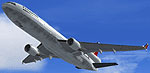
Screenshot of Philippine Airlines MD-11 in flight.
The real-life MD-11 is regarded as a modern successor to the DC-10 series, incorporating wingtip winglets and an extended tail cone to minimize drag. This design refinement increases overall range and improves fuel economy, which is reflected in this simulation model. Meanwhile, a narrower horizontal stabilizer with built-in fuel capacity further optimizes aerodynamic control, making extended operations more achievable.
In actual service, the MD-11 can travel upwards of 7,600 statute miles at its maximum takeoff weight of approximately 602,500 lb (273,290 kg). By opting for an extended-range version, operators could add an auxiliary fuel tank and increase takeoff weight to roughly 630,500 lb (285,990 kg), pushing the distance to more than 8,200 statute miles—a vital characteristic for intercontinental flights. This versatility allowed airlines like Philippine Airlines to plan long-haul routes with fewer stops.
This three-engine aircraft is powered by either the General Electric CF6-80C2 or the Pratt & Whitney 4460/4462, providing robust thrust while retaining trijet efficiency. In practice, such engine options ensure consistent performance under different flight conditions. All engines deliver smooth operation, improve climb capabilities, and maintain reliable operation on extended journeys.
One of the MD-11’s most noteworthy features is its flight deck architecture. The cockpit employs six cathode ray tube (CRT) displays for critical flight information and centralized digital instrumentation, which decrease pilot fatigue. There is also dual flight management functionality that helps optimize fuel usage, as well as an autopilot system with fail-operational capability aiding in enhanced safety. Additionally, automated checklist controllers alleviate the flight crew’s workload by managing normal and emergency procedures without the need for a third occupant in the cockpit.
Philippine Airlines—recognized as one of Asia’s pioneering carriers—operates diverse route networks across international and domestic segments. While this MD-11 livery honors the look and feel associated with the airline, it also highlights the versatility of the real narrow-winged, long-range trijet. Pilots in the virtual skies can explore transpacific or regional routes covered historically by the airline, with a strong emphasis on authentic flight parameters.
iFDG (International Flightsim Design Group) designed this model and flight dynamics. The talented team includes:
Simply extract the compressed file into your main Flight Simulator aircraft directory. Make sure to relocate all files located in the “effects” folder to the simulator’s EFFECTS directory. Then, initiate special effects by pressing the “I” key in the simulation environment. Double-check all folder placements to ensure that gauges and effects are recognized correctly.
Have fun exploring the skies with this freeware MD-11 package!
Free for all simmers · 3.38 MB · Scanned clean Oct 2026
Download speed: Free tier is capped at 0.5 Mbps. PRO members download at full line speed.
FS9\Aircraft\, FS9\Addon Scenery\, FS9\Gauges\, or FS9\Effects\.readme.txt or README file. It tells you exactly where files go, what dependencies are needed, and any quirks specific to this add-on.The archive if11phil.zip has 53 files and directories contained within it.
This list displays the first 500 files in the package. If the package has more, you will need to download it to view them.
| Filename/Directory | File Date | File Size |
|---|---|---|
| Model.GE_PAX_A | 02.09.04 | 0 B |
| MD11PGE.mdl | 10.04.03 | 3.91 MB |
| Model.cfg | 09.18.03 | 26 B |
| panel | 02.09.04 | 0 B |
| panel.cfg | 07.29.03 | 32 B |
| Thumbs.db | 07.29.03 | 21.50 kB |
| Sound | 02.09.04 | 0 B |
| Sound IFDG SOUNDPACK.cfg | 10.29.03 | 41 B |
| Sound.cfg | 10.29.03 | 30 B |
| Aircraft.cfg | 02.09.04 | 10.88 kB |
| INSTALLATION.txt | 10.12.03 | 58 B |
| MD-11.air | 09.16.03 | 8.14 kB |
| readme.txt | 02.09.04 | 6.14 kB |
| texture | 02.09.04 | 0 B |
| Antenna.bmp | 02.06.04 | 65.07 kB |
| Antenna_l.bmp | 09.15.03 | 64.07 kB |
| Engine.bmp | 02.06.04 | 1.00 MB |
| Engine_l.bmp | 09.15.03 | 64.07 kB |
| enginefan.bmp | 09.15.03 | 65.07 kB |
| enginefan_fast.bmp | 09.15.03 | 65.07 kB |
| enginefan_fast_l.bmp | 09.15.03 | 64.07 kB |
| enginefan_l.bmp | 09.15.03 | 64.07 kB |
| Flaps.bmp | 02.06.04 | 4.00 MB |
| Flaps_l.bmp | 09.15.03 | 64.07 kB |
| Gear.bmp | 02.06.04 | 256.07 kB |
| Gear_l.bmp | 09.15.03 | 64.07 kB |
| MainGear.bmp | 02.06.04 | 256.07 kB |
| MainGear_l.bmp | 09.15.03 | 64.07 kB |
| MD11_Fuse_front.bmp | 02.06.04 | 1.00 MB |
| MD11_Fuse_front_l.bmp | 11.07.03 | 1.00 MB |
| MD11_Fuse_middle.bmp | 02.06.04 | 1.00 MB |
| MD11_Fuse_middle_l.bmp | 09.15.03 | 1.00 MB |
| MD11_Fuse_rear.bmp | 02.06.04 | 1.00 MB |
| MD11_Fuse_rear_l.bmp | 09.15.03 | 1.00 MB |
| MD11_PWing_bottom.bmp | 02.06.04 | 1.00 MB |
| MD11_PWing_bottom_l.bmp | 09.15.03 | 64.07 kB |
| MD11_PWing_top.bmp | 02.06.04 | 1.00 MB |
| MD11_PWing_top_l.bmp | 09.15.03 | 64.07 kB |
| MD11_Stabilizer.bmp | 02.06.04 | 1.00 MB |
| MD11_Stabilizer_l.bmp | 09.15.03 | 1.00 MB |
| MD11_SWing_bottom.bmp | 02.06.04 | 1.00 MB |
| MD11_SWing_bottom_l.bmp | 09.15.03 | 64.07 kB |
| MD11_SWing_top.bmp | 02.06.04 | 1.00 MB |
| MD11_SWing_top_l.bmp | 09.15.03 | 64.07 kB |
| MD11P_Interior.bmp | 02.06.04 | 256.07 kB |
| MD11P_Interior_l.bmp | 10.07.03 | 1.00 MB |
| tail.bmp | 02.06.04 | 1.00 MB |
| tail_l.bmp | 09.16.03 | 1.00 MB |
| Thumbs.db | 11.08.03 | 82.50 kB |
| pspbrwse.jbf | 02.06.04 | 53.66 kB |
| MD11P | 02.09.04 | 0 B |
| flyawaysimulation.txt | 10.29.13 | 959 B |
| Go to Fly Away Simulation.url | 01.22.16 | 52 B |
Only PRO members can place votes.
More FS2004 add-ons hand-picked based on this download.
FS2004 Civil Jet Aircraft
This freeware package delivers a faithful representation of the Airbus A300B4…
 FS2004 Civil Jet Aircraft
A repaint of Project Open Sky's A330 in Philippine Airlines colors, registrat…
FS2004 Civil Jet Aircraft
Model by FFX/SGA. Livery by Nicolo Cervantes. PLEASE READ! Please read the wh…
 FS2004 Civil Jet Aircraft
Full package, v2.0. SMS Overland MD11 by Matsushi Yutaka and Jim Waters. Scre…
 FS2004 Civil Jet Aircraft
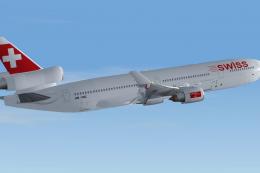
This freeware release of a Swiss Airlines MD-11 (registration HB-IWC) provide…
 FS2004 Civil Jet Aircraft
This freeware add-on provides a complete McDonnell Douglas MD-11 simulation p…
 FS2004 Civil Jet Aircraft
The Delta Airlines MD-11 “Centennial Spirit” presented here is a complete fre…
FS2004 Civil Jet Aircraft
China Eastern Airlines McDonnell Douglas MD-11 PW. Model by iFDG. [fltsim.0] …
Read what other simmers think, or add your own.
