

 FS2004 Propeller Aircraft
Trans-Canada Air Lines L-1049G V6
This updated package introduces refined textures for the Trans-Canada Air Lin…
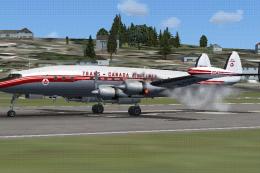
Trans-Canada Airlines’ classic CF-TEU scheme brings mid-century Canadian airline history to the Lockheed 1049G Super Constellation with period-correct insignia, fonts, and metallic accents across fuselage and engine details. Designed for Microsoft Flight Simulator 2004, it requires Mike Stone’s freeware 1049G base model and preserves the golden-age piston airliner look.
 Rate
Rate
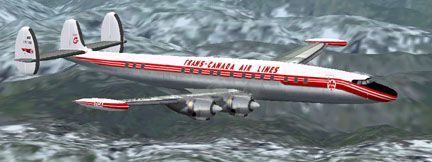
This repaint package brings Trans-Canada Airlines’ classic color scheme to Mike Stone’s Lockheed 1049G Super Constellation in Microsoft Flight Simulator 2004. It offers an authentic texture set that commemorates one of Canada’s most iconic early commercial air carriers, reflecting the period when Trans-Canada Airlines (TCA) introduced expanded long-range routes as commercial aviation advanced. Created by Geoff Chambers, these textures immerse simmers in the golden era of piston-driven transcontinental travel. You will need Mike Stone’s freeware base model, “SCONNIE.ZIP,” in order to fully enjoy this repaint.
The Lockheed 1049G Super Constellation builds on Lockheed’s renowned Constellation series, featuring a distinctive triple-tail design and a pressurized fuselage for high-altitude flights. This variant boasted improved Wright R-3350 engines and an extended wingspan that allowed for increased passenger capacity. In the mid-20th century, TCA deployed these airliners to serve core routes across Canada and internationally, laying the groundwork for modern operations under Air Canada.

An in-flight preview of the Trans-Canada Airlines Lockheed 1049G livery.
Begin by downloading and installing Mike Stone’s Lockheed 1049G Super Constellation base package (SCONNIE.ZIP) from the Fly Away Simulation library. After the base aircraft is installed, extract the contents of this repaint package to a temporary location on your system. Then, copy the “tca” texture folder into your main Lockheed 1049G aircraft folder. Finally, open your “aircraft.cfg” file and add the following entry, adjusting the [fltsim.x] number as needed so that it aligns with the next available sequence:
[fltsim.x]
title=Lockheed Super Constellation Trans-Canada Airlines
sim=connie
model=
panel=
sound=
texture=tca
kb_checklists=
kb_reference=
atc_id=CFTEU
ui_manufacturer=Lockheed
ui_type=Super Constellation
ui_variation=Trans-Canada Airlines
description=Lockheed Super Constellation Trans-Canada Airlines CF-TEU
atc_heavy=0
atc_airline=Air Canada
atc_flight_number=049
atc_parking_types=GATE,RAMP
This addition activates the Trans-Canada Airlines repaint within the simulator’s aircraft library and lets you select it from the standard aircraft selection menu.
With these textures applied, you can soar through the skies in the same vibrant livery that once propelled Canadian aviation forward. Enjoy the nostalgic charm of TCA’s fleet in your virtual hangar and experience the distinctive performance of this Super Constellation while exploring vintage transcontinental routes in Microsoft Flight Simulator 2004.
Free for all simmers · 906.31 KB · Scanned clean Oct 2026
Download speed: Free tier is capped at 0.5 Mbps. PRO members download at full line speed.
FS9\Aircraft\, FS9\Addon Scenery\, FS9\Gauges\, or FS9\Effects\.readme.txt or README file. It tells you exactly where files go, what dependencies are needed, and any quirks specific to this add-on.The archive 1049tca.zip has 27 files and directories contained within it.
This list displays the first 500 files in the package. If the package has more, you will need to download it to view them.
| Filename/Directory | File Date | File Size |
|---|---|---|
| 1049_TCA.gif | 09.24.03 | 9.01 kB |
| FILE_ID.DIZ | 05.16.04 | 221 B |
| Readme first.txt | 05.16.04 | 1004 B |
| TCA CF-TEU.jpg | 09.24.03 | 26.63 kB |
| cowl_l.bmp | 04.19.03 | 257.05 kB |
| cowl_t.bmp | 07.25.03 | 341.43 kB |
| flaps_l.bmp | 04.19.03 | 257.05 kB |
| flaps_t.bmp | 07.25.03 | 257.05 kB |
| fuslg_l.bmp | 04.26.03 | 1.00 MB |
| fuslg_t.bmp | 09.24.03 | 1.00 MB |
| lwing_l.bmp | 04.19.03 | 1.00 MB |
| lwing_t.bmp | 09.24.03 | 1.00 MB |
| ndoor_l.bmp | 04.19.03 | 65.05 kB |
| ndoor_t.bmp | 09.24.03 | 65.07 kB |
| propdisk_t.bmp | 03.30.03 | 65.05 kB |
| rwing_l.bmp | 04.19.03 | 1.00 MB |
| rwing_t.bmp | 10.12.03 | 1.00 MB |
| spin_l.bmp | 04.19.03 | 5.05 kB |
| spin_t.bmp | 04.10.03 | 5.43 kB |
| stab_l.bmp | 04.19.03 | 257.05 kB |
| stab_t.bmp | 10.12.03 | 257.05 kB |
| tail_l.bmp | 04.19.03 | 257.05 kB |
| tail_t.bmp | 09.27.03 | 257.05 kB |
| tank_l.bmp | 04.19.03 | 257.05 kB |
| tank_t.bmp | 09.23.03 | 257.07 kB |
| flyawaysimulation.txt | 10.29.13 | 959 B |
| Go to Fly Away Simulation.url | 01.22.16 | 52 B |
Only PRO members can place votes.
More FS2004 add-ons hand-picked based on this download.
FS2004 Propeller Aircraft
This updated package introduces refined textures for the Trans-Canada Air Lin…
 FS2004 Propeller Aircraft
Immerse yourself in a refined version of the Lockheed L-1049G Super Constella…
 FS2004 Propeller Aircraft
This is version 2 with updated textures. CF-TGE has been restored by the Muse…
 FS2004 Propeller Aircraft
Lockheed 1049G, N6237G (cn4662). N6327G, in the "Hockey Stick" livery, was us…
 FS2004 Propeller Aircraft
Textures only for the default DC. Repaint by Owen Davies. Screenshot of Trans…
 FS2004 Propeller Aircraft
Lockheed L-1049G-82-105 (c/n 4603), registration D-ALEM, belonging to Lufthan…
 FS2004 Propeller Aircraft
"Santa Maria". Iberia, the Spanish national line, used seven Super Constellat…
 FS2004 Propeller Aircraft
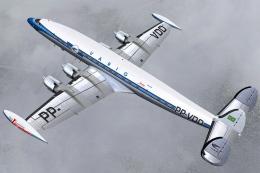
A Lockheed L-1049G-03-158 (c/n 4681) 'PP-VDD' belonging to Varig. Delivered t…
Be the first to leave a comment on this download.
Be the first to share your thoughts on this download.