

 FSX Civil Aircraft
Air New Zealand Boeing 737-800
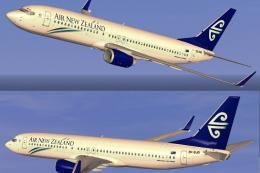
FSX Air New Zealand Boeing 737-800, registration ZK-SJB. Textures only for th…
Air New Zealand’s Rugby 2011 black livery brings bold national pride to the default Boeing 737-800 in Microsoft Flight Simulator X, pairing the iconic tail branding with rugby-inspired graphics for realistic short- to medium-haul ops. The repaint requires the base 737-800 model and adds a distinctive texture set for authentic airline atmosphere.
 Rate
Rate
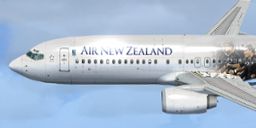
This enhanced repaint showcases a striking black-themed Air New Zealand Rugby 2011 livery for the default Boeing 737-800 in Microsoft Flight Simulator X. Created by Alex James, it commemorates the nation’s passion for rugby during that period, blending the airline’s signature branding with sporty design cues. This freeware package allows enthusiasts to add a realistic national carrier texture set to their virtual hangar, highlighting the 737’s contribution to short- to medium-range flights across New Zealand and beyond.
The Air New Zealand Rugby 2011 paint scheme blends the airline’s traditional tail logo with bold, rugby-centric graphics symbolizing the fervor surrounding New Zealand’s beloved sport. The Boeing 737 itself, recognized worldwide for its reliable narrow-body configuration, pairs naturally with the dedicated livery that emphasizes national pride and commemorates rugby culture. This jet, commonly deployed on domestic routes, now offers simmers a glimpse of how a black exterior and distinctive lettering transform the aircraft’s overall presence.
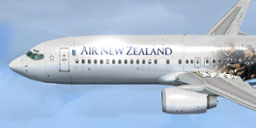
Air New Zealand Rugby 2011 Boeing 737-800 in flight.
...SimObjects\Airplanes\B737_800.aircraft.cfg file in the same folder, locate the existing [fltsim.X] entries, and then append the block of text below. Ensure you replace [fltsim.X] with the appropriate next entry value (e.g., [fltsim.9]).
[fltsim.X]
title=Boeing 737-800 Air New Zealand Rugby
sim=Boeing737-800
model=
panel=
sound=
texture=New-Zealand-Rugby2011
kb_checklists=Boeing737-800_check
kb_reference=Boeing737-800_ref
atc_id=ZK-NCI
atc_airline=NEW ZEALAND
atc_flight_number=ANZ
ui_manufacturer="Boeing"
ui_type="737-800"
ui_variation="Air New Zealand Rugby 2011"
ui_typerole="Commercial Airliner"
ui_createdby="One should hardly be surprised that the world's most prolific manufacturer of commercial aircraft is also the producer of the world's most popular jetliner. The 737 became the best-selling commercial jetliner worldwide when orders for it hit 1,831 in June 1987 (surpassing Boeing's own 727 as the previous champ). However, it wasn't always that way\s in the first few years of production, there were so few orders that Boeing considered canceling the program. They didn't, and the airplane has more than proven itself in over three decades of service."
This repaint is freeware and requires the base Boeing 737-800 model, which should be readily available in the Fly Away Simulation library. By integrating this unique scheme, you can faithfully replicate the excitement of 2011’s rugby festivities in your virtual skies. Textures remain courtesy of Alex James, who skillfully combined real-world design elements with simulator-ready fidelity.
Free for all simmers · 4.88 MB · Scanned clean Oct 2026
Download speed: Free tier is capped at 0.5 Mbps (this file takes approximately 1 min at the cap). PRO members download at full line speed.
texture.{airline}) inside FSX\SimObjects\Airplanes\{base-aircraft}\.aircraft.cfg in Notepad. Add a new [fltsim.X] section per the readme.readme.txt or README file. It tells you exactly where files go, what dependencies are needed, and any quirks specific to this add-on.The archive default737-800rugby.zip has 11 files and directories contained within it.
This list displays the first 500 files in the package. If the package has more, you will need to download it to view them.
| Filename/Directory | File Date | File Size |
|---|---|---|
| Texture.New-Zealand-Rugby2011 | 08.08.11 | 0 B |
| b737_800_1_T.dds | 08.08.11 | 4.00 MB |
| b737_800_1_T_Specular.dds | 08.08.11 | 4.00 MB |
| b737_800_2_T.dds | 01.21.11 | 4.00 MB |
| Fresnel_Ramp.dds | 09.04.06 | 640 B |
| texture.cfg | 08.14.06 | 137 B |
| thumbnail.jpg | 08.08.11 | 21.24 kB |
| Air New Zealand Rugby World Cup 2011.jpg | 08.08.11 | 21.24 kB |
| README _INSTALL.txt | 08.08.11 | 2.02 kB |
| flyawaysimulation.txt | 10.29.13 | 959 B |
| Go to Fly Away Simulation.url | 01.22.16 | 52 B |
Only PRO members can place votes.
More FSX & P3D add-ons hand-picked based on this download.
FSX Civil Aircraft
FSX Air New Zealand Boeing 737-800, registration ZK-SJB. Textures only for th…
 FSX Civil Aircraft
This freeware add-on offers a carefully rendered Air New Zealand repaint for …
 FSX Civil Aircraft
Immerse yourself in a carefully designed Boeing 737-800 repaint that showcase…
 FSX Civil Aircraft
Textures only for the default B737-800. By Jon Murchison. Screenshot of Air N…
 FSX Civil Aircraft
Air New Zealand Boeing 737-800 (no wave), registration 9H-ADH and 9H-ADI. Two…
 FSX Civil Aircraft
FSX Air New Zealand Boeing 737-300. Model by Erick Cantu. Repaint by Michael …
 FSX Civil Aircraft
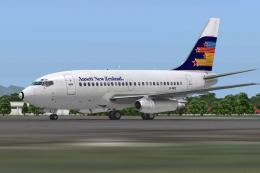
A repaint of the payware Captain Sim B737-100 model in Ansett New Zealand liv…
 FSX Civil Aircraft
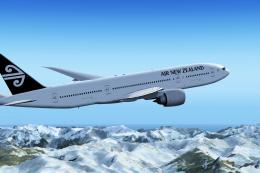
Air New Zealand Boeing 777-200LR (new livery). B777-200 model by SkySpirit201…
Be the first to leave a comment on this download.
Be the first to share your thoughts on this download.