

 FSX General Aviation Aircraft
Cessna 172
Cessna 172. This repaints the default Cessna to a modern Cessna paint stripe …
Cessna 172 G-BONO brings a real-world black-and-gold livery to the default Skyhawk, adding crisp exterior markings and an authentic UK registration for everyday GA flying. Designed for Microsoft Flight Simulator X, it targets the stock C172 and supports the Garmin G1000 variant for a cohesive look from ramp to cruise.
 Rate
Rate
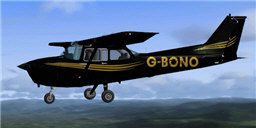
Cessna 172 G-BONO real world livery. A black and gold repaint of the default C172. By Chris Brisland.

Cessna 172 G-BONO in flight.
Generic readme for Eagleskinner repaints
Repaint name: FSX default C172
Painter's notes and Installation instructions.
This paint has been prepared by Chris Brisland.
This paint is for the FSX default C172
Original copyright for this aircraft with Microsoft. Please respect copyrights and intellectual property rights.
NOTES
INSTALLATION
This zipfile contains only those textures actually changed during the painting process.
It's as easy as 1, 2, 3!
############################################
1. Create a new folder for this paint
############################################
Open your FS9 aircraft folder for this particular download - it will be something like C:\Program Files\Microsoft Games\Microsoft Flight Simulator X\SimObjects\Airplanes\C172
Make a copy of one of the existing texture.???? folders there. In explorer view this can be done by right-click-holding a folder and dragging it slightly to one side. Windows will ask you if you wish to create a copy. Click yes and then rename the copy as texture.GBONO
############################################
2. Unzip the files
############################################
Unzip the contents of this zipfile into the new folder C:\Program Files\Microsoft Games\Microsoft Flight Simulator X\SimObjects\Airplanes\C172\Texture.GBONO and allow overwriting - that way you have the basic textures already in and the new textures will overwrite.
############################################
3. Edit the aircraft.cfg
############################################
Next open the aircraft.cfg file with any text editor program (Windows editor does the trick) and find the last block of text that starts with a line [fltsim.x] where the x will be a sequential number which starts at flightsim.0 and goes on for as many variants of the model are installed.
You will find this aircraft.cfg file here: C:\Program Files\Microsoft Games\Microsoft Flight Simulator X\SimObjects\Airplanes\RealAir SF-260\aircraft.cfg
Copy and paste the block of text from below into the aircraft.cfg file and change the x in the first line to the next number up in sequence in your cfg file
NOTE! You will see that I used the Garmin G1000 model for this skin. If you want a standard dash just delete the two instances of "G1000" below
Go flying and enjoy!
[fltsim.xx]

title=Cessna Skyhawk 172SP G-BONO

sim=Cessna172SP

model=G1000

panel=G1000

sound=

texture=GBONO

kb_checklists=Cessna172SP_check

kb_reference=Cessna172SP_ref

atc_id=G-BONO

atc_id_color=0xffffff

ui_manufacturer="Cessna"

ui_type="C172SP Skyhawk G1000"

ui_variation="G-BONO"

ui_typerole="Single Engine Prop"

ui_createdby="Microsoft Corporation"

description="A stable and trustworthy plane, most pilots have logged at least a few hours in a Cessna 172, since it's the most widely available aircraft in the rental fleet, and is used by most flight schools. Since the first prototype was completed in 1955, more than 35,000 C172s have been produced, making it the world's most popular single-engine plane. One of Cessna's first tricycle-gear airplanes, the 172 quickly became the favorite of a growing class of business pilots. Its reliability and easy handling (along with thoughtful engineering and structural updates) have ensured its continued popularity for decades."
Free for all simmers · 417.39 KB · Scanned clean Oct 2026
Download speed: Free tier is capped at 0.5 Mbps. PRO members download at full line speed.
texture.{airline}) inside FSX\SimObjects\Airplanes\{base-aircraft}\.aircraft.cfg in Notepad. Add a new [fltsim.X] section per the readme.readme.txt or README file. It tells you exactly where files go, what dependencies are needed, and any quirks specific to this add-on.The archive txtgbono.zip has 6 files and directories contained within it.
This list displays the first 500 files in the package. If the package has more, you will need to download it to view them.
| Filename/Directory | File Date | File Size |
|---|---|---|
| C172_T.dds | 09.06.07 | 1.00 MB |
| c172_t_spec.dds | 09.06.07 | 1.00 MB |
| thumbnail.jpg | 09.06.07 | 11.15 kB |
| readmeGBONO.txt | 09.06.07 | 3.34 kB |
| flyawaysimulation.txt | 10.29.13 | 959 B |
| Go to Fly Away Simulation.url | 01.22.16 | 52 B |
Only PRO members can place votes.
More FSX & P3D add-ons hand-picked based on this download.
FSX General Aviation Aircraft
Cessna 172. This repaints the default Cessna to a modern Cessna paint stripe …
 FSX General Aviation Aircraft
A huge selection of liveries created by various freeware repaint developers c…
 FSX General Aviation Aircraft
Cessna 172 Trainer. This is the standard FSX Cessna 172 with a custom panel t…
 FSX General Aviation Aircraft
Cessna 172 Repaint Template in PSD (Photoshop) format with layers and palette…
 FSX General Aviation Aircraft
Blue And White Cessna 172. Default Cessna 172SP Skyhawk repaint textures for …
 FSX General Aviation Aircraft
Experience a detailed Lufthansa training environment with this freeware repai…
 FSX General Aviation Aircraft
Cessna 172 Skyhawk. This livery is from the tribute for Microsoft Flight Simu…
 FSX General Aviation Aircraft
FSX Cessna 172 SP Skyhawk registration N7690X. Textures only for the default …
Read what other simmers think, or add your own.

Why is the whole cockpit black and so is the prop when it's spinning. It looks horrific and I can't see anything out of it. Is it meant to be like that?