

 FSX Helicopters
Marines Bell 206 FX Helicopter 'BURNO 162682'
This repaint offers a detailed representation of a US Marine Corps TH-57C, be…
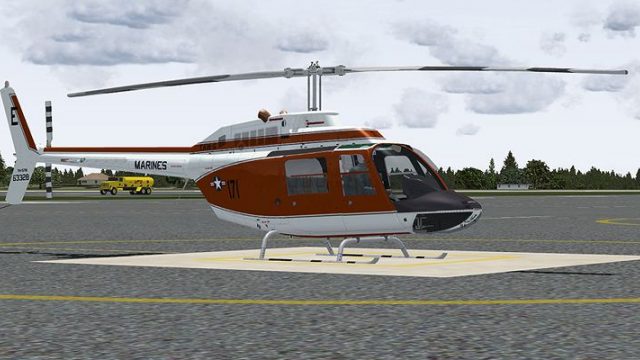
US Marine Corps TH-57B trainer markings for the Bell 206 FX deliver modex 171 “BURNO 163328” with sharp DDS textures and an authentic orange-and-white scheme for rotorcraft training flights in Microsoft Flight Simulator X. Requires the payware Dodosim 206 package and adds a clean, recognizable livery to the virtual cockpit lineup.
 Rate
Rate
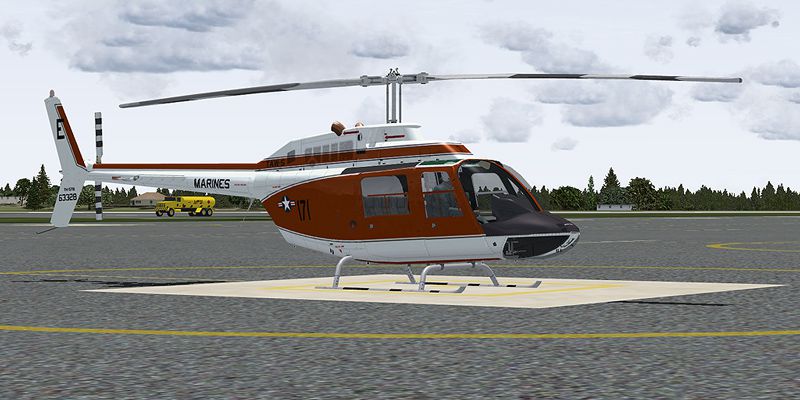
This freeware repaint brings the US Marines TH-57B trainer markings to the Bell 206 FX in Microsoft Flight Simulator X. It showcases modex 171, labeled BURNO 163328, and accurately reflects the look of a training helicopter under the United States Marine Corps. Developed as an enhancement for the payware Dodosim 206 package, it integrates detailed textures in DDS format, replicating a known TH-57B livery. Credited solely to the dedicated work of Russel R. Smith, this repaint adds a compelling visual element to rotorcraft operations within FSX.
The Bell 206 series, well-known for its single-engine layout and proven reliability, serves as the foundation for multiple military trainers, including the Marine Corps version adapted as the TH-57. This repaint draws from the iconic trainer design used by US Marine aviators and stands as a faithful representation of the deep orange and white color scheme commonly encountered in flight training programs.
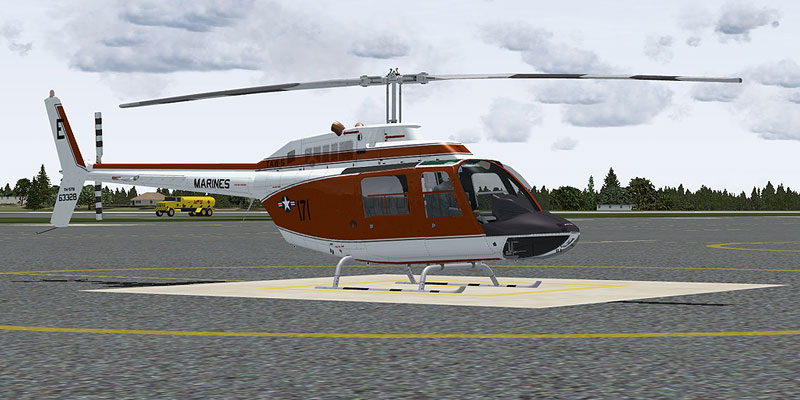
Marines Bell 206 FX Helicopter on the ground.
After following the above steps, the helicopter repaint should be ready for immediate selection within Microsoft Flight Simulator X.
[fltsim.x]
title=Dodosim 206 FSX TH57C_RRS3
sim=DodoSim206FSX_lowskid
model=
panel=
sound=
texture=63328
kb_checklists=..\DodoSim_206_FSX_LowSkid\DodoSim206FSX_check
kb_reference=..\DodoSim_206_FSX_LowSkid\DodoSim206FSX_ref
atc_id=63328
ui_manufacturer="Bell"
ui_type="US Marines TAW-5 TH-57B, 171,"
ui_variation="63328"
ui_typerole="Rotorcraft"
ui_createdby="Dodosim"
description=171 Textures by Russel R. Smith. "The DodoSim 206 FSX is the culmination of over two man-years of work, bringing you unparalleled realism and features never before seen in MS Flight Simulator helicopters. This version is fitted with a CECO fuel control system for fully manual fuel control during engine starts."
This package includes textures only and does not contain the core payware model. For realistic system behavior, the Dodosim 206 incorporates a CECO fuel control module, offering advanced manual fuel scheduling to replicate engine start dynamics found in real-world rotorcraft.
Repaint by Russel R. Smith
“Many aviators receive recognition for flight proficiency, yet the distinguished Wings of Gold worn by a United States Naval Aviator carry deeper significance. They come at a price and embody a transformative purpose that echoes across a lifetime.”
Free for all simmers · 3.54 MB · Scanned clean Oct 2026
Download speed: Free tier is capped at 0.5 Mbps. PRO members download at full line speed.
texture.{airline}) inside FSX\SimObjects\Airplanes\{base-aircraft}\.aircraft.cfg in Notepad. Add a new [fltsim.X] section per the readme.readme.txt or README file. It tells you exactly where files go, what dependencies are needed, and any quirks specific to this add-on.The archive th57b_171.zip has 15 files and directories contained within it.
This list displays the first 500 files in the package. If the package has more, you will need to download it to view them.
| Filename/Directory | File Date | File Size |
|---|---|---|
| brotor.dds | 07.01.09 | 1.00 MB |
| texture.cfg | 03.28.09 | 188 B |
| thumbnail.jpg | 06.30.09 | 30.18 kB |
| x2061_C.bmp | 06.09.09 | 4.00 MB |
| x2061_C_night.bmp | 06.10.09 | 4.00 MB |
| x2062_T.dds | 07.02.09 | 4.00 MB |
| x206_C.bmp | 06.09.09 | 4.00 MB |
| x206_C_night.bmp | 06.10.09 | 4.00 MB |
| x206_T.dds | 07.02.09 | 4.00 MB |
| x206_T_spec.bmp | 05.20.09 | 1.00 MB |
| texture.63328 | 07.01.09 | 0 B |
| 63328_Repaint.txt | 07.02.09 | 2.15 kB |
| 171.jpg | 07.01.09 | 174.04 kB |
| flyawaysimulation.txt | 10.29.13 | 959 B |
| Go to Fly Away Simulation.url | 01.22.16 | 52 B |
Only PRO members can place votes.
More FSX & P3D add-ons hand-picked based on this download.
FSX Helicopters
This repaint offers a detailed representation of a US Marine Corps TH-57C, be…
 FSX Helicopters
This repaint showcases a distinguished US Navy training helicopter livery app…
 FSX Helicopters
This freeware repaint for Microsoft Flight Simulator X depicts a United State…
 FSX Helicopters
This repaint showcases a dedicated US Navy Bell 206 FX helicopter, faithfully…
 FSX Helicopters
This repaint package features a historically significant TH-57C, identified b…
 FSX Helicopters
This livery provides a detailed United States Navy training scheme for the Be…
 FSX Helicopters
Orbit Airlines Bell 206 Helicopter. Textures only for the default helicopter.…
 FSX Helicopters
FSX Bell 206 JetRanger Helicopter with dragon butterfly livery. A real paint …
Be the first to leave a comment on this download.
Be the first to share your thoughts on this download.