


 United States of America
  FSX Scenery
Fort Langley
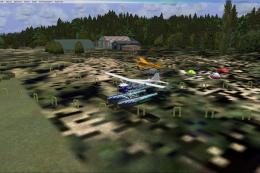
Fort Langley (CBQ2), British Columbia, Canada. Enhances the airfield only wit…
Langley AFB (KLFI) scenery upgrades the Hampton, Virginia base with a corrected layout, refined taxiways and ramps, repositioned buildings, and an expanded aero club and fire station area. For FSX, it adds coded military parking, realistic lighting, and static vehicles and aircraft to bring the flight line to life.
This custom-built package refines Langley AFB (KLFI) in Hampton, Virginia with detailed additions, interactive parking spots, and newly positioned structures. It has been meticulously crafted by Jim Cook to address the limited military airfield content in FSX while enhancing a key United States Air Force installation. Langley AFB is known for its historic association with the 1st Fighter Wing and is situated near the Chesapeake Bay, providing significant strategic importance in real-world operations.
Langley AFB’s default configuration in FSX is systematically overhauled in this add-on, integrating precise reconfigurations of taxi routes, ramps, and aprons based on AirNav figures and Google Earth references. The modification includes an improved aero club area, in addition to firefighting facilities with stationed fire trucks (fire station refers to the dedicated facility protecting the airfield). Buildings no longer aligned with actual base layouts are removed or replaced, while newly introduced structures closely align with the real-world environment. This transformation aims to replicate the operational feel of the real ramp and flight line.
Several Military_Combat and Military_Cargo parking spaces are incorporated to accommodate assigned or visiting aircraft. These parking codes ensure a more dynamic traffic flow when paired with accompanying AI traffic packages. Meanwhile, ground objects such as stationary airplanes and a variety of vehicles populate the base, adding realism and depth. Additional elements like lighting fixtures, fuel trucks, and clearly defined parking lots enhance both daytime and nighttime activities.
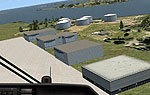
Langley AFB Scenery.
This scenery operates seamlessly alongside Just Flight’s Military Plus Packs, where various combat aircraft can occupy the newly assigned ramps. Popular terrain solutions such as Ultimate Terrain and FSGenesis work well but are nonessential. All scenery objects originate from standard FSX libraries, eliminating the need for additional installations. Through Flight 1’s AFX program and Instant Scenery, accurate placings and adjustments were made to reflect genuine airfield dimensions.
AFX_KLFI_JC.bgl and KLFI_JC.bgl.Jim Cook intends to extend improvements to other military fields in FSX as scheduling permits. This enhanced version of Langley AFB serves as a valuable upgrade to anyone interested in exploring more authentic Air Force operations within the virtual world.
Free for all simmers · 16.87 KB · Scanned clean
Download speed: Free tier is capped at 0.5 Mbps. PRO members download at full line speed.
FSX\Addon Scenery\ containing scenery and texture sub-folders.readme.txt or README file. It tells you exactly where files go, what dependencies are needed, and any quirks specific to this add-on.Use these coordinates to fly directly to this location once the mod is installed.
37.08527800,-76.35416700
Launch FSX or Prepar3D and use Flights → Load to open the downloaded .pln file. Your aircraft will be positioned at this location.
The archive langley2.zip has 6 files and directories contained within it.
This list displays the first 500 files in the package. If the package has more, you will need to download it to view them.
| Filename/Directory | File Date | File Size |
|---|---|---|
| langley_read_me.txt | 05.29.08 | 1.09 kB |
| AFX_KLFI_JC.bgl | 05.29.08 | 30.44 kB |
| KLFI_JC.bgl | 05.29.08 | 3.15 kB |
| FILE_ID.DIZ | 06.04.08 | 228 B |
| flyawaysimulation.txt | 10.29.13 | 959 B |
| Go to Fly Away Simulation.url | 01.22.16 | 52 B |
More FSX & P3D add-ons hand-picked based on this download.
FSX Scenery
Fort Langley (CBQ2), British Columbia, Canada. Enhances the airfield only wit…
 FSX Scenery
FS2004/FSX Scenery Langley Airpark, WA, Australia. Realistic lengths, buildin…
 FSX Scenery
Dover Air Force Base or Dover AFB (IATA: DOV, ICAO: KDOV, FAA LID: DOV) is a …
 FSX Scenery
Custom built hangars and buildings for Altus AFB, Oklahoma (OK), USA. AFCAD f…
 FSX Scenery
Scenery Edwards AFB Additions (KEDW), California (CA). Adds two refuel statio…
 FSX Scenery
Charleston AFB / International Airport (KCHS), South Carolina (SC). A complet…
 FSX Scenery
Scenery Griffiss AFB New York (NY) as it was back in the late 1980's before i…
 FSX Scenery
This freeware package refines the stock representation of Nellis Air Force Ba…
Be the first to leave a comment on this download.
Be the first to share your thoughts on this download.