


 United States of America
  FSX Scenery
Unisa University Of South Africa
Unisa University Of South Africa. Made with a custom designed building. By Fr…
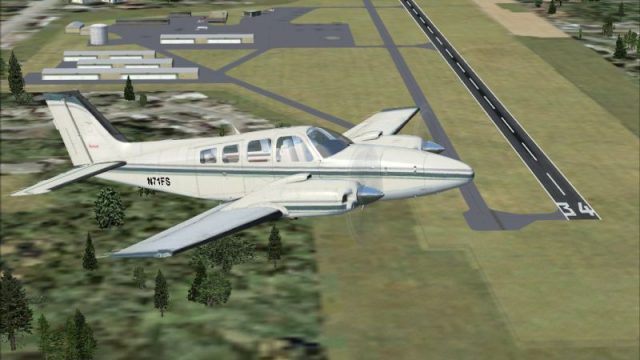
University Airport (KEDU/0O5) in Davis, California gets a refreshed layout with accurately repositioned runways, taxiways, aprons, and buildings guided by satellite reference, plus added default scenery-library objects for a fuller field environment in FSX. It requires at least NORMAL scenery density to display most placed objects.
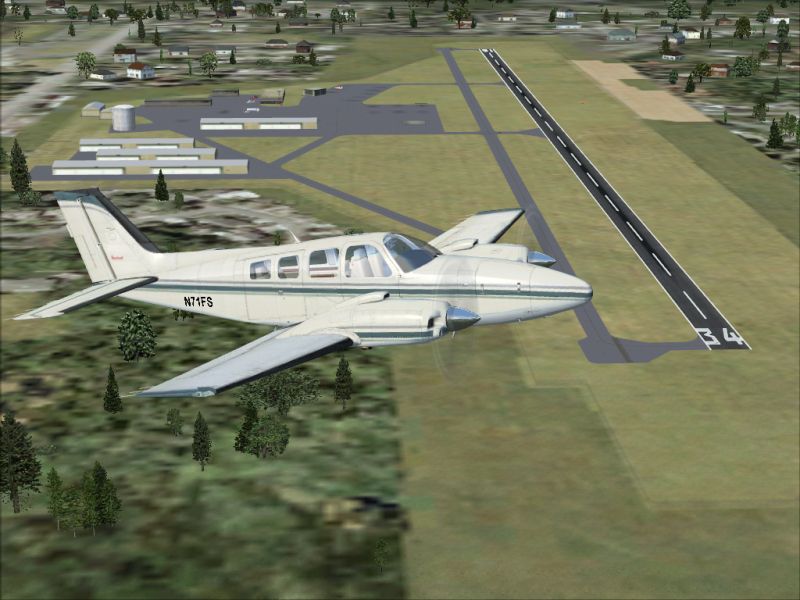
University Airport (KEDU, formerly 0O5), Davis, California (CA). This scenery package updates taxiways, runways and various other aspects of University Airport. In addition, it includes the placement of various objects from the default FSX scenery library. By Phillip Coyle.
University Airport Scenery.
This package updates University Airport in Davis, California. Taxiways, runways, and aprons were resized and moved to their real-world locations. Buildings were also moved and adjusted. Satellite images from Google Earth were used for accuracy. Many default scenery objects were placed from the FSX scenery libraries.
Thanks for downloading!
====================
Note - Compilation
====================
The BGL files in this scenery package were designed and compiled using Airport Design Editor.
================
Note - Scenery
================
This packages uses scenery from the default FSX libraries. In order for the majority of these objects to appear, scenery settings of at least NORMAL are required
======================
Note - Taxiway Lines
======================
In trying to make this scenery package as realistic as possible, I have edited the lines on the taxiways and aprons to appear as they would in real life. In some cases it might appear that there should be a taxi line when there isn't. This is not a mistake, it is as close as I could get the airport to it's real life appearance.
====================
Note - ICAO Update
====================
I am aware the University airport changed its ICAO from 0O5 to KEDU. I was unable to make this change for this scenery update. Parameters in FSX do not allow the deletion of the current 0O5 airport stored in it's database. If I changed the ICAO code, the result would be two airports: the original FSX airport, with the new version sitting right on top of it.
==============
Installation
==============
Installation is quick and easy:
1. Copy the two BGL files (0O5_ADE.BGL and 0O5_ADE_CVX.BGL) into your Flight Simulator X / Addon Scenery / Scenery folder.
2. That's it! Load up Flight Simulator X and changes will be present.
================
Uninstallation
================
Uninstallation is even quicker and easier than installing:
1. Remove the two BGL files (0O5_ADE.BGL and 0O5_CVX.BGL) from your Flight Simulator X / Addon Scenery / Scenery folder.
2. Load Flight Simulator X and changes will be present.
============
Disclaimer
============
This is a freeware package, USE AT YOUR OWN RISK! I am not responsible for any damage caused to your computer.
No support is offered for these files.
Phillip Coyle
Free for all simmers · 325.42 KB · Scanned clean
Download speed: Free tier is capped at 0.5 Mbps. PRO members download at full line speed.
FSX\Addon Scenery\ containing scenery and texture sub-folders.readme.txt or README file. It tells you exactly where files go, what dependencies are needed, and any quirks specific to this add-on.Use these coordinates to fly directly to this location once the mod is installed.
38.53200000,-121.78500000
Launch FSX or Prepar3D and use Flights → Load to open the downloaded .pln file. Your aircraft will be positioned at this location.
The archive 0o5_sce2.zip has 6 files and directories contained within it.
This list displays the first 500 files in the package. If the package has more, you will need to download it to view them.
| Filename/Directory | File Date | File Size |
|---|---|---|
| 0O5_ADE.BGL | 03.01.09 | 12.00 kB |
| 0O5_ADE_CVX.bgl | 03.01.09 | 603 B |
| Readme.txt | 03.01.09 | 5.30 kB |
| 0O5_Scenery.jpg | 03.01.09 | 317.09 kB |
| flyawaysimulation.txt | 10.29.13 | 959 B |
| Go to Fly Away Simulation.url | 01.22.16 | 52 B |
More FSX & P3D add-ons hand-picked based on this download.
FSX Scenery
Unisa University Of South Africa. Made with a custom designed building. By Fr…
 FSX Scenery
Lewis University (KLOT), Illinois (IL). This is as close to actual representa…
 FSX Scenery
Princess Juliana International Airport (TNCM) in Saint Marteen, Netherlands A…
 FSX Scenery
Los Angeles Airport Scenery v3, California (CA). This photoreal scenery is a …
 FSX Scenery
Barbados International Airport (TBPB). Grantley Adams International Airport f…
 FSX Scenery
Paris Charles de Gaulle Airport (CDG, LFPG), France. The entire airport has b…
 FSX Scenery
John F. Kennedy Airport (KJFK), New York, NYU. This is a photoreal scenery re…
 FSX Scenery
Dubai International Airport (OMDB), Dubai. Includes a new passenger terminal …
Be the first to leave a comment on this download.
Be the first to share your thoughts on this download.