


 Portugal
  FSX AFCAD Files
AFCAD File For KJFK
John F. Kennedy International Airport, New York, NY, USA, v2. This airport up…
Lisbon International Airport (LPPT) receives a sharper, more functional layout with updated parking and gates, improved service vehicle routes, extra fuel truck activity, and better object placement for smoother apron operations in Microsoft Flight Simulator X. Two runway configurations are included, offering either standard flows or crosswind-enabled dual-runway departures and arrivals.
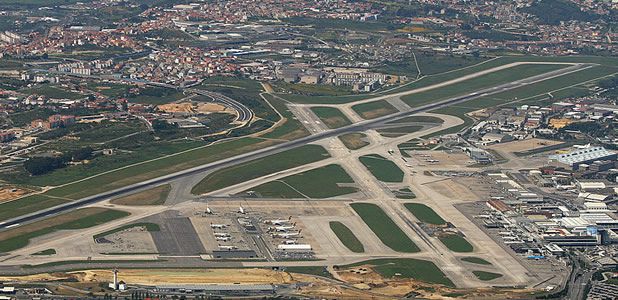
Elevate Microsoft Flight Simulator X with a refined rendition of Lisbon International Airport (LPPT), made freely available by creator Ray Smith. This add-on applies a comprehensive airport layout update while enabling extra parking spots, additional fuel trucks, upgraded support vehicle paths, and placement refinements. It also offers unique runway configuration options that facilitate more flexible operations at Portugal’s busiest air hub.
This custom AFCAD (Airport Facility Computer-Aided Design) file, engineered with Airport Design Editor (ADE), expands and fine-tunes numerous details around the default Microsoft Flight Simulator X LPPT. The author, Ray Smith, has accurately positioned gates and parking assignments to accommodate a range of aircraft while ensuring proper ground movement. Moreover, the newly introduced routes for service vehicles help streamline apron traffic, reducing congestion for virtual pilots.
View of Lisbon International Airport.
There are three essential BGL files included:
By using LPPT_ADE_CW_RS.BGL, Lisbon’s secondary runway accompanies the primary strip in handling departures and arrivals. This configuration alleviates traffic bottlenecks by spreading out load, although it may prompt additional ATIS listings since each runway is digitally recognized for guidance.
For those who prefer the standard runway scheme, LPPT_ADE_RS.BGL retains the typical layout. It omits crosswind functionality but matches the updated gate and ground placements.
Those seeking a vantage point from the tower can reassign a control input to toggle “View track/pan.” This adjustment unlocks a 360-degree tower panorama at Lisbon, letting you inspect every inch of Ray Smith’s detailed airport improvements and still revert to your aircraft swiftly.
Above all, this AFCAD mod enhances authentic immersion at one of Europe’s busiest coastal gateways, expertly crafted by Ray Smith. Enjoy traversing Portuguese skies and exploring refined ramp operations across Lisbon’s busy aprons.
Free for all simmers · 127.24 KB · Scanned clean
Download speed: Free tier is capped at 0.5 Mbps. PRO members download at full line speed.
AF2_*.bgl or AFX_*.bgl) go into FSX\Addon Scenery\Scenery\ or a dedicated AFCAD folder you create.readme.txt or README file. It tells you exactly where files go, what dependencies are needed, and any quirks specific to this add-on.Use these coordinates to fly directly to this location once the mod is installed.
38.77420000,-9.13420000
Launch FSX or Prepar3D and use Flights → Load to open the downloaded .pln file. Your aircraft will be positioned at this location.
The archive lppt_ade_rs_fsx.zip has 8 files and directories contained within it.
This list displays the first 500 files in the package. If the package has more, you will need to download it to view them.
| Filename/Directory | File Date | File Size |
|---|---|---|
| lisbon-airport.jpg | 05.16.12 | 102.29 kB |
| LPPT_ADE_CW_RS.BGL | 10.12.09 | 35.01 kB |
| LPPT_ADE_OBJ.BGL | 10.12.09 | 16.18 kB |
| LPPT_ADE_RS.BGL | 10.12.09 | 34.81 kB |
| ReadMe.txt | 05.16.12 | 3.29 kB |
| FSX_lppt_ade_rs | 05.16.12 | 0 B |
| flyawaysimulation.txt | 10.29.13 | 959 B |
| Go to Fly Away Simulation.url | 01.22.16 | 52 B |
More FSX & P3D add-ons hand-picked based on this download.
FSX AFCAD Files
John F. Kennedy International Airport, New York, NY, USA, v2. This airport up…
 FSX AFCAD Files
Dubai International Airport, United Arab Emirates (UAE). This airport update …
 FSX AFCAD Files
Los Angeles International Airport (LAX), California (CA), USA. This airport u…
 FSX AFCAD Files
This freeware package modernizes Zurich International Airport (LSZH) in Micro…
 FSX AFCAD Files
Lic Benito Juarez International Airport, Mexico City, Mexico. This airport up…
 FSX AFCAD Files
Enhance Kastrup Airport (EKCH) in Copenhagen, Denmark with this freeware upgr…
 FSX AFCAD Files
This enhanced update for Schiphol (EHAM) in Amsterdam focuses on reconstructi…
 FSX AFCAD Files
This freeware release by Ray Smith refines Narita International Airport (RJAA…
Be the first to leave a comment on this download.
Be the first to share your thoughts on this download.