

 FS2004 Civil Jet Aircraft
(Clean) Jetsgo Fokker 100 /W Tay650 Engines
This repaint provides a fresh, “clean” Jetsgo Fokker 100 texture set, specifi…
Jetsgo’s bright green-and-white Fokker 100 gets a convincingly weathered, “dirty” finish for the Project Fokker Tay 650 variant, adding lived-in realism across fuselage shading and engine detailing in Microsoft Flight Simulator 2004. Textures focus on authentic airline character and operational wear patterns, and requires the Project Fokker F100 base model.
 Rate
Rate

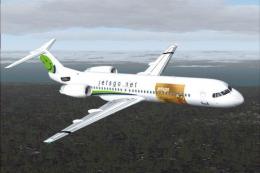
This package provides a detailed Jetsgo livery for the Project Fokker F100 in Microsoft Flight Simulator 2004. It features a realistic “dirty” effect on the fuselage and showcases the distinctive Tay 650 engine configuration. Created by Shane Strong, this repaint aims to deliver an enhanced visual experience while retaining accurate performance characteristics. Textures only, base model required.
The Fokker 100 is a medium-range twinjet originally developed in the late 1980s by Fokker in the Netherlands. Known for its efficiency, it typically comes equipped with Rolls-Royce Tay 650 engines, which offer high thrust while maintaining fuel economy. Real-world operators appreciated its low operating costs and respectable passenger capacity, making it popular with several regional airlines, including historical carriers like Jetsgo.
Jetsgo was a Canadian budget airline recognized for its bright green and white paint schemes. By incorporating weathered accents, this repaint replicates a more operationally authentic appearance, implying frequent service and exposure to varying environmental conditions. This visual approach appeals to virtual aviation enthusiasts who wish to replicate realistic wear patterns in their simulator.

Screenshot of Jetsgo Fokker 100 in flight.
Before proceeding, confirm that the Project Fokker F100 base package is installed in your “FS2004\aircraft\PF Fokker-100 Tay-650” directory. After verifying that the model is in place, follow these steps:
aircraft.cfg file inside the same directory with a text editor.
[fltsim.xx]
title=Gmax F-100 jetsgo2 Tay650-15
sim=Fokker100-650
model=fpd
panel=
sound=
texture=jgo2
checklists=F100
description=Fokker 100 Tay650-15 model
             based on official Fokker F100 specs
             PROJECT Fokker-100/70 FDE by Martin Purps
             Model by Erez Werber
             true FS2002 Gmax aircraft (will not work with FS98/FS2000)
             PF10070
ui_manufacturer=jetsgo
ui_type=F-100
ui_variation=jetsgo TAY-650 dirty
atc_heavy=0
atc_id=C-GKZA
atc_airline=jetsgo
atc_flight_number=0001
editable=0
kb_checklists=Fokker100-650_check
kb_reference=Fokker100-650_ref
atc_parking_types=GATE
atc_parking_codes=jgo
aircraft.cfg and exit the text editor.This livery modification depends on the Project Fokker freeware model and does not include the actual aircraft. The visual design is courtesy of Shane Strong, who invested effort in outlining realistic external details. To enjoy this liveried aircraft, ensure you possess the original Project Fokker F100, which should be accessible in the Fly Away Simulation library. Once installed, the repaint brings an additional layer of immersion through the portrayal of operational grime and Jetsgo’s former brand identity.
Free for all simmers · 913.58 KB · Scanned clean Oct 2026
Download speed: Free tier is capped at 0.5 Mbps. PRO members download at full line speed.
FS9\Aircraft\, FS9\Addon Scenery\, FS9\Gauges\, or FS9\Effects\.readme.txt or README file. It tells you exactly where files go, what dependencies are needed, and any quirks specific to this add-on.The archive f100jtod.zip has 17 files and directories contained within it.
This list displays the first 500 files in the package. If the package has more, you will need to download it to view them.
| Filename/Directory | File Date | File Size |
|---|---|---|
| file_id.diz | 05.31.04 | 320 B |
| jetgo2.gif | 05.31.04 | 6.53 kB |
| jetgo2.jpg | 05.31.04 | 17.97 kB |
| Mapleleaf Imaging Readme.doc | 12.26.03 | 26.00 kB |
| Readme.txt | 05.31.04 | 1.96 kB |
| texture.jgo2 | 05.31.04 | 0 B |
| FOKKER100FUSE_L.bmp | 12.07.02 | 1.00 MB |
| FOKKER100FUSE_T.bmp | 05.21.04 | 1.00 MB |
| FOKKER100LWING_L.bmp | 09.02.02 | 1.00 MB |
| FOKKER100LWING_T.BMP | 05.23.04 | 1.00 MB |
| FOKKER100RWING_L.bmp | 09.02.02 | 1.00 MB |
| FOKKER100RWING_T.BMP | 05.21.04 | 1.00 MB |
| FOKKER100_L.bmp | 09.02.02 | 1.00 MB |
| FOKKER100_T.BMP | 05.21.04 | 1.00 MB |
| f100jtodt | 05.31.04 | 0 B |
| flyawaysimulation.txt | 10.29.13 | 959 B |
| Go to Fly Away Simulation.url | 01.22.16 | 52 B |
Only PRO members can place votes.
More FS2004 add-ons hand-picked based on this download.
FS2004 Civil Jet Aircraft
This repaint provides a fresh, “clean” Jetsgo Fokker 100 texture set, specifi…
 FS2004 Civil Jet Aircraft
This repaint pack adds uniquely weathered exterior artwork for the Fokker 100…
 FS2004 Civil Jet Aircraft
This repaint offers detailed Inter-Canadian Airlines markings designed for th…
 FS2004 Civil Jet Aircraft
This updated package features a specialized texture set for the Fokker 100 V2…
 FS2004 Civil Jet Aircraft
This repaint offers a fresh Jetsgo Airlines livery for the Fokker 100 V2 with…
 FS2004 Civil Jet Aircraft
For AI. Textures only; requires F70100AI.ZIP. Model by Fernando Martinez. Liv…
 FS2004 Civil Jet Aircraft
For AI use (low poly model). Features 8 LODs, dynamic shine, moving gear, fla…
 FS2004 Civil Jet Aircraft
Model Designer : C. Vincent Cho Flight Dynamics Designer : Warren C,Daniel FD…
Be the first to leave a comment on this download.
Be the first to share your thoughts on this download.