

 FS2004 Civil Jet Aircraft
InterCanadian Fokker 100 V2 Tay 620
This package offers a detailed set of external textures for the Fokker 100 eq…
Inter-Canadian Airlines “Dirty” repaint for the Project Fokker Fokker 100 V2 Tay 620 brings authentic Canadian regional character with accurate logo placement, consistent engine-area texture mapping, and convincing weathering across fuselage, wings, and tail in Microsoft Flight Simulator 2004. Requires the freeware PF Fokker-100 Tay-620 base model.
 Rate
Rate
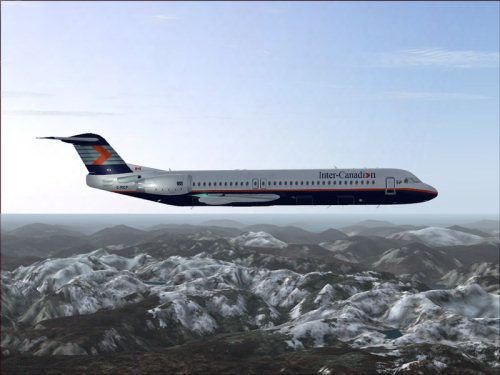
This repaint offers detailed Inter-Canadian Airlines markings designed for the Fokker 100 V2 powered by Tay 620 engines, specifically for Microsoft Flight Simulator 2004. Built to showcase a realistically weathered fuselage, this “Dirty” variant blends subtle abrasions with accurate livery placements. Repainted by Shane Strong and based on the Project Fokker original, it adds authentic Canadian regional airline flair to your virtual hangar. The base aircraft model is freeware and must be acquired from the Fly Away Simulation library in advance.
The external paint scheme reflects Inter-Canadian Airlines’ classic branding, with carefully placed logos and worn textures along the aircraft's surfaces. Operators once employed the Fokker 100 for short to medium routes, and traces of usage on the fuselage, engine nacelles, and empennage provide a grounded, lived-in feel. This design choice is ideal for simmers seeking extra immersion on regionally focused flights.
-fs9-1.jpg)
Showcasing the distinct Inter-Canadian Airlines livery in flight.
The aircraft model utilizes Rolls-Royce Tay 620-15 turbofans, offering believable performance behavior in the simulator. These engines deliver a balanced thrust profile suitable for both short and medium-haul missions. The mod ensures the texture alignment around engine components appears consistent with the real-world Fokker 100 layout, improving the overall sense of authenticity in flight.
This add-on modifies only the exterior artwork. It retains the original flight dynamics crafted by Martin Purps, along with the Gmax model authored by Erez Werber under the Project Fokker banner. To enable the full visual experience, confirm that you already have any existing Fokker 100 V2 Tay 620 livery installed in your FS2004 directory.
aircraft.cfg in a text editor.
[fltsim.xx]
title=Gmax V2 F-100 Inter-Canadian Dirty Tay620-15
sim=fokker100-620
model=dpd
panel=
sound=
texture=intcan2
checklists=F100
description=Fokker 100 Tay620-15 V2 model
             based on official Fokker F100 spec's
             PROJECT Fokker-100/70 FDE by Martin Purps
             Model by Erez Werber
             true FS2004 Gmax aircraft (will not work with FS98/FS2000)
ui_manufacturer=Canadian
ui_type=F-100
ui_variation=Inter-Canadian Dirty
atc_heavy=0
atc_id=C-FICP
atc_airline=Canadian
atc_flight_number=502
editable=0
kb_checklists=fokker100-620_check
kb_reference=fokker100-620_ref
This repaint depicts an era when Inter-Canadian Airlines operated regional services across Canada, leveraging the Fokker 100’s efficient performance to navigate diverse airports. Enhanced visual wear on the fuselage and wings helps replicate day-to-day workloads. For best results, complement this package with the correct panel, sound set, and model files, all readily available within the Fly Away Simulation mod library.
Free for all simmers · 2.81 MB · Scanned clean Oct 2026
Download speed: Free tier is capped at 0.5 Mbps. PRO members download at full line speed.
FS9\Aircraft\, FS9\Addon Scenery\, FS9\Gauges\, or FS9\Effects\.readme.txt or README file. It tells you exactly where files go, what dependencies are needed, and any quirks specific to this add-on.The archive f100intd.zip has 19 files and directories contained within it.
This list displays the first 500 files in the package. If the package has more, you will need to download it to view them.
| Filename/Directory | File Date | File Size |
|---|---|---|
| intcan | 12.20.04 | 0 B |
| file_id.diz | 12.20.04 | 353 B |
| Mapleleaf Imaging Readme.doc | 12.26.03 | 26.00 kB |
| Readme.txt | 12.20.04 | 2.01 kB |
| ss.gif | 12.20.04 | 8.14 kB |
| ss.jpg | 12.20.04 | 36.60 kB |
| Texture.intcan2 | 12.19.04 | 0 B |
| FOKKER100FUSE_L.bmp | 12.21.02 | 1.00 MB |
| FOKKER100FUSE_T.bmp | 12.18.04 | 4.00 MB |
| FOKKER100LWING_L.bmp | 09.02.02 | 1.00 MB |
| FOKKER100LWING_T.BMP | 12.18.04 | 4.00 MB |
| FOKKER100RWING_L.bmp | 06.16.03 | 1.00 MB |
| FOKKER100RWING_T.BMP | 12.18.04 | 4.00 MB |
| FOKKER100_L.bmp | 09.02.02 | 1.00 MB |
| FOKKER100_T.BMP | 12.18.04 | 4.00 MB |
| Thumbs.db | 12.18.04 | 13.00 kB |
| f100intcdt | 12.19.04 | 0 B |
| flyawaysimulation.txt | 10.29.13 | 959 B |
| Go to Fly Away Simulation.url | 01.22.16 | 52 B |
Only PRO members can place votes.
More FS2004 add-ons hand-picked based on this download.
FS2004 Civil Jet Aircraft
This package offers a detailed set of external textures for the Fokker 100 eq…
 FS2004 Civil Jet Aircraft
This repaint pack adds uniquely weathered exterior artwork for the Fokker 100…
 FS2004 Civil Jet Aircraft
This package provides a detailed Jetsgo livery for the Project Fokker F100 in…
 FS2004 Civil Jet Aircraft
This is a paint of the HNAC Airbus A300-600 model in Guyana Air 2000 colors. …
 FS2004 Civil Jet Aircraft
A300B4-620, registration HZ-AJF, delivered in April 1984. Textures only; requ…
 FS2004 Civil Jet Aircraft
This updated package features a specialized texture set for the Fokker 100 V2…
 FS2004 Civil Jet Aircraft
This repaint offers a fresh Jetsgo Airlines livery for the Fokker 100 V2 with…
 FS2004 Civil Jet Aircraft
Original aircraft by Project Fokker. Repaint by Frederic Kabalu. Screenshot o…
Be the first to leave a comment on this download.
Be the first to share your thoughts on this download.