

 FS2004 Civil Jet Aircraft
(Clean) Jetsgo Fokker 100 /W Tay650 Engines
This repaint provides a fresh, “clean” Jetsgo Fokker 100 texture set, specifi…
Jetsgo Airlines’ clean green-and-white livery brings a crisp, well-aligned finish to the Project Fokker Fokker 100 V2 with Tay 650 engines in Microsoft Flight Simulator 2004. Textures preserve the airframe’s lines for authentic Canadian short-haul routes and cockpit immersion, and requires the PF Fokker-100 Tay-650 base package.
 Rate
Rate
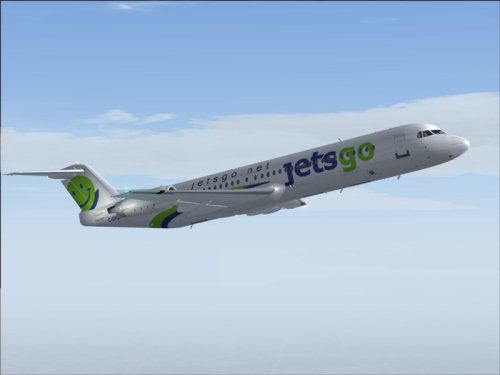
This repaint offers a fresh Jetsgo Airlines livery for the Fokker 100 V2 with Tay 650 engines in Microsoft Flight Simulator 2004. It is designed by Shane Strong using the freeware model from Project Fokker. You will need the original base package from the Fly Away Simulation library before installing these textures.
The included textures depict a clean and crisp interpretation of Jetsgo Airlines’ signature paintwork. Every fuselage detail is accurately aligned, emphasizing the airline’s green and white scheme. The result is a sharp, high-contrast finish reflecting the style of this former Canadian budget carrier.
Jetsgo operated as a low-cost airline in Canada, providing short-haul and medium-haul flights. The Fokker 100, a twin-engined regional jet, suits this type of domestic service thanks to its efficient Tay 650 powerplants and reliable systems. In this V2 rendition, the airframe maintains accurate flight dynamics derived from real-world specifications, allowing virtual pilots to experience performance characteristics similar to the actual aircraft.
-fs9-1.jpg)
Screenshot of Jetsgo Fokker 100 in flight.
PF Fokker-100 Tay-650 installed).aircraft.cfg to include the entry below (increment the [fltsim.xx] line accordingly).[fltsim.xx]
title=Gmax V2 F-100 Jetsgo Tay650-15
sim=fokker100-650
model=fpd
panel=
sound=
texture=jetscl
checklists=F100
description=Fokker 100 Tay650-15 V2 model\nbased on official Fokker F100 spec's\nPROJECT Fokker-100/70 FDE by Martin Purps Model by Erez Werber\ntrue FS2004 Gmax aircraft (will not work with FS98/FS2000)
ui_manufacturer=Jetsgo
ui_type=F-100
ui_variation=Jetsgo
atc_heavy=0
atc_id=C-GKZV
atc_airline=jetsgo
atc_flight_number=0001
editable=0
kb_checklists=fokker100-650_check
kb_reference=fokker100-650_ref
atc_parking_types=GATE
atc_parking_codes=JGO
Once the repaint is installed, the distinctive Jetsgo scheme will enrich any virtual Canadian route. This refined design offers a clean look, reflecting the airline’s branding while preserving the authentic lines of the F100.
Free for all simmers · 1.79 MB · Scanned clean Oct 2026
Download speed: Free tier is capped at 0.5 Mbps. PRO members download at full line speed.
FS9\Aircraft\, FS9\Addon Scenery\, FS9\Gauges\, or FS9\Effects\.readme.txt or README file. It tells you exactly where files go, what dependencies are needed, and any quirks specific to this add-on.The archive f100jets.zip has 19 files and directories contained within it.
This list displays the first 500 files in the package. If the package has more, you will need to download it to view them.
| Filename/Directory | File Date | File Size |
|---|---|---|
| f100jetsgo-clean | 12.20.04 | 0 B |
| file_id.diz | 12.20.04 | 306 B |
| Mapleleaf Imaging Readme.doc | 12.26.03 | 26.00 kB |
| Readme.txt | 12.20.04 | 1.97 kB |
| ss.gif | 12.20.04 | 5.09 kB |
| ss.jpg | 12.20.04 | 19.55 kB |
| Texture.jetscl | 12.20.04 | 0 B |
| FOKKER100FUSE_L.bmp | 12.18.04 | 1.00 MB |
| FOKKER100FUSE_T.bmp | 12.18.04 | 4.00 MB |
| FOKKER100LWING_L.bmp | 09.02.02 | 1.00 MB |
| FOKKER100LWING_T.BMP | 12.18.04 | 4.00 MB |
| FOKKER100RWING_L.bmp | 06.16.03 | 1.00 MB |
| FOKKER100RWING_T.BMP | 12.18.04 | 4.00 MB |
| FOKKER100_L.bmp | 09.02.02 | 1.00 MB |
| FOKKER100_T.BMP | 12.18.04 | 4.00 MB |
| Thumbs.db | 12.20.04 | 12.50 kB |
| f100jetscl | 12.20.04 | 0 B |
| flyawaysimulation.txt | 10.29.13 | 959 B |
| Go to Fly Away Simulation.url | 01.22.16 | 52 B |
Only PRO members can place votes.
More FS2004 add-ons hand-picked based on this download.
FS2004 Civil Jet Aircraft
This repaint provides a fresh, “clean” Jetsgo Fokker 100 texture set, specifi…
 FS2004 Civil Jet Aircraft
This updated package features a specialized texture set for the Fokker 100 V2…
 FS2004 Civil Jet Aircraft
This repaint pack adds uniquely weathered exterior artwork for the Fokker 100…
 FS2004 Civil Jet Aircraft
This package provides a detailed Jetsgo livery for the Project Fokker F100 in…
 FS2004 Civil Jet Aircraft
For AI. Textures only; requires F70100AI.ZIP. Model by Fernando Martinez. Liv…
 FS2004 Civil Jet Aircraft
For AI use (low poly model). Features 8 LODs, dynamic shine, moving gear, fla…
 FS2004 Civil Jet Aircraft
This fully featured freeware release brings a meticulously recreated Boeing 7…
 FS2004 Civil Jet Aircraft
Experience a classic Boeing 727-200 outfitted with Western Airlines’ 1977 pai…
Be the first to leave a comment on this download.
Be the first to share your thoughts on this download.