

 FSX Misc
Aerobatic Tutorial - The Loop
Fly into a precise aerobatic experience with this free tutorial focusing on t…
Aerobatic spin training breaks down entry, fully developed rotation, and recovery with clear control cues and aerodynamic context. Built around the RealAir Citabria and Decathlon in Microsoft Flight Simulator X (FSX), it also explains how to adapt technique to comparable aircraft by checking handling and flight envelope basics.
 Rate
Rate
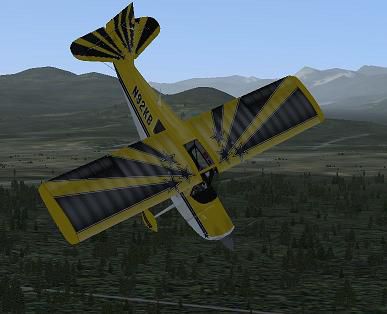

This comprehensive tutorial focuses on a critical aerobatic maneuver—the spin—and is offered entirely free of charge. Originally created by RealAir Simulations, it highlights specific practices for executing controlled spins in Microsoft Flight Simulator X (FSX). Although the guide primarily covers the RealAir Citabria and Decathlon, it also offers insights for pilots wanting to use a different than the recommended aircraft.
Performing a full spin requires an intentional entry into a stall, followed by a yaw-induced roll. In FSX, this movement demands precise inputs and an understanding of the aerodynamic forces at play. Properly introducing the spin calls for carefully reducing airspeed, establishing the right nose attitude, and then applying the rudder in the correct direction. Expect rapid wing drop if the angle of attack becomes too high without immediate corrective action.
RealAir Simulations, known for their authentic flight models, designed the Citabria and Decathlon to reflect real-world flight behavior. Both aircraft feature:
While this tutorial references the Citabria and Decathlon, it is equally relevant to planes with similar weight and balance characteristics. For different aircraft, verify entries in the aircraft.cfg file to ensure flight envelope consistency. A higher-performance aerobatic plane might demand more aggressive control inputs, whereas a basic trainer could exhibit milder spinning tendencies.
Depiction of the aircraft demonstrating a fully developed spin profile.
RealAir Simulations, the creator of this tutorial, is recognized for pioneering highly accurate flight behavior in FSX. Their dedication to detail has guided many enthusiasts worldwide in discovering advanced maneuvers like spins and loops. Each flight model carefully simulates control input nuances, airflow dynamics, and stall characteristics so aviators can refine their skills in a realistic environment.
To deepen understanding, experiment with incremental pitch and bank angles before initiating the spin sequence. Observing how the airplane responds at different flight attitudes builds confidence and situational awareness. This step-by-step approach ensures proper mastery, helping virtual pilots progress safely through more advanced aerobatic techniques.
Free for all simmers · 31.4 MB · Scanned clean Oct 2026
Download speed: Free tier is capped at 0.5 Mbps (this file takes approximately 9 mins at the cap). PRO members download at full line speed.
SimObjects\Airplanes\, Addon Scenery\, Effects\, or Gauges\.readme.txt or README file. It tells you exactly where files go, what dependencies are needed, and any quirks specific to this add-on.The archive spin.zip has 32 files and directories contained within it.
This list displays the first 500 files in the package. If the package has more, you will need to download it to view them.
| Filename/Directory | File Date | File Size |
|---|---|---|
| Aerobatic Tutorial - The Aerobatic Spin.xml | 01.30.08 | 42.41 kB |
| AerobaticTraining.htm | 01.30.08 | 28.01 kB |
| AerobaticTraining_files | 01.30.08 | 0 B |
| filelist.xml | 01.30.08 | 207 B |
| image001.png | 01.28.08 | 16.03 kB |
| image002.jpg | 01.28.08 | 3.55 kB |
| ReadMe.htm | 01.28.08 | 18.86 kB |
| ReadMe_files | 01.28.08 | 0 B |
| filelist.xml | 01.28.08 | 196 B |
| image001.png | 01.26.08 | 16.03 kB |
| image002.jpg | 01.26.08 | 3.54 kB |
| Sound | 01.30.08 | 0 B |
| abeam.wav | 01.30.08 | 1.28 MB |
| abeam.wma | 01.30.08 | 105.71 kB |
| AddAlt.wav | 01.30.08 | 1.89 MB |
| Climb.wav | 01.29.08 | 2.63 MB |
| Crowd.wav | 01.23.08 | 922.71 kB |
| Downwind.wav | 01.29.08 | 3.54 MB |
| goodFin.wav | 01.30.08 | 2.98 MB |
| Introduction.wav | 01.29.08 | 8.79 MB |
| PreTO.wav | 01.29.08 | 8.15 MB |
| recover.wav | 01.29.08 | 7.08 MB |
| spinentr.wav | 01.29.08 | 5.08 MB |
| ViewMode.wav | 01.29.08 | 2.87 MB |
| Waiver.wav | 01.23.08 | 922.71 kB |
| The Aerobatic Spin.FLT | 01.29.08 | 8.11 kB |
| The Aerobatic Spin.FSSAVE | 01.28.08 | 97.65 kB |
| The Aerobatic Spin.WX | 01.28.08 | 91.37 kB |
| Spin.JPG | 01.30.08 | 26.30 kB |
| File_ID.DIZ | 01.28.08 | 191 B |
| flyawaysimulation.txt | 10.29.13 | 959 B |
| Go to Fly Away Simulation.url | 01.22.16 | 52 B |
Only PRO members can place votes.
More FSX & P3D add-ons hand-picked based on this download.
FSX Misc
Fly into a precise aerobatic experience with this free tutorial focusing on t…
 FSX Misc
This freeware package illustrates a thoughtful approach to executing aileron …
 FSX Misc
An illustrated guide. After landing your favorite FSX aircraft, are you frust…
 FSX Misc
A tutorial in PDF format. By Mike Basford. Thumbnail of Tiger Sky6 in flight.
 FSX Misc
This is a PDF tutorial intended for use with PMDG's Boeing 737NGX product. In…
FSX Misc
How to make your first model in FSX Gmax. A simple beginner's tutorial to hel…
 FSX Misc
Tutorial on changing tow plane in FSX. A tutorial to make the things in FSX m…
FSX Misc
Installation and Configuration. A tutorial based on ADE 1.20. Detailed step b…
Be the first to leave a comment on this download.
Be the first to share your thoughts on this download.