

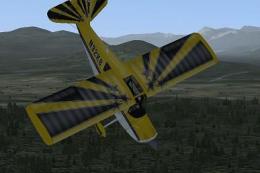
 FSX Misc
Aerobatic Tutorial - The Spin
This comprehensive tutorial focuses on a critical aerobatic maneuver—the spin…
Aerobatic Tutorial: The Loop delivers a clear, step-by-step lesson for flying a clean vertical circle in FSX, built around RealAir’s Citabria and Decathlon. It explains entry speed, elevator and rudder coordination, throttle changes, trim, and visual cues, with practical notes for adapting the technique to other aerobatic aircraft.
 Rate
Rate
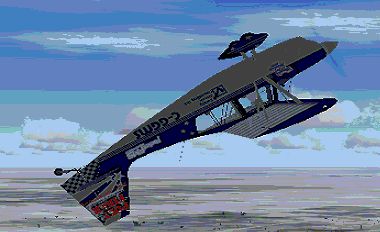
Fly into a precise aerobatic experience with this free tutorial focusing on the loop maneuver. Created by RealAir, it is designed around the Citabria and Decathlon, yet it also comes with guidance on modifying these steps for other aircraft in FSX. This tutorial provides structured insight into the fundamental techniques needed to execute a flawless vertical circle, blending smooth control inputs with accurate pitch management.
Learning the loop involves balancing airspeed, elevator deflection, and coordinated rudder input. In this tutorial, the authors illustrate how to initiate the ascend, manage energy through the apex, and maintain directional authority during recovery. By carefully adjusting throttle throughout the trajectory, pilots are encouraged to preserve momentum without overstraining the airframe.
The RealAir Citabria and Decathlon are well-known for their predictable flight model, which is ideal for practicing loops. The developers emphasize entering the maneuver at a recommended speed bracket, ensuring altitude stability and consistent G-load throughout the climb. Additionally, the tutorial highlights how to keep a steady heading by making minor corrective rudder moves as the aircraft tips over the top of the loop.
Screenshot of a plane performing a loop.
Although the instructions reference the Citabria and Decathlon, they can be adapted for comparable aerobatic-capable aircraft in FSX. RealAir recommends confirming the recommended entry speeds for different airframes and adjusting back-pressure accordingly to accommodate variations in roll rate and power settings. These refinements ensure a well-rounded study of how airplane-specific factors influence into-the-loop performance.
Throughout the lesson, the creators also incorporate reminders on proper trim usage, energy conservation, and visual cues. Whether one is testing fundamental aerobatics or aiming to master advanced flight handling, this step-by-step add-on package guides FSX enthusiasts through the loop’s mechanics, ultimately reinforcing smooth corrections and a disciplined technique.
Free for all simmers · 41.68 MB · Scanned clean Sep 2026
Download speed: Free tier is capped at 0.5 Mbps (this file takes approximately 12 mins at the cap). PRO members download at full line speed.
SimObjects\Airplanes\, Addon Scenery\, Effects\, or Gauges\.readme.txt or README file. It tells you exactly where files go, what dependencies are needed, and any quirks specific to this add-on.The archive theloop.zip has 36 files and directories contained within it.
This list displays the first 500 files in the package. If the package has more, you will need to download it to view them.
| Filename/Directory | File Date | File Size |
|---|---|---|
| AerobaticTraining.htm | 01.25.08 | 26.55 kB |
| AerobaticTraining.xml | 01.26.08 | 30.82 kB |
| AerobaticTraining_files | 01.26.08 | 0 B |
| filelist.xml | 01.25.08 | 207 B |
| image001.png | 01.24.08 | 16.03 kB |
| image002.jpg | 01.24.08 | 3.54 kB |
| LivSky1.bmp | 01.22.08 | 87.15 kB |
| LivSky2.bmp | 01.22.08 | 87.15 kB |
| ReadMe.htm | 01.26.08 | 19.08 kB |
| ReadMe_files | 01.26.08 | 0 B |
| filelist.xml | 01.26.08 | 196 B |
| image001.png | 01.26.08 | 16.03 kB |
| image002.jpg | 01.26.08 | 3.54 kB |
| Sound | 01.26.08 | 0 B |
| Below.wav | 01.23.08 | 1.68 MB |
| Climbout.wav | 01.25.08 | 7.21 MB |
| Crowd.wav | 01.23.08 | 922.71 kB |
| CrowdDebrief.wav | 01.26.08 | 5.41 MB |
| Downwd2.wav | 01.25.08 | 3.81 MB |
| Downwind.wav | 01.25.08 | 1.70 MB |
| endpull.wav | 01.23.08 | 2.15 MB |
| FinLoop.wav | 01.25.08 | 7.30 MB |
| float.wav | 01.23.08 | 2.36 MB |
| Introduction.wav | 01.25.08 | 6.72 MB |
| LoopEntr.wav | 01.25.08 | 3.13 MB |
| LowDeBrief.wav | 01.26.08 | 5.65 MB |
| PreTO.wav | 01.25.08 | 8.95 MB |
| PullU.wav | 01.23.08 | 884.72 kB |
| Waiver.wav | 01.23.08 | 922.71 kB |
| Wingtip.wav | 01.25.08 | 2.86 MB |
| The Loop.FLT | 01.28.08 | 8.13 kB |
| The Loop.FSSAVE | 01.25.08 | 115.88 kB |
| The Loop.WX | 01.25.08 | 86.59 kB |
| File_ID.DIZ | 01.28.08 | 191 B |
| flyawaysimulation.txt | 10.29.13 | 959 B |
| Go to Fly Away Simulation.url | 01.22.16 | 52 B |
Only PRO members can place votes.
More FSX & P3D add-ons hand-picked based on this download.
FSX Misc
This comprehensive tutorial focuses on a critical aerobatic maneuver—the spin…
 FSX Misc
This freeware package illustrates a thoughtful approach to executing aileron …
 FSX Misc
An illustrated guide. After landing your favorite FSX aircraft, are you frust…
 FSX Misc
A tutorial in PDF format. By Mike Basford. Thumbnail of Tiger Sky6 in flight.
 FSX Misc
This is a PDF tutorial intended for use with PMDG's Boeing 737NGX product. In…
FSX Misc
How to make your first model in FSX Gmax. A simple beginner's tutorial to hel…
 FSX Misc
Tutorial on changing tow plane in FSX. A tutorial to make the things in FSX m…
FSX Misc
Installation and Configuration. A tutorial based on ADE 1.20. Detailed step b…
Be the first to leave a comment on this download.
Be the first to share your thoughts on this download.