

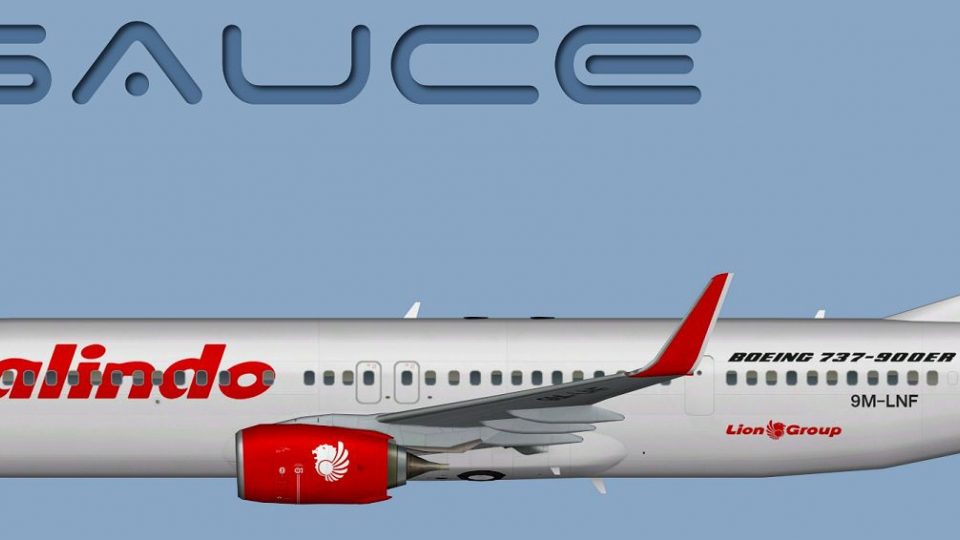
FSX Malindo Air Boeing 737-900W 9M-LNF
Malindo Air’s Boeing 737-900W in registration 9M-LNF comes to life with crisp, airline-accurate textures for the FAIB freeware AI model, including detailed winglets and clean markings for realistic traffic and close-up viewing. Compatible with Microsoft Flight Simulator X and FS2004, it requires the matching FAIB 737-900 base package.
 Rate
Rate
Images & Screenshots
1 total
This repaint showcases a Malindo Air Boeing 737-900W (registration 9M-LNF) designed for the freeware FAIB model. It was created by Mariano Bonaccorso and originally developed for use with the FSX AI Bureau base package. Enthusiasts seeking to operate this add-on will need the corresponding freeware model, which can be obtained from the Fly Away Simulation library. This comprehensive texture set ensures that sim pilots can integrate an accurate livery into their virtual hangars with minimal effort.
Technical Details of the Malindo Air 737-900W
The Boeing 737-900W represents one of the stretched fuselage variants in the renowned 737 Next Generation family. Malindo Air’s signature tail design is rendered meticulously here to replicate the real-world operator’s fleet appearance. In particular:
- Winglets: Marked with the airline’s color scheme to reflect the “blended winglet” style on the actual aircraft.
- Registration: 9M-LNF is accurately depicted to match the real jets in service with Malindo Air’s fleet.
- High-Resolution Textures: Provided to maintain sharp visuals when viewed close-up in the simulator.
Included Textures and Formats
This repaint package accommodates varying user needs across platforms. Within the included textures folder, you will find:
- DDS Format for FSX
- These are optimized for DirectX-enabled environments in Microsoft Flight Simulator X.
- BMP Format for FS9
- Hosted in a separate “FS9” subfolder, ensuring compatibility with FS2004.
- Targa Files
- Located in an additional directory for those who require custom conversions without sacrificing quality.
Installation and Configuration Steps
When you add this repaint to your aircraft list, make sure the texture folder is copied into the correct FAIB 737-900 directory. Afterwards, introduce this repaint by editing the aircraft.cfg (in your chosen simulator folder) according to the following sample entry:
[fltsim.X]
title=AI B739W MXD_9M-LNF
sim=FAIB_7379
model=winglets_SN
texture=MXD_9M-LNF
atc_airline=MALINDO
atc_parking_codes=MXD,LNI
atc_parking_types=GATE
ui_manufacturer=Boeing
ui_type=B737-900W
ui_variation=Malindo Air
description=AI Aircraft from FAIB
Note: Replace the “X” in the bracketed title with the appropriate incremental number for your repaint list. If you require more information on editing these configurations, consult the documentation provided with your base FAIB model and the relevant SDK references.

Accurate side profile of the Malindo Air Boeing 737-900W livery.
Important Notes
- Base Model Required: This repaint does not include the FAIB aircraft itself. Obtain the freeware model from the Fly Away Simulation library.
- Performance Standard: The textures align with recommended formats for enhanced visual fidelity in both FSX and FS9.
- Custom Conversion: Use the supplied Targa assets if you need to create alternative formats without compromising clarity.
Credit to the Developers
This detailed repaint was orchestrated by Mariano Bonaccorso, utilizing the FAIB 737-900 base model engineered by the FSX AI Bureau. Their collective craftsmanship ensures a realistic depiction of Malindo Air’s Boeing 737-900W while celebrating the airline’s unique identity.
Ready to download Malindo Air Boeing 737-900W 9M-LNF?
Free for all simmers · 7.12 MB · Scanned clean Sep 2026
File information
Download speed: Free tier is capped at 0.5 Mbps (this file takes approximately 2 mins at the cap). PRO members download at full line speed.
How to install this mod
FSX / P3D
Repaint
How to install this mod
-
Extract the downloaded archive
Use 7-Zip (free) or WinRAR to extract the ZIP to a temporary folder. Don't install while still zipped — the simulator can't read inside ZIP files. -
Add livery to base aircraft folder
Place the texture folder (typicallytexture.{airline}) insideFSX\SimObjects\Airplanes\{base-aircraft}\. -
Update aircraft.cfg
Open the baseaircraft.cfgin Notepad. Add a new[fltsim.X]section per the readme. -
Always read the included readme
Every mod ships with areadme.txtorREADMEfile. It tells you exactly where files go, what dependencies are needed, and any quirks specific to this add-on.
What’s inside this archive
The archive malindo_air__9m-lnf__boeing_b737-900w.zip has 13 files and directories contained within it.
File Contents
This list displays the first 500 files in the package. If the package has more, you will need to download it to view them.
| Filename/Directory | File Date | File Size |
|---|---|---|
| FAIB_737_900_L.dds | 01.26.13 | 2.67 MB |
| FAIB_737_900_T.dds | 05.22.13 | 5.33 MB |
| FS9 | 05.22.13 | 0 B |
| FAIB_737_900_L.bmp | 04.27.13 | 1.33 MB |
| FAIB_737_900_T.bmp | 05.22.13 | 1.33 MB |
| Targas | 05.22.13 | 0 B |
| FS9_MXD_9M-LNF_T.tga | 05.22.13 | 4.00 MB |
| FSX_MXD_9M-LNF_T.tga | 05.22.13 | 16.00 MB |
| Installation.txt | 05.22.13 | 1.84 kB |
| Preview 9M-LNF.jpg | 05.22.13 | 107.95 kB |
| Thumbnail 9M-LNF.png | 05.22.13 | 5.59 kB |
| flyawaysimulation.txt | 10.29.13 | 959 B |
| Go to Fly Away Simulation.url | 01.22.16 | 52 B |
Rate this add-on
PRO perkOnly PRO members can place votes.
0 comments
Be the first to leave a comment on this download.
No comments yet
Be the first to share your thoughts on this download.