

 FSX Military Aircraft
USAF Canadair C-139 Yukon
USAF Canadair C-139 Yukon. A repaint for Jens Kristensen's Bristol Britannia …
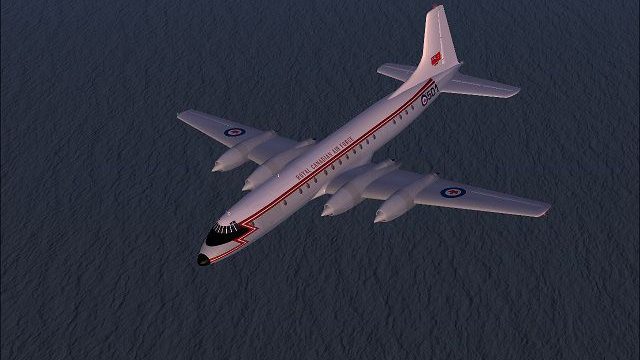
Canadair CC-106 Yukon repaint brings Royal Canadian Air Force character to Jens Kristensen’s Bristol Britannia in Microsoft Flight Simulator X, capturing the stretched CL-44 transport’s cargo-door look with authentic markings and period details. It suits long-range troop, logistics, and medevac-style flying, and requires the JBK Britannia base aircraft.
 Rate
Rate
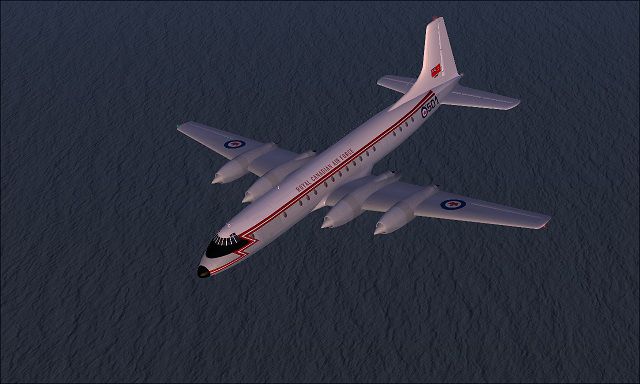
Canadair CC.106 Yukon. A repaint for Jens Kristensen's Bristol Britannia for FSX only, as a Canadair Yukon (ish). In the 1950s, Canadair had acquired a licence to build the Bristol Britannia airliner. With an RCAF requirement for a replacement for its C-54GM North Star (modified C-54 Skymaster with Merlin engines) fleets, Canadair began work on a long range transport primarily intended to provide personnel and logistics support for Canadian Forces in Europe. In January 1957 Canadair received a contract for eight aircraft, later increased to 12. The RCAF designation for the new design was the CC-106 Yukon, while the companys civilian variant was known as the CL-44-6. In company parlance the CL-44 was simply "the Forty-Four." By Mike Barnes.
Canadair CC.106 Yukon in flight.
The RCAF had specified the CL-44 to be equipped with Bristol Orion engines. When the British Ministry of Supply canceled the Orion program, the RCAF revised the specifications to substitute the Rolls-Royce Tyne 11. The CL-44 fuselage was lengthened by 12 ft 4 in (3.75 m) to be almost identical to the Britannia 300 with two large cargo doors added on the port side while the cabin was pressurised to maintain a cabin altitude of 2,400 m at 9,000 m (30,000 ft). The design used modified CL-28 wings and controls. The Yukon could accommodate 134 passengers and a crew of nine. In the casualty evacuation role it could take 80 patients and a crew of 11.
The rollout of the Yukon was a near-disaster when the prototype could not be pushed out of the hangar since the tail was unable to clear the hangar doors. The first flight took place 15 November 1959 at Cartierville Airport. During test flights many problems were encountered from complete electrical failure to engines shaking loose and almost falling off. Rolls-Royce had problems delivering engines resulting in the sarcastically named "Yukon gliders" being parked outside Canadair as late as 1961.
Initially, the CL-44-6 was produced for the RCAF as the CC-106 Yukon. Once initial problems were resolved, in RCAF service the Yukon performed well and in December 1961, a Yukon set a world record for its class when it flew 6,750 mi (10,860 km) from Tokyo to RCAF Station Trenton, Ontario, in 17 hours, three minutes at an average speed of 400 mph (640 km/h). Later, a Yukon set a new record staying airborne for 23 hours and 51 minutes. These records were unbroken until bettered by the Boeing 747SP in 1975. By the time of their retirement, Yukons had flown 65 million miles, 1.5 billion passenger miles and 360 million ton-miles.
Unzip the texture zip files , and move to yourJBK Britannia folder, then copy and paste the [fltsim.X] entries found below into your JBK Britannia "aircraft.cfg" file in the proper logically sequential order. Remember to change the "X" in [fltsim.X] to the next numbers in line among your JBK Britannia repaints. Then click 'file', then click 'save', of course.
These files may:
A) NOT be up-loaded to any site that charges a fee for acess.
B) Otherwise, you may share and modify as you like.
[fltsim.xx]

	title=Canadair Yukon CC.106

	sim=JBK Britannia

	model=

	panel=

	sound=

	texture=Yukon CC.1

	kb_checklists=

	kb_reference=britannia_ref

	atc_id=AF501

	ui_manufacturer=Canadair

	ui_type=Yukon CC.1

	ui_variation=AF501

	atc_heavy=0

	atc_airline=RCAF

	atc_flight_number=1958

	description=Canadair Yukon Long range strategic transport
Free for all simmers · 973.7 KB · Scanned clean Oct 2026
Download speed: Free tier is capped at 0.5 Mbps. PRO members download at full line speed.
SimObjects\Airplanes\, Addon Scenery\, Effects\, or Gauges\.readme.txt or README file. It tells you exactly where files go, what dependencies are needed, and any quirks specific to this add-on.The archive canadair_yukon_ish_.zip has 6 files and directories contained within it.
This list displays the first 500 files in the package. If the package has more, you will need to download it to view them.
| Filename/Directory | File Date | File Size |
|---|---|---|
| Canadair CC.106 Yukon(ish) | 06.26.11 | 0 B |
| CC.106.jpg | 10.23.10 | 84.27 kB |
| readme.txt | 06.26.11 | 3.71 kB |
| texture.Yukon CC.106.zip | 06.26.11 | 893.68 kB |
| flyawaysimulation.txt | 10.29.13 | 959 B |
| Go to Fly Away Simulation.url | 01.22.16 | 52 B |
Only PRO members can place votes.
More FSX & P3D add-ons hand-picked based on this download.
FSX Military Aircraft
USAF Canadair C-139 Yukon. A repaint for Jens Kristensen's Bristol Britannia …
 FSX Military Aircraft
FSX F/A-18 VFA-106 Gladiators. A set of VFA-106 "Gladiators" textures for the…
 FSX Military Aircraft
A-4E 152078, USS Intrepid, 1968, VA-106 Gladiators. Model by Virtavia. Repain…
 FSX Military Aircraft
Canadian Lockheed CC-130J Hercules. Updated textures for Canada's first CC-13…
 FSX Military Aircraft
This model depicts CC-115 s/n 115461 in United Nations peacekeeping livery. O…
 FSX Military Aircraft
CC model supersonic jet fighter from flight sim aircraft manufacturer HE. Mod…
 FSX Military Aircraft
This is the full package for the F-14D Tomcat developed by Dino Cattaneo for …
 FSX Military Aircraft
The F35 Lightning II is a fifth-generation, single-seat, single-engine stealt…
Be the first to leave a comment on this download.
Be the first to share your thoughts on this download.