


 Germany
  FSX Scenery
Blackburn Wind Farms
Blackburn Wind Farms for users of Neil's Microlight's. Eight new wind generat…
Calden Wind Farms and the 186 m Essigberg Radio and TV Tower bring extra VFR landmarks to the countryside around Kassel-Calden Airport in Germany, aligned to the default terrain in Microsoft Flight Simulator X. The scenery adds multiple wind parks, a custom Gmax tower model, and autogen excludes for cleaner placement.
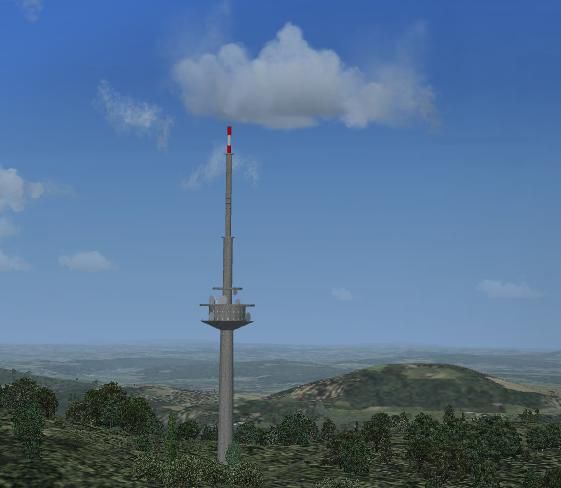

Scenery Calden Wind Farms And TV Tower, Germany. Places windfarms and Essigberg TV tower in the area surrounding Kassel-Calden airport. Uses generic wind turbines for the wind farms and a simple Gmax model for the tower. No night textures. Contains excludes for autogen scenery. Aligned with the default scenery. By Christian Grimsel.
Calden Wind Farms And TV Tower Scenery.
Kassel Calden airport is a small airport in the heart of Germany, a few kilometers north of Kassel (the town of the "documenta" modern art exhibition, but also the town where the brothers Grimm spent many years of their lives). It is mainly used by private pilots and small business jets.
This scenery places windfarms and the "Essigberg" Radio & TV Tower (186 m height - the highest of it's kind) in the area surrounding the airport. Please refer to the simple basemap for directions and relative distances.
The scenery uses a generic wind turbine for the wind farms and a simple GMax model for the tower. No night textures included.
Contains exclude files for autogen scenery.
The scenery should work with the FSX default scenery. It has not been tested with previous versions of FS.
To install:
Extract the archive to the directory, where you keep your add-on sceneries. Ensure, that the directory structure is kept intact. This will create a subdirectory called "Calden", with the "scenery", "texture" and "documentation" directories below.
You may also extract the archive to some other place and then move it to your add-on scenery folder, if you feel more comfortable this way.
Activate the usual way.
Acknowledgements:
Google Earth and windprojects were used to locate the windparks. Thanks to Cube Engineering GmbH (Kassel) and energie-online (their subsidiary) for their assistence.
FSX_KML was used to create autogen exclude BGLs.
GMax was used to design the tower. It is my first GMax model and there is certainly scope for improvement.
The cement4.bmp file stems from the FSX main texture directory. Whether it is an original Microsoft file or has been copied there by one of the add-ons I use, I am not able to say. It is certainly not my work. The cement4_1 & _2.bmp are my modifications of the original.
SBuilderX 3.13 was used the place the objects
Plans:
As soon as the weather (and time) permits go out an shoot photos of the airport to create custom airport buildings.
This scenery is freeware. If you use it, you do so fully at your own risk. The author disclaims all warranties, either expressed or implied.
The archive may be distributed freely, provided, the contents is left unchanged and no money is asked for it.
By Christian Grimsel
Free for all simmers · 176.74 KB · Scanned clean Oct 2026
Download speed: Free tier is capped at 0.5 Mbps. PRO members download at full line speed.
FSX\Addon Scenery\ containing scenery and texture sub-folders.readme.txt or README file. It tells you exactly where files go, what dependencies are needed, and any quirks specific to this add-on.Use these coordinates to fly directly to this location once the mod is installed.
51.40860000,9.37720000
Launch FSX or Prepar3D and use Flights → Load to open the downloaded .pln file. Your aircraft will be positioned at this location.
The archive calden.zip has 20 files and directories contained within it.
This list displays the first 500 files in the package. If the package has more, you will need to download it to view them.
| Filename/Directory | File Date | File Size |
|---|---|---|
| Calden | 01.17.10 | 0 B |
| documentation | 01.21.10 | 0 B |
| basemap.PNG | 01.17.10 | 12.91 kB |
| Essigberg.gif | 01.17.10 | 13.46 kB |
| Essigberg.JPG | 01.17.10 | 25.23 kB |
| FILE_ID.DIZ | 01.17.10 | 329 B |
| Readme.txt | 01.21.10 | 2.39 kB |
| scenery | 01.17.10 | 0 B |
| Calden_Env_OBX.BGL | 01.16.10 | 48.74 kB |
| cvxCALDEN_EXCLUDE.BGL | 01.17.10 | 466 B |
| cvxESSIGBERG_EXCLUDE.BGL | 01.17.10 | 236 B |
| texture | 01.17.10 | 0 B |
| antenne.bmp | 01.12.10 | 754 B |
| Cement4.bmp | 01.16.10 | 42.74 kB |
| Cement4_1.bmp | 01.16.10 | 42.74 kB |
| Cement4_2.bmp | 01.16.10 | 42.74 kB |
| Essigberg.gif | 01.17.10 | 13.46 kB |
| FILE_ID.DIZ | 01.17.10 | 329 B |
| flyawaysimulation.txt | 10.29.13 | 959 B |
| Go to Fly Away Simulation.url | 01.22.16 | 52 B |
Only PRO members can place votes.
More FSX & P3D add-ons hand-picked based on this download.
FSX Scenery
Blackburn Wind Farms for users of Neil's Microlight's. Eight new wind generat…
 FSX Scenery
Kassel Calden Airport, Germany, with wind farms and TV tower. Replaces defaul…
 FSX Scenery
Calden Airport, Germany. This is the second in a series of planned updates an…
 FSX Scenery
Winter Hill TV Transmitter, Manchester, UK. By Stewart Haworth. Winter Hill T…
 FSX Scenery
Freedom Tower. Includes day, night and specular textures using 1024x1024 DTX …
 FSX Scenery
Portsmouth Spinnaker Tower UK. A concrete, steel and composite structure that…
 FSX Scenery
Telecom Tower near Leeds Bradford Airport, UK. Models are fully textured. Inc…
 FSX Scenery
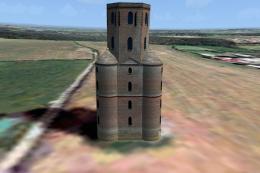
Horton Tower, UK. This seven storey tower is situated on high ground near the…
Be the first to leave a comment on this download.
Be the first to share your thoughts on this download.