


 Canada
  FSX Scenery
BC PNW Lighthouses
BC PNW Lighthouses. Eighteen light houses from the Pacific Northwest area of …
Whistler, British Columbia gets a focused scenery upgrade with Whistler-Green Lake Water Aerodrome (CAE5) plus Whistler Hospital (CAW4) and Municipal (CBE9) heliports, complemented by several custom objects for realistic local operations. Built for Microsoft Flight Simulator X and requires Orbx FTX NA Blue Pacific Northwest (PNW) for best integration.
BC PNW Whistler. Welcome to Whistler, British Columbia, Canada. Included in this scenery enhancement: Whistler-Green Lake Water Aerodrome (CAE5), Whistler (Hospital) Heliport (CAW4) and Whistler (Municipal) Heliport (CBE9). Several custom objects were created for this project. This scenery was designed for Orbx's FTX NA Blue Pacific Northwest (PNW). By Mike Mann.
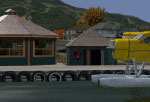
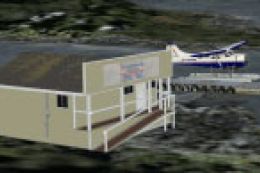
Screenshot of BC PNW Whistler Scenery.
This scenery will provide you with a float plane base as well as two heliports. The float plane base, which is located on the southwest end of Green Lake, is known as Whistler-Green Lake Water Aerodrome (CAE5) and is the home base for Whistler Air. The Whistler Health Care Centre has a helipad, known as Whistler (Hospital) Heliport (CAW4) which is located right in town. The other helicopter base is Whistler (Municipal) Heliport (CBE9) which is located just east of the northeast end of Green Lake.
I also recommend that you download my BC Coastal Beaver Repaints package (the file is named bccoastalbeavers.zip at both sites). This will give you a number of repaints for the default FSX Beaver, including the one for Whistler Air. This will give you an authentic experience while flying in the Whistler area.
Installation:
This scenery enhancement was designed to be used with Orbx's FTX NA Blue Pacific Northwest (PNW). To install the scenery-
1. After unzipping the whistlerbases.zip file, copy the BCPNWFloatBases folder into your Addon Scenery folder \\Program Files\Microsoft Flight Simulator X\Addon Scenery.
Note: if you have installed any of my other FSX BC PNW sceneries then this folder will already exist, so just add the additional files.
2. Copy the file CAE5_Whistler_Green_Lake_Float_ALT.BGL in the WorldScenery folder into your Scenery\World\Scenery folder \\Program Files\Microsoft Flight Simulator X\Scenery\World\Scenery.
3. Add BCPNWFloatBases through your scenery FSX settings and make sure it is above all the Orbx PNW entries.
Note: if you have installed any of my other FSX BC PNW sceneries then this folder will already be enabled.
4. This scenery was designed for a mesh resolution of 10 m. Set your FSX – Settings – Display – Scenery – Mesh resolution: 10
Acknowledgements:
Thanks to Arno Gerretsen for Library Creator XML, ModelConverterX and for the animated windsock, Jon Masterson for Airport Design Editor, Martin Wright for DTXBmp and Richard Ludowise for TcalcX.
Free for all simmers · 3.3 MB · Scanned clean Oct 2026
Download speed: Free tier is capped at 0.5 Mbps. PRO members download at full line speed.
This add-on may require the following files to function properly. If this is a repaint, the dependency below is likely the base aircraft package.
FSX\Addon Scenery\ containing scenery and texture sub-folders.readme.txt or README file. It tells you exactly where files go, what dependencies are needed, and any quirks specific to this add-on.Use these coordinates to fly directly to this location once the mod is installed.
50.11630000,-122.95740000
Launch FSX or Prepar3D and use Flights → Load to open the downloaded .pln file. Your aircraft will be positioned at this location.
The archive whistlerbases.zip has 32 files and directories contained within it.
This list displays the first 500 files in the package. If the package has more, you will need to download it to view them.
| Filename/Directory | File Date | File Size |
|---|---|---|
| FSX BC PNW Whistler | 03.06.11 | 0 B |
| BCPNWFloatBases | 03.06.11 | 0 B |
| scenery | 03.06.11 | 0 B |
| 0_WhistlerExcludes_x.BGL | 03.06.11 | 152 B |
| CAE5_Whistler_Green_Lake_Float.BGL | 03.01.11 | 564 B |
| CAE5_Whistler_Green_Lake_Float_OBJ.BGL | 03.01.11 | 156 B |
| CAW4_Whistler_(Hospital)_Heliport.BGL | 03.01.11 | 549 B |
| CAW4_Whistler_(Hospital)_Heliport_CVX.bgl | 03.01.11 | 519 B |
| CAW4_Whistler_(Hospital)_Heliport_OBJ.BGL | 03.01.11 | 540 B |
| CBE9_Whistler_(Municipal)_Heliport.BGL | 03.05.11 | 1.32 kB |
| CBE9_Whistler_(Municipal)_Heliport_OBJ.BGL | 03.05.11 | 796 B |
| WhistlerObjects.bgl | 03.06.11 | 178.56 kB |
| Windsock.bgl | 08.14.10 | 59.80 kB |
| texture | 03.06.11 | 0 B |
| WhistlerHospital.dds | 02.27.11 | 682.79 kB |
| WhistlerHospital_LM.dds | 02.27.11 | 682.79 kB |
| WhistlerHospitalHelipad.dds | 02.28.11 | 682.79 kB |
| WhistlerHospitalHelipad_LM.dds | 02.28.11 | 682.79 kB |
| WhistlerMunicipal.dds | 03.05.11 | 682.79 kB |
| WhistlerMunicipal_LM.dds | 03.06.11 | 682.79 kB |
| WhistlerObjects.dds | 03.01.11 | 682.79 kB |
| WhistlerObjects_LM.dds | 03.06.11 | 682.79 kB |
| windsock.bmp | 10.12.06 | 42.75 kB |
| windsock_LM.bmp | 10.20.06 | 42.75 kB |
| File_id.diz | 03.06.11 | 375 B |
| FSX BC PNW Whistler.pdf | 03.06.11 | 836.38 kB |
| Readme.txt | 03.06.11 | 3.62 kB |
| thumbnail.gif | 03.01.11 | 11.46 kB |
| WorldScenery | 03.06.11 | 0 B |
| CAE5_Whistler_Green_Lake_Float_ALT.BGL | 03.01.11 | 460 B |
| flyawaysimulation.txt | 10.29.13 | 959 B |
| Go to Fly Away Simulation.url | 01.22.16 | 52 B |
Only PRO members can place votes.
More FSX & P3D add-ons hand-picked based on this download.
FSX Scenery
BC PNW Lighthouses. Eighteen light houses from the Pacific Northwest area of …
 FSX Scenery
BC PNW Tofino. Welcome to Tofino, British Columbia, Canada. Included in this …
 FSX Scenery
BC PNW Port McNeill. Welcome to Port McNeill, British Columbia, Canada. Inclu…
 FSX Scenery
BC PNW Gold River, British Columbia, Canada. Welcome to Gold River Water Aero…
 FSX Scenery
This file was created modify the existing textures with FSX to offer a better…
 FSX Scenery
Skara Scenery Bonaire X. Flamingo International Airport or Bonaire Internatio…
 FSX Scenery
Iwo Jima Scenery 1945 Update. This is a complete scenery with added effects a…
FSX Scenery
Kjeller Area Scenery X, Norway. Scenery around Kjeller airport with photoreal…
Be the first to leave a comment on this download.
Be the first to share your thoughts on this download.