


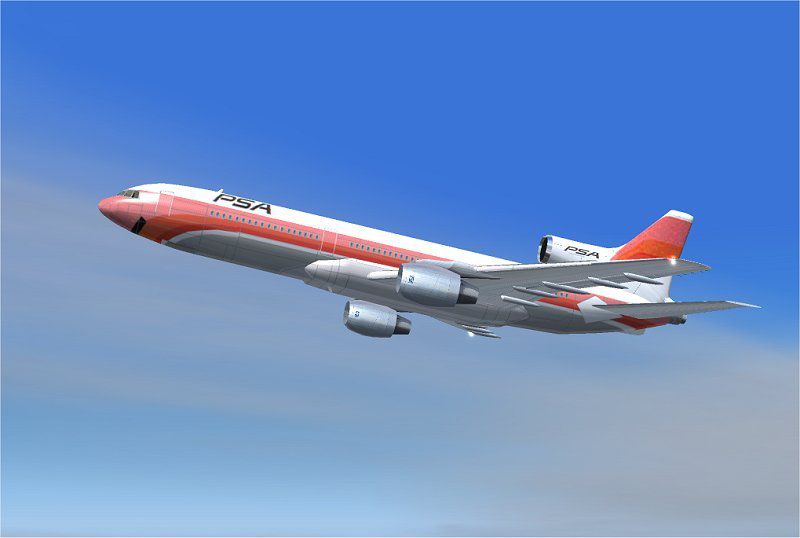
FS2004 PSA Lockheed L-1011 TriStar
Pacific Southwest Airlines’ iconic “smile” livery is recreated for the Lockheed L-1011 TriStar, adding era-accurate colors and markings that suit the wide-body tri-jet’s classic lines and RB211-powered profile in Microsoft Flight Simulator 2004. It requires ADSL1011.ZIP, preserving the base aircraft’s model and flight behavior while refreshing its historic presentation.



- File: texpsa.zip
- Size:2.24 MB
- Scan:
Clean (4d)

- Access:Freeware
- Content:Everyone

 Description
 Comments
 This freeware repaint set brings the classic Pacific Southwest Airlines (PSA) scheme to the Lockheed L-1011 TriStar in Microsoft Flight Simulator 2004. It requires the base package ADSL1011.ZIP and is meticulously painted by Rey Lopez. All installation details, usage notes, and limitations are explained below.
Historic PSA Tri-Jet Appearance
PSA was known for its vibrant and welcoming branding, which included a distinctive smile on the plane’s nose section. This additional texture accurately reflects that iconic look, giving flight simulation enthusiasts a nostalgic glimpse of the airline’s legacy. The real-world Lockheed L-1011 TriStar, developed in the 1970s, was a wide-body tri-jet designed to handle mid-to-long-range routes and featured advanced flight deck technology as well as Rolls-Royce RB211 engines.
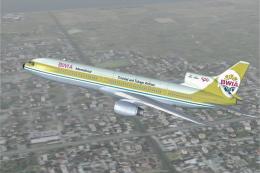
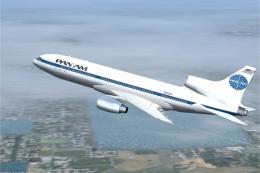
Screenshot of PSA Lockheed L-1011 TriStar in flight.
Texture Package Requirements
Before adding this livery to your library, ensure that you have installed the fundamental ADSL1011.ZIP package. Once that primary file is in place, these texture enhancements can be integrated seamlessly. This approach preserves the complex modeling and flight characteristics of the base aircraft while upgrading it with PSA’s unique color scheme.
Step-by-Step Installation
- Unzip the downloaded repaint file to reveal its folder contents.
- Place those extracted texture files into the ADSL1011 directory (normally found in your main aircraft folder).
- No further adjustments or configuration changes are necessary.
After following these steps, pilots can select the PSA livery from the aircraft menu within Microsoft Flight Simulator 2004 and enjoy flying this tri-jet in its classic paintwork.
Notices and Usage Guidelines
- This repaint is provided by Rey Lopez and no modifications are permitted without explicit permission, except for additional repaints.
- The texture set was thoroughly tested on the creator’s own system to ensure functionality, but any software is used at your own risk. Neither the developer nor the painter will be responsible for potential issues pertaining to your unique setup.
These guidelines and requirements are designed to facilitate a smooth installation process while preserving the authenticity of the L-1011 TriStar design. Once installed, the PSA livery will grant simmers a flashback to the golden age of American air travel when the distinctive tri-jet took to the skies in these striking colors.
Images & Screenshots


The archive texpsa.zip has 32 files and directories contained within it.
File Contents
This list displays the first 500 files in the package. If the package has more, you will need to download it to view them.
| Filename/Directory | File Date | File Size |
|---|---|---|
| File_id.diz | 04.04.04 | 129 B |
| Must_read.txt | 04.04.04 | 1006 B |
| PSA 4.jpg | 04.04.04 | 33.56 kB |
| Texture.psa | 04.04.04 | 0 B |
| CHROME.bmp | 01.13.04 | 32.07 kB |
| CHROME_LM.bmp | 01.13.04 | 65.05 kB |
| COCKPIT_MISC.bmp | 02.05.04 | 1.00 MB |
| FUSE.bmp | 01.21.04 | 1.00 MB |
| fuse.psp | 01.21.04 | 952.07 kB |
| FUSE_LM.bmp | 01.13.04 | 1.00 MB |
| HOR_STAB.bmp | 01.13.04 | 1.00 MB |
| HOR_STAB_LM.bmp | 01.13.04 | 1.00 MB |
| Image1.jpg | 01.13.04 | 20.23 kB |
| Image2.jpg | 01.13.04 | 3.05 kB |
| Image3.jpg | 01.13.04 | 20.24 kB |
| Image4.jpg | 01.13.04 | 7.09 kB |
| Image5.jpg | 01.21.04 | 13.88 kB |
| Image6.jpg | 01.21.04 | 44.94 kB |
| Image7.jpg | 01.21.04 | 44.85 kB |
| MISC.bmp | 01.23.04 | 1.00 MB |
| PANEL.bmp | 01.04.04 | 1.00 MB |
| pilot.bmp | 01.13.04 | 65.05 kB |
| pilot_lm.bmp | 06.17.02 | 65.05 kB |
| pspbrwse.jbf | 02.24.04 | 35.90 kB |
| TIRE.bmp | 01.13.04 | 257.05 kB |
| VERT STAB.psp | 12.29.03 | 148.43 kB |
| WINGS.bmp | 02.25.04 | 1.00 MB |
| WINGS.psp | 12.30.03 | 231.91 kB |
| WINGS_LM.bmp | 01.13.04 | 1.00 MB |
| TEXPSA | 04.04.04 | 0 B |
| flyawaysimulation.txt | 10.29.13 | 959 B |
| Go to Fly Away Simulation.url | 01.22.16 | 52 B |
Complementing Files & Dependencies
This add-on mentions the following files below in its description. It may be dependent on these files in order to function properly. It's possible that this is a repaint and the dependency below is the base package.
You may also need to download the following files:

Installation Instructions
Most of the freeware add-on aircraft and scenery packages in our file library come with easy installation instructions which you can read above in the file description. For further installation help, please see our Flight School for our full range of tutorials or view the README file contained within the download. If in doubt, you may also ask a question or view existing answers in our dedicated Q&A forum.

0 comments
Leave a Response