

 FS2004 Propeller Aircraft
Finnish Air Force Douglas DC-2 "DC-1"
This repaint showcases a distinctive Finnish Air Force Douglas DC-2 “DC-1,” a…
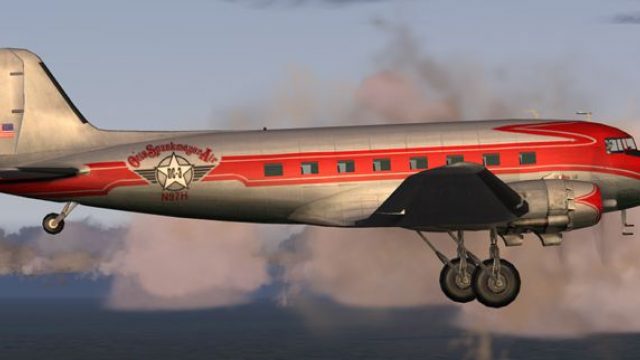
Otis Spunkmeyer Air livery refreshes the Douglas DC-3 with clean, cohesive fuselage artwork tuned to the default texture layout, giving the classic taildragger a distinctive, era-appropriate look in Microsoft Flight Simulator 2004. The package provides textures only and requires the original DC-3 base model.
 Rate
Rate
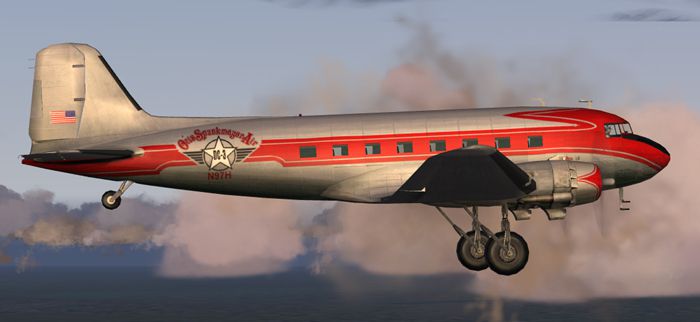
Enhance your virtual hangar in Microsoft Flight Simulator 2004 with this meticulously prepared repaint for the Douglas DC-3, featuring the distinctive Otis Spunkmeyer Air-themed exterior. Created by Ed Knapp, this freeware package provides new textures only, so the original DC-3 model must be obtained separately from the Fly Away Simulation archives.
This rendition of the classic twin-engine taildragger carries an Otis Spunkmeyer Air motif across the fuselage. The artwork incorporates deliberate alignment on the port and starboard sides—an especially challenging task, given the limited texture space in the default DC-3 framework. Although exact mirrored perfection is difficult, each fuselage section still flows cohesively from nose to tail.
In-sim view of the custom Otis Spunkmeyer Air DC-3 livery.
Originally introduced during the 1930s, this aircraft revolutionized passenger services and cargo operations. It offered amenities like a heated cabin and on-board running water in its lavatory. Balancing range, speed, and capacity, the DC-3 was famously the first commercial airliner to yield a profit purely by ferrying travelers. Even today, a select number of them remain active, underscoring their robust design.
[fltsim.x]
title=Douglas DC-3 Otis Spunkmeyer Air
sim=Douglas_DC3
model=
panel=
sound=
texture=otis
kb_checklists=Douglas_DC3_check
kb_reference=Douglas_DC3_ref
atc_id_color=
ui_manufacturer=Douglas
ui_type="DC-3
ui_variation="Otis Spunkmeyer Air "
description="The Douglas DC-3 revolutionized air transportation and airline service during the 1930s and 1940s. It was a luxury airliner that boasted cabin heat and running water in its on-board lavatory. With the right balance of efficiency, range, speed, and payload, the DC-3 was the first aircraft to earn a profit for its owners just by carrying passengers. The hero of early airlines, a handful of DC-3s are still at work today."
Kindly remember that this upload supplies textures only and does not include the required base package. Be sure to download the original DC-3 model from the Fly Away Simulation library to ensure proper functionality. Once everything is placed, you can experience the Otis Spunkmeyer Air livery inside your simulator, showcasing Ed Knapp’s intricate work. Immerse yourself in the timeless charm of one of aviation’s greatest aircraft lineages.
Free for all simmers · 1.75 MB · Scanned clean Oct 2026
Download speed: Free tier is capped at 0.5 Mbps. PRO members download at full line speed.
FS9\Aircraft\, FS9\Addon Scenery\, FS9\Gauges\, or FS9\Effects\.readme.txt or README file. It tells you exactly where files go, what dependencies are needed, and any quirks specific to this add-on.The archive otis_dc3.zip has 15 files and directories contained within it.
This list displays the first 500 files in the package. If the package has more, you will need to download it to view them.
| Filename/Directory | File Date | File Size |
|---|---|---|
| Douglas_DC3_1_C.bmp | 04.29.03 | 682.74 kB |
| Douglas_DC3_1_D.bmp | 04.12.03 | 682.74 kB |
| Douglas_DC3_1_T.bmp | 10.29.03 | 1.00 MB |
| Douglas_DC3_2_C.bmp | 04.29.03 | 170.74 kB |
| Douglas_DC3_2_T.bmp | 04.28.03 | 341.40 kB |
| Douglas_DC3_3_C.bmp | 04.29.03 | 42.74 kB |
| Prop_DC3.bmp | 10.06.03 | 85.43 kB |
| Thumbs.db | 09.23.03 | 5.00 kB |
| texture.otis | 10.31.03 | 0 B |
| File_id.diz | 10.29.03 | 147 B |
| otis.gif | 10.31.03 | 5.11 kB |
| otis.jpg | 10.31.03 | 116.36 kB |
| read me.txt | 10.29.03 | 2.00 kB |
| flyawaysimulation.txt | 10.29.13 | 959 B |
| Go to Fly Away Simulation.url | 01.22.16 | 52 B |
Only PRO members can place votes.
More FS2004 add-ons hand-picked based on this download.
FS2004 Propeller Aircraft
This repaint showcases a distinctive Finnish Air Force Douglas DC-2 “DC-1,” a…
 FS2004 Propeller Aircraft
These layered PSD files can be used in Paint Shop Pro or Photoshop to allow e…
 FS2004 Propeller Aircraft
DC-3 Airways Douglas DC-3 classic and 1940's liveries. Based on the default D…
 FS2004 Propeller Aircraft
"City of Boston", in bare metal scheme. Original model by Arik Hohmeyer and F…
 FS2004 Propeller Aircraft
DC-3 Airways Douglas DC-2 bare metal livery. A repaint for the virtual airlin…
 FS2004 Propeller Aircraft
DC-3 Airways Douglas DC-3 N18560, in bare metal livery. A rework of the defau…
 FS2004 Propeller Aircraft
Designed to be added to the CalClassic DC-7B. Livery by Eric Joiner. Aircraft…
 FS2004 Propeller Aircraft
These skins depict the old colors of United Airlines circa summer 1958. This …
Be the first to leave a comment on this download.
Be the first to share your thoughts on this download.