


 Germany
 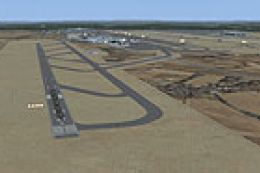 FSX Scenery
Frankfurt Airport (EDDF)
Frankfurt Airport (EDDF), Frankfurt, Germany. With new runway 07L-25R. ILS, t…
Frankfurt/Main Airport (EDDF) for FSX refreshes the default hub with reworked terminals, aprons, taxiways, and accurately sized parking stands for smoother AI operations. Updated roads, railways, fields, landclass, and nearby landmarks improve immersion around the airport, and it remains compatible with UTX Europe.
Frankfurt/Main Airport (EDDF), Germany. This scenery is an enhancement of default scenery. Only default objects were used. Buildings, aprons, taxiways, parking have been revised by help of Google images to make the airport as real as possible. Surrounding area including roads, railways, fields, landclass and other landmarks have been reworked or added. The scenery is also compatible with UTX Europe. By Yves Laske.
Frankfurt Main Airport Scenery.
About AI-Traffic:
All parkings does have correct sizes and does not overlap each other. If you have problems with overlapping wings you should take a look in your aircraft.cfg-files of your AI-planes. The wing span is registred under "wingspan=". I noticed that e.g. all PAI planes have incorrect wingspans.
Example:
Boeing 747-400 has a real wingspan of 64.44m = 211.42ft -> "wingspan=211.42" is the correct entry.
Airbus A340-300 has a real wingspan of 60.3m = 197.84ft -> "wingspan=197.84" is the correct entry.
A Boeing 747-400 can use parkings greater than 32.22m radius only.
It is highly recommended to use only FSX-traffic files. Use AI Flight Planner to convert your FS9 traffic files.
Installation:
Unzip FSX_EDDF folder into Addon Scenery folder and add it to your Scenery Library. (Main Menu -> Settings -> Scenery Library -> Add Area.)
Scenery was made with SBuilderX and Airport Design Editor.
This scenery is freeware!
Happy landings!
Yves Laske
Free for all simmers · 162.46 KB · Scanned clean Sep 2026
Download speed: Free tier is capped at 0.5 Mbps. PRO members download at full line speed.
FSX\Addon Scenery\ containing scenery and texture sub-folders.readme.txt or README file. It tells you exactly where files go, what dependencies are needed, and any quirks specific to this add-on.Use these coordinates to fly directly to this location once the mod is installed.
50.03790000,8.56220000
Launch FSX or Prepar3D and use Flights → Load to open the downloaded .pln file. Your aircraft will be positioned at this location.
The archive fsx_eddf.zip has 8 files and directories contained within it.
This list displays the first 500 files in the package. If the package has more, you will need to download it to view them.
| Filename/Directory | File Date | File Size |
|---|---|---|
| scenery | 02.01.09 | 0 B |
| EDDF_ADE_YL.BGL | 01.31.09 | 294.94 kB |
| EDDF_CVX.BGL | 02.01.09 | 64.79 kB |
| EDDF_Landclass.bgl | 02.01.09 | 519 B |
| EDDF_OBX.BGL | 02.01.09 | 43.84 kB |
| readme.TXT | 02.02.09 | 1.39 kB |
| flyawaysimulation.txt | 10.29.13 | 959 B |
| Go to Fly Away Simulation.url | 01.22.16 | 52 B |
Only PRO members can place votes.
More FSX & P3D add-ons hand-picked based on this download.
FSX Scenery
Frankfurt Airport (EDDF), Frankfurt, Germany. With new runway 07L-25R. ILS, t…
 FSX Scenery
Scenery Frankfurt Airport. This is just an update for Frankfurt with an added…
 FSX Scenery
Frankfurt Airport (EDDF), Germany. ILS updated, gates have gate numbers and p…
 FSX Scenery
Frankfurt, Germany. With new Terminal A Plus, ILSZ and ILSY for runway 07L-25…
 FSX Scenery
(EDDF), Germany. With new Terminal A Plus, ILSZ and ILSY for runway 07L-25R, …
 FSX Scenery
Princess Juliana International Airport (TNCM) in Saint Marteen, Netherlands A…
 FSX Scenery
Los Angeles Airport Scenery v3, California (CA). This photoreal scenery is a …
 FSX Scenery
Barbados International Airport (TBPB). Grantley Adams International Airport f…
Be the first to leave a comment on this download.
Be the first to share your thoughts on this download.