


 Zambia
  FSX AFCAD Files
AFCAD File For LPPT
Elevate Microsoft Flight Simulator X with a refined rendition of Lisbon Inter…
Mbala International Airport (FLBA) brings a more realistic layout and terrain to Zambia’s northern gateway, updating an ex–air force base earmarked for renewed civilian service and tourism access near Lake Tanganyika. Designed for Microsoft Flight Simulator X using default objects, the AFCAD refines runway, parking, and airfield data for smoother stopovers.


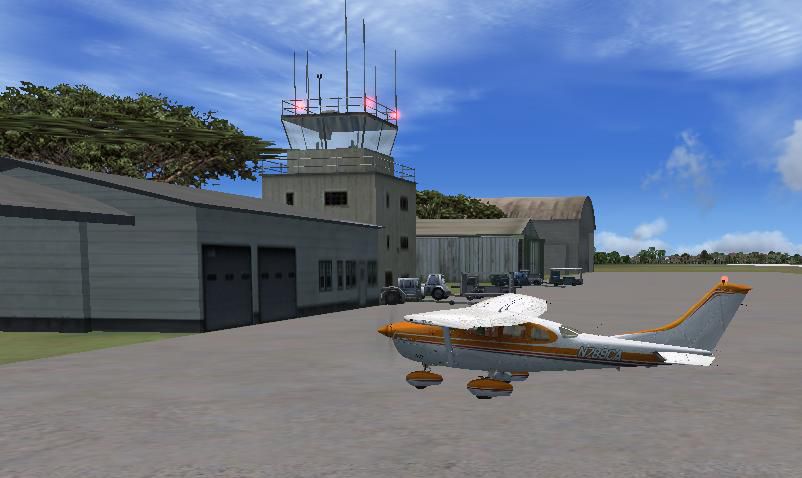

Mbala International Airport, Zambia, version 1. By Bashir Ismail.
Screenshot of Mbala International Airport.
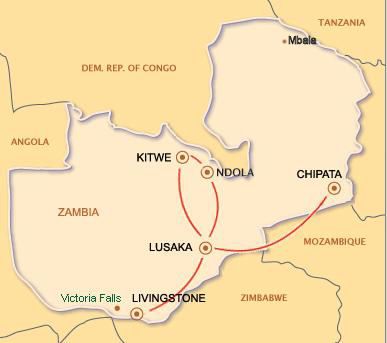
Mbala is Zambia's most northerly large town, occupying a strategic location close to the border with Tanzania and controlling the southern approaches to Lake Tanganyika, 40 km by road to the north-east, where the port of Mpulungu is located. Under the name Abercorn, Mbala was a key outpost in British colonial control of this part of south-central Africa. It is headquarters of an administrative district of the Northern Province.
The town is at the edge of the plateau covering most of Zambia, at an elevation of 1670 m, about 900 m higher than Lake Tanganyika, which comes within 22 km (straight line distance).The second highest waterfall in Africa, Kalambo Falls lies about 40 km (by road) north west, and is formed where the Kalambo River comes over the Rift Valley escarpment.
It became the focus of British interest as a result of travels by the explorer David Livingstone, the first European to visit the area, in the 1860s. He was followed some years later by Verney Lovett Cameron who surveyed Lake Tanganyika. Livingstone inspired missionaries of the London Missionary Society to come in the 1880s to Niamkolo on the lake and Fwambo and Kawimbe on the plateau. These missions had links to the African Lakes Company which later set up in Mbala and Mpulungu.
In 1895 the British South Africa Company took over administration of the territory, called it North-Eastern Rhodesia, and the 'Zombe boma' became known as Abercorn, named after the company chairman. The site was favored by British administrators as being healthy and having a pleasant climate with plenty of hunting and fishing.After Zambia's independence in 1964, the name of the town was changed back to Mbala.
Mbala International Airport is an Ex-Zambia Air force Base which the government has decided to revert to Civilian use, because there has been a number of potential tourism interests from outside the country to develop the area.The government hopes once commercial service begins to this airport that it will spur tourism development in the region.
The FSX one was not convincing enough! I have tried to make it close to realistic as possible using Airport Scenery Creator v1.37 and the objects that are available for use from FSX. Hope this will make your stop-over more enjoyable!
Installation:
Free for all simmers · 237.24 KB · Scanned clean Oct 2026
Download speed: Free tier is capped at 0.5 Mbps. PRO members download at full line speed.
AF2_*.bgl or AFX_*.bgl) go into FSX\Addon Scenery\Scenery\ or a dedicated AFCAD folder you create.readme.txt or README file. It tells you exactly where files go, what dependencies are needed, and any quirks specific to this add-on.Use these coordinates to fly directly to this location once the mod is installed.
-8.83700000,31.36500000
Launch FSX or Prepar3D and use Flights → Load to open the downloaded .pln file. Your aircraft will be positioned at this location.
The archive flba.zip has 11 files and directories contained within it.
This list displays the first 500 files in the package. If the package has more, you will need to download it to view them.
| Filename/Directory | File Date | File Size |
|---|---|---|
| File_ID.diz | 03.22.09 | 111 B |
| FLBA.BGL | 03.23.09 | 7.62 kB |
| FLBA_CVX.bgl | 03.23.09 | 254 B |
| FLBA_Read me.txt | 03.24.09 | 2.71 kB |
| Mbala_Airport.jpg | 03.24.09 | 45.46 kB |
| Mbala_Kalambo Falls.jpg | 03.23.09 | 62.07 kB |
| Mbala_Lake Tanganyika.jpg | 03.23.09 | 40.56 kB |
| National Parks of Zambia.jpg | 03.22.09 | 69.79 kB |
| Zambia.jpg | 03.22.09 | 19.50 kB |
| flyawaysimulation.txt | 10.29.13 | 959 B |
| Go to Fly Away Simulation.url | 01.22.16 | 52 B |
Only PRO members can place votes.
More FSX & P3D add-ons hand-picked based on this download.
FSX AFCAD Files
Elevate Microsoft Flight Simulator X with a refined rendition of Lisbon Inter…
 FSX AFCAD Files
John F. Kennedy International Airport, New York, NY, USA, v2. This airport up…
 FSX AFCAD Files
Dubai International Airport, United Arab Emirates (UAE). This airport update …
 FSX AFCAD Files
Los Angeles International Airport (LAX), California (CA), USA. This airport u…
 FSX AFCAD Files
This freeware package modernizes Zurich International Airport (LSZH) in Micro…
 FSX AFCAD Files
Lic Benito Juarez International Airport, Mexico City, Mexico. This airport up…
 FSX AFCAD Files
Enhance Kastrup Airport (EKCH) in Copenhagen, Denmark with this freeware upgr…
 FSX AFCAD Files
This enhanced update for Schiphol (EHAM) in Amsterdam focuses on reconstructi…
Read what other simmers think, or add your own.

Thank you so much for making this! My family's from Mbala and I'm hoping to work for an airline that'll start flying there soon. Hoping to get some practice flying there beforehand :-) Thanks for the extra info on the airport and town on top of that too!