

 FS2004 Civil Jet Aircraft
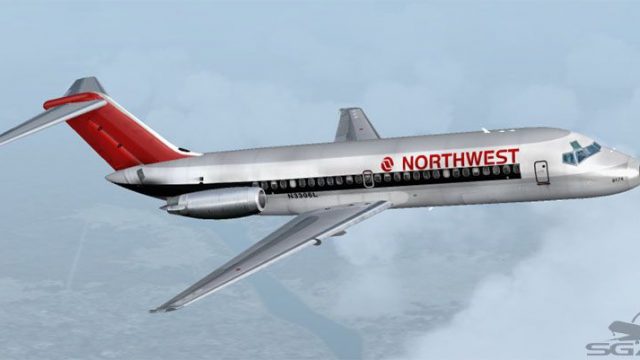
Northwest Airlines Douglas DC-9-14 N8911E
This add-on provides a meticulously detailed repaint of Northwest Airlines’ D…
Northwest Airlines Douglas DC-9-14 repaint depicting aircraft N3306L in a circa-1987 scheme brings crisp period markings, accurate fuselage striping, tail logos, and registration detail to your fleet in Microsoft Flight Simulator 2004. It requires the freeware SGA Douglas DC-9 base package and suits authentic short- to medium-range airline operations.
 Rate
Rate
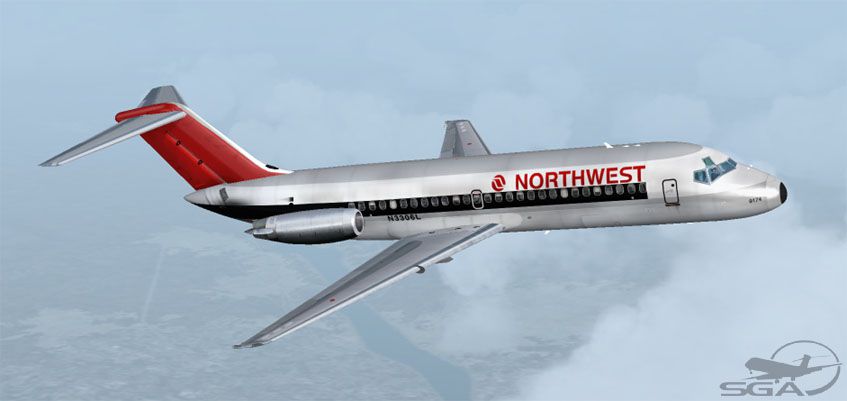
This repaint package showcases a vivid Northwest Airlines Douglas DC-9-14 (registration N3306L, circa 1987) built for use within Microsoft Flight Simulator 2004. It adds historically relevant markings to SGA’s base Douglas DC-9 series model, emphasizing the reliable short- to medium-range service the DC-9 provided to countless airports across the United States.
The textures have been meticulously crafted to reflect the authentic Northwest Airlines appearance from the late 1980s. Careful attention has been paid to the fuselage stripes, tail logos, and registration detail on the fin, capturing the airline’s classic color arrangement. The developer, Frank Idone, ensured the design matches the distinct red, white, and silver scheme originally used by Northwest Airlines at that time, bringing an era-appropriate ambiance right into your simulator.
Screenshot of Northwest Airlines Douglas DC-9-14 in flight.
The Douglas DC-9 series was specifically engineered for operations on shorter runways while maintaining robust performance on routes between regional hubs and larger cities. With a wingspan of approximately 89 feet (27.2 m) and a fuselage length spanning about 104 feet (31.8 m), the series can seat around 90 passengers and hold up to 600 cubic feet (16.9 m3) of cargo. Operators often selected Pratt & Whitney JT8D engines, providing ample power in the 14,000-pound thrust class, thereby extending competitive service to airports that previously supported only propeller-driven flights. Northwest Airlines capitalized on that capability for short-haul routes, offering reliable service throughout its network.
[fltsim.XX]
title=SGA DC-9-14 NWA
sim=SGA DC9_10
model=
panel=
sound=
texture=nwo
checklists=
atc_id=N3306L
atc_id_color=
atc_airline=Northwest
atc_flight_number=151
ui_manufacturer=Douglas
ui_type=DC-9-14
ui_variation=Northwest Airlines (1987)
description=DC-9 no.12 flown by Northwest Airlines.
Livery by Frank Idone.

The DC-9 was designed specifically to operate from short runways...
This repaint applies only to the SGA Douglas DC-9 add-on. It does not include the base model. You must already have the freeware SGA910.ZIP package before proceeding. Once everything is in place, you can fly the iconic N3306L with your custom Northwest Airlines textures, highlighting the aircraft’s unique historical significance.
All paintwork here is the creation of Frank Idone, who accurately reproduced the striking Northwest Airlines layout. Full acknowledgment goes to the SGA (Stewart Global Aircraft) team for their DC-9 base model, providing the foundation for this repaint.
Free for all simmers · 2.49 MB · Scanned clean Oct 2026
Download speed: Free tier is capped at 0.5 Mbps. PRO members download at full line speed.
This file is a repaint — the package below is the base model it paints onto. Install it first, or the textures will have nothing to load onto.
FS9\Aircraft\, FS9\Addon Scenery\, FS9\Gauges\, or FS9\Effects\.readme.txt or README file. It tells you exactly where files go, what dependencies are needed, and any quirks specific to this add-on.The archive dc910nwo.zip has 24 files and directories contained within it.
This list displays the first 500 files in the package. If the package has more, you will need to download it to view them.
| Filename/Directory | File Date | File Size |
|---|---|---|
| TEXTURE.nwo | 11.01.04 | 0 B |
| 10FUSE_L.BMP | 10.31.04 | 1.00 MB |
| 10FUSE_T.BMP | 11.01.04 | 4.00 MB |
| CONE_L.BMP | 08.07.03 | 5.43 kB |
| CONE_T.BMP | 08.07.03 | 5.43 kB |
| DC9xINTERIOR_L.BMP | 05.19.04 | 256.07 kB |
| DC9xINTERIOR_T.BMP | 01.28.04 | 1.00 MB |
| DC9_B_L.BMP | 05.19.04 | 256.07 kB |
| DC9_B_T.BMP | 11.01.04 | 1.00 MB |
| ENGINES_L.BMP | 05.19.04 | 256.07 kB |
| ENGINES_T.BMP | 10.30.04 | 1.00 MB |
| INTAKE_L.bmp | 08.07.03 | 5.43 kB |
| INTAKE_t.BMP | 07.31.03 | 128.07 kB |
| Thumbs.db | 09.24.04 | 34.50 kB |
| WING_LEFT_L.BMP | 05.19.04 | 256.07 kB |
| WING_LEFT_T.BMP | 10.30.04 | 1.00 MB |
| WING_RIGHT_L.BMP | 05.19.04 | 256.07 kB |
| WING_RIGHT_T.BMP | 10.30.04 | 1.00 MB |
| file_id.diz | 11.01.04 | 139 B |
| SGA DC-9 Readme.pdf | 09.23.04 | 153.00 kB |
| nw10.jpg | 11.01.04 | 48.28 kB |
| Install.txt | 11.01.04 | 1.87 kB |
| flyawaysimulation.txt | 10.29.13 | 959 B |
| Go to Fly Away Simulation.url | 01.22.16 | 52 B |
Only PRO members can place votes.
More FS2004 add-ons hand-picked based on this download.
FS2004 Civil Jet Aircraft
This add-on provides a meticulously detailed repaint of Northwest Airlines’ D…
 FS2004 Civil Jet Aircraft
This repaint showcases the classic Eastern Airlines scheme for the short-haul…
 FS2004 Civil Jet Aircraft
For use with DC9AVM.ZIP. This file will fix the right wing. By Carlos Flores …
 FS2004 Civil Jet Aircraft
Bring a touch of classic aviation to Microsoft Flight Simulator 2004 with thi…
 FS2004 Civil Jet Aircraft
This complete freeware package brings the iconic tri-jet design of the Dougla…
 FS2004 Civil Jet Aircraft
Features photoreal tail, 32 bit textures (non-mipped). Model by SGA. Livery b…
 FS2004 Civil Jet Aircraft
Registration N1825U (new colors). Newly painted color scheme by NWA on SGA'S …
 FS2004 Civil Jet Aircraft
This repaint offers a detailed Northwest Airlines DC-9-41 (circa 2004) livery…
Be the first to leave a comment on this download.
Be the first to share your thoughts on this download.