

 FSX Utilities
Virtual Correct Gauge Placement
FSX Virtual Correct Gauge Placement. This file places the default FSX gauges …
Gauge Recover v1.2 restores missing default gauges and Effects in Microsoft Flight Simulator X in seconds, fixing black panel screens and invisible visuals like smoke, afterburner, and contrails after file loss or add-on changes. It also resolves gray, textureless FS9-era add-ons and automatically deploys required MSVCP70.DLL and MSVCR70.DLL.
 Rate
Rate
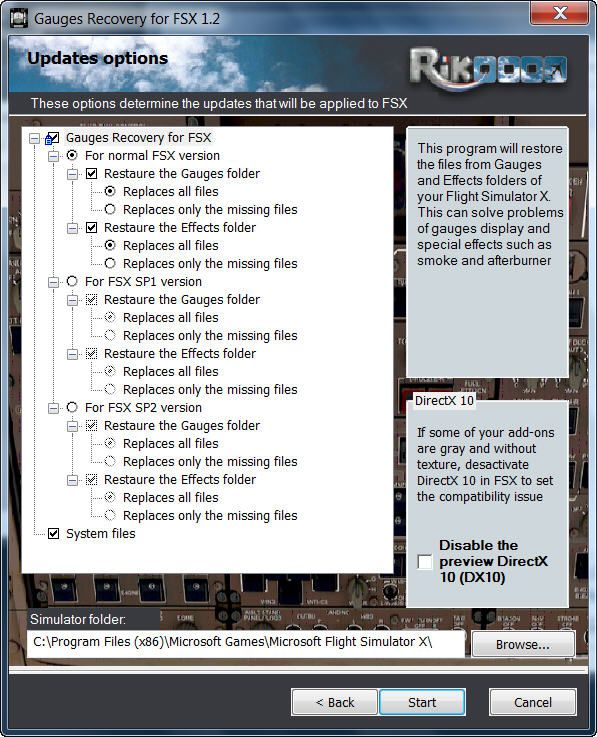
A small free utility that will restore all your gauges and effects of origin in less than 10 seconds. With Gauges Recovery, you're sure to get the display of all gauges and effects. By Erik Bender.
New ! Since version 1.2 Gauges Recovery also fix the problem of compatibility of FS9 add-ons which display all gray and without texture!
For years I worked on Flight Simulator I realized that many people have problems with showing the gauges panel (black screen) or special effects such as afterburner, smoke or line of condensation occurring after uninstalling an add-on or accidentally deleted files of the simulator.
In your Flight Simulator X there is a folder named 'Gauges' it contains files 'gauges' representative board instrumentation for each add-on, such as the autopilot, the horizon indicator etc, if you delete one of these files, your panel will not display the gauge that it was programmed. It is the same for the folder 'Effects' that contains all the special effects in FSX, it sometimes happens that some files in these folders disappear leaving your simulator in a situation where you no longer see your instrument panel (black screens) and afterburner invisible. Under these conditions, you reinstall FSX and lose a lot of time (and patience).
So I created Gauges Recovery, a small free utility that will restore all your gauges and effects of origin in less than 10 seconds. With Gauges Recovery, you're sure to get the display of all gauges and effects.
This program does restore the original files from Microsoft FSX FSX SP1, FSX SP2 and not the files from other publishers, no changes will be made to these files.
Some people see the gauges all black (black screens), unless FSX is installed correctly. The solution to this problem is to install the files MSVCP70.DLL and msvcr70.dll in your 'system32', Gauges Recovery does this automatically for you.
Do not look if Gauges Recovery is installed because there is no installation, the program only updates files in FSX and nothing else.
Use this program at your own risk, I can not be held liable for any damage caused to your computer, although this program is safe.
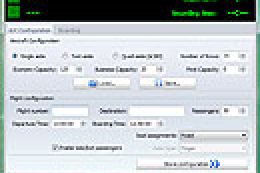
Screenshot of the Gauge Recover Utility.
Free for all simmers · 11.44 MB · Scanned clean Oct 2026
Download speed: Free tier is capped at 0.5 Mbps (this file takes approximately 3 mins at the cap). PRO members download at full line speed.
FSX\SimObjects\Airplanes\{aircraft}\panel\. Back up the existing panel folder first.readme.txt or README file. It tells you exactly where files go, what dependencies are needed, and any quirks specific to this add-on.The archive gauges_recovery_fsx.zip has 6 files and directories contained within it.
This list displays the first 500 files in the package. If the package has more, you will need to download it to view them.
| Filename/Directory | File Date | File Size |
|---|---|---|
| Gauges_Recovery_FSX.exe | 01.18.10 | 11.64 MB |
| Lisez_moi.txt | 01.19.10 | 2.60 kB |
| Readme.txt | 01.19.10 | 2.21 kB |
| snapshot.jpg | 01.19.10 | 142.79 kB |
| flyawaysimulation.txt | 10.29.13 | 959 B |
| Go to Fly Away Simulation.url | 01.22.16 | 52 B |
Only PRO members can place votes.
More FSX & P3D add-ons hand-picked based on this download.
FSX Utilities
FSX Virtual Correct Gauge Placement. This file places the default FSX gauges …
 FSX Utilities
FSX Event Logger Gauge. This gauge is designed to detect repeating FS Key_Eve…
FSX Utilities
This module adds improved recording and replay features to FS. It can record …
FSX Utilities
The FSX Reg Utility was prepared especially for users with custom setups or w…
 FSX Utilities
A.I. Traffic tool is created to provide a way for the average flight simulato…
FSX Utilities
Engine checking bug is fixed. This is the support application for Flight Simu…
 FSX Utilities
paX is a passenger simulation/emulation module for FSX only. At this time, it…
 FSX Utilities
TMLE was designed to make the use of High Definition and Super High Definitio…
Read what other simmers think, or add your own.

My "Motorcycle" gauges vanished a long time ago. I always thought of them as motorcycle gauges because they were lined up along the bottom of the screen where their location reminded me of bike gauges. This software did not restore them. I sure wish I knew where they went.